• The move to the new server is done. There are some software and database maintenance updates in process. This has us passing the hat around to help out. We appreciate any donations. Seriously, even a dollar helps. The payment page may be found here - https://www.audiokarma.org/support.html

Left Channel Cutting Out on Pioneer SX-650... unless I put it in Mono!

celt_rock

Member
So I've been reading and Googling for the last two weeks trying to figure out why my Pioneer SX-650 is having issues. Is it me or does it seem like this is a common issue with the Pioneer SX series?

Anyway, here's what happens, sometimes I'll be playing music and the left channel will cut out almost completely, I'll still hear it faintly if I turn the balance all the way left but it sounds like a fly caught between two pieces of paper (or trying to get out a closed window). I found that sometimes just picking the needle up off the turntable would get it to come back while other times I gave my needle a gentle rub with the Magic Eraser in order to get it back. At one point I got so frustrated I (with one of the lesser quality records in my collection) forced the needle to jump a groove which got the left channel to kick back on.

So I thought it may be a speaker problem. Switched the speakers and same problem, just now a different speaker.

So I thought maybe it was just the A Channel. Nope, put both wires in B channel and still same problem, same left speaker

I swapped out cartridges on my turntable. Same. I swapped out the whole damn turntable! Same.

So then I came across a post describing the cleaning of the speaker relay. I spent one evening with a nice Vermont double IPA and a desoldering bulb, removed the relay, cleaned it and re-installed it.

I was riding high for 3 FULL DAYS of beautiful non-buzzing sound and then... you guessed it. It came back, maybe even worse than before.

So here's what works. When I digitize vinyl, the tape output which goes to my laptop gives strong signal from both channels.

If I move my selector switch from Stereo to Mono, all of a sudden I can hear both speakers, no more farting coming out of the left speaker.

So if it wasn't the relay, what gives? What could it be? And what would cause the speaker to work fine when given a mono signal but crap out (intermittently) when given a stereo signal? This is not a case of cleaning pots or deoxiting anything, it's internal and I know one of you has the answer, anyone wanna spill the beans? ;-)
 
Register to hide this ad
Thanks, but as I mentioned, it's not a case of cleaning pots and switches... that was all done this winter back when I thought I had a bad connection from the TT, replaced the hardwired cable and still had the same issue. I removed the face, cleaned switches and pots hoping for an easy fix. Not that easy...
 
May have a bad switch or control.
It sure sounds like a dirty switch to me as well.
 
Do you have the same problem with AUX inputs or AM/FM radio? The only things between the phono amp outputs and the stereo/mono switch contacts is wires (traces) and other switch contacts. Tried De-Oxit on the switches? Check the solder connections of the switches to the circuit board?

EDIT: more info
 
Last edited:
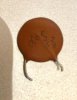
I'm actually going to tear into it tonight to check the solder joints. I disassembled the front panel and knobs and switches cleaning them with de-oxit as a last resort. I mean, none of the switches were scratchy or glitchy but I figured it couldn't hurt. Also, since I'm sometimes able to give the unit a whack and have the speaker kick back in lead me to think there's a bad solder joint somewhere. But THEN I found this random disc cap floating around inside. I'm going to try to find out where that sucker goes.

Here's what's weird. When I throw this into mono, both speakers work but it's still only the right channel. The left speaker isn't getting any left speaker information. Anyone know why that might be? Could it have something to do with this cap? I'll include a photo...


IMG_3088 2.jpg
 
Check the solder joints on the rca jacks. Those often go bad due to manhandling of plugs. Other than that, I would check solder joints on the preamp before the eq board, especially if it happens on all inputs, or on am/fm. As for the cap, It is most likely a spark suppressor for the power switch, possibly soldered across it.
 
But if somebody broke loose there is a good chance that is your problem. Find where it belongs and solder it back in your problem may be gone. I dealt with someone's NAD 7020 and one bypass cap in the amp section pulling a lead loose from a solder joint was killing a channel. A bad connection (contact, solder joint, broken wire) or bad component is often all it takes to kill a channel. I don't just mean in the signal path, but somewhere in the circuit. Good luck finding where it belongs. Usually ceramic caps are spread everywhere. Hopefully Pioneer used a symmetric board layout where things are mirrored channel to channel making something missing more obvious. Some brands/models good at that some not.

Another night owl!
 
Last edited:
If you are getting similar volume from both speakers but its only the right channel information when in mono that would indicate the problem is not in the amp sections. Look at the preamp section and possibly back toward the sources. Your loose capacitor's home should be up there. The volume, balance, and all would be part of the preamp. I don't know about that vintage Pioneer but it is not uncommon in vintage stuff for caps, resistors, etc, to be soldered to and between pot and selector disk tabs so make sure and check those.
 
Sometimes small ceramic caps can be soldered in on the bottom or trace side of some boards so make sure that is not the case here. Those are easy to overlook.
 
Yeah, I was up until 2 am working on this. Couldn't for the LIFE of me find where that cap went. Cleaned a bit of gunk off the bottom of the boards but other than that it was a bust. Looking online for internal pictures and videos of this thing and comparing back and forth came up with nothing. I thought I had found the spot for a while there but a couple of fuzzy pictures later showed me it most likely wasn't the place. I'll have to find someone with the same machine and get them to take detailed pics!
 
Check the solder joints on the rca jacks. Those often go bad due to manhandling of plugs. Other than that, I would check solder joints on the preamp before the eq board, especially if it happens on all inputs, or on am/fm. As for the cap, It is most likely a spark suppressor for the power switch, possibly soldered across it.

I thought of that too but then check this out; I use this setup to digitize vinyl for when I travel. The TT goes into the Phono jacks and then I take a mini to RCA connector out of the Tape Rec jacks and then into my computer. That signal is always fine, never the left channel cutting in and out. So this distorted signal is happening elsewhere...
 
Well... it's working... for now. I really don't know why. All I did was two things. Fist was to add a touch of solder to points where the solder looked a little skimpy. Second, in researching the last tip by shrugg about the cap possibly being attached to the power switch I found that one of the contacts on the power switched looked a little loose, wasn't entirely contacting the switch as it came across the circle. May have happened when I cleaned them back in the winter though it doesn't explain why taking off the speaker relay and cleaning it caused both channels to work fully and cleanly for 4 days before it crapped out again. I monkeyed around with the contact a little, closing it a bit but making sure the switch still moved smoothly through it. Everything seems to work magically now, don't know if it was working on the contact or resoldering and you know what, I'm not going to question it. I'm just going to enjoy listening to my stereo in stereo again! Thanks for all the assistance!
 
Touching up solder joints can do a lot. Somebody gave me a Technics SA-5170 that I gave to somebody else who uses with a pair of speakers for background music at their office. It was losing one of the channels and I noticed the input selector pins had poor solder joints. Remelted them adding solder to the ones that looked like they needed more channel problem was solved. Had a Scott fm was dropping in and out. Had to hunt but ended up being a solder joint that had a ring crack. Remelt it adding solder problem gone.

If it keeps working for a bit and going out again there more than likely there is a bad connection somewhere. Keep hunting. It can take some time and effort to find them. The FM problem in the Scott took me numerous attempts to find. I would do something and it would behave for a while then start acting up again. FM would be at full volume, then a whisper, many times going back and forth by itself. Since I found that bad solder joint it has been good for an sizable number of hours. I had narrowed things down that it had to somewhere on the MPX board. Took the board out and kept looking it over until I found a likely culprit. That Scott had a largely snap together design and it was easy to pop the board out.
 
I have not had to deal with ceramics much but looking up their values and the guy you have pictured it looks like a 10000 pF (third digit is how many zeros follow the first 2). Taking a quick look at the schematic of the SX-650 there are a handful of them sprinkled around. Looks like 8 of them are on the power supply board with the 8 rectifier diodes. The service manual can be downloaded free at this link once you create an account:

https://www.hifiengine.com/manual_library/pioneer/sx-650.shtml

It is a great site to get service and owner manuals. There is a section for manual pdfs at audiokarma but I did not see one there for the SX-650. Look at the parts lists, schematics, and board layouts for every capacitor labeled .01 or .01 uF. You can use the parts lists and/or schematic, then look at the board layout images to figure out where they are located. The parts list is usually pretty accurate (95-99% right) but often can have a few value mismatches or additional/missing ones vs what actually got put in the unit. One .01 ceramic should be missing.
 
If you have not done it before it takes some time to wrap your head around the info. Pioneer service manuals are usually very thorough this one looks good, similar to the ones for their older models.
 
If you have not done it before it takes some time to wrap your head around the info. Pioneer service manuals are usually very thorough this one looks good, similar to the ones for their older models.

You rock my friend... I'm on it!
 
I have only been working on these about about two years. I can still remember how much fun it was the first time. That was a SX-535 (one generation before and one level down from your 650) that sounded like it had a major head cold, worse on FM than on AUX. Totally lacking on the highs. A recap plus a lot of transistors replaced and it was working great. Some of the transistors used in older models, particularly late 60s into the 70s, do not age well and there is a list of Audiokarma of the 11 worst and that poor guy had 5 of the types in it, at least 16 transistors total. I then tackled a Yamaha amp with a badly distorting channel that I had picked up with its matching tuner for $30 at a local Goodwill. The pair were in great physical shape. It was a 45 wpc amp about the same vintage as your 650. With some help from Avionic got that one working too. I had some questions about fusible resistors. He can be very helpful.
 
I am having a similar issue and have isolated it to the phono jack. It seems like a bad connection to the circuit board. If I gently wedge something between the jacks and the board both speakers work.

I have zero experience working on these, though I currently have the side, rear and bottom panels off.

Are the jacks just held on by solder?
 
Back
Top Bottom