• The move to the new server is done. There are some software and database maintenance updates in process. This has us passing the hat around to help out. We appreciate any donations. Seriously, even a dollar helps. The payment page may be found here - https://www.audiokarma.org/support.html

Line out to computer - What software?

Scott594

Active Member
I'm trying to convert an analog vinyl signal into mp3 files on the computer, I see a bunch of free software out there, but don't have any experience in the digital music stuff other than ripping CD's for my son's Ipod, now he wants some of my "old" music to put on his Ipod. I have a cable 1/8" stereo to RCAs and a line in on my laptop. I've hooked from the tape monitor out to the computer line in but have no software. I looked at a few downloadable freebies but have doubts. Anybody doing this that can give me some guidance? Thanks.
 
Register to hide this ad
I believe audacity is one of the most used ones for free. Never used it buy I always read people who are and seem very happy with it
 
Audacity. I use it for records and recording my band. It is a very good piece of software and with an add on MP3 encoder will make great MP3's (I suggest using LAME, there are instructions on the Audacity website on how to get it to work).
 
Thanks to all who chimed in. I downloaded Audacity, and got it working, and it looks like a nice setup, but I've got no right channel signal, which I believe is a hardware problem. I checked the cable and my outputs to it, and all is well. It may be a sound card issue.(or operator error) I still need to aquire LAME and get it working to convert files to mp3, but I'm making progress.
 
Reaper...easier - better, quicker, more stable, way way way more options and supported formats and way way way cooler if you want to get into multi-tracking.

Not "technically" free - but it's non-crippling after the trial period (they advise you to buy it on the splash screen at start).
 
Final Vinyl for the Mac. BTW the consensus here is that most lap top sound cards and mic inputs aren't up to this service. After you get the hang of ripping vinyl you may want to think about an outboard ADC.
 
Thanks to all who chimed in. I downloaded Audacity, and got it working, and it looks like a nice setup, but I've got no right channel signal, which I believe is a hardware problem. I checked the cable and my outputs to it, and all is well. It may be a sound card issue.(or operator error) I still need to aquire LAME and get it working to convert files to mp3, but I'm making progress.

Nope, Audacity is set to Mono by default. You need to go into the preferences and set it up for 2 tracks (stereo). :thmbsp:
 
Nope, Audacity is set to Mono by default. You need to go into the preferences and set it up for 2 tracks (stereo). :thmbsp:

Spot on X 25!

I switched Audacity to stereo (they hid that setting well), set up Lame (not an mp3 encoder) and am making mp3s now. After getting into it a bit Audacity is a pretty neat digital studio, maybe I ought to learn a little more about this digital stuff, I've avoided digital audio in the past because I'm still getting used to solid state audio. It may have a place after all.

The one problem that remains is that on high level records, it's clipping the input of the sound card. I'm running a MC head amp into the integrated amps MM phono input, so it's probably a tad hot. I'm going to run to the shack and see about either a 1/4" plug so I can use the headphone output, or a pair of pots to make a little attenuator box.

Now my son can play "Children of the Sun" and amaze his friends without bringing them home.

Thanks!
 
Spot on X 25!

I switched Audacity to stereo (they hid that setting well), set up Lame (not an mp3 encoder) and am making mp3s now. After getting into it a bit Audacity is a pretty neat digital studio, maybe I ought to learn a little more about this digital stuff, I've avoided digital audio in the past because I'm still getting used to solid state audio. It may have a place after all.

The one problem that remains is that on high level records, it's clipping the input of the sound card. I'm running a MC head amp into the integrated amps MM phono input, so it's probably a tad hot. I'm going to run to the shack and see about either a 1/4" plug so I can use the headphone output, or a pair of pots to make a little attenuator box.

Now my son can play "Children of the Sun" and amaze his friends without bringing them home.

Thanks!

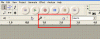
Try turning this slider down.

attachment.php


Also, if you go through the settings you can find a setting to change the bitrate of the final MP3 file. Set it to 256 for better sound. :thmbsp:
 

Attachments

  • untitled.GIF
    untitled.GIF
    13.3 KB · Views: 98
Turning down the level within the software didn't stop the input clipping, it decreased the volume but didn't stop the distortion. I did turn the resolution up to max while looking for a solution in "preferences".

On some recordings, it was fine except on extreme peaks (which you could clearly see on the graphical display) you would get a an unpleasant crash at the peak. On others the crashing was almost continous because the recorded levels were that much higher. I always knew the levels on vinyl varied, but didn't realize how much.

I was 99% sure it was overdriving the sound card (I'm not sure at what voltage it occurs, I was too lazy to drag a scope in from the shop).
Feeling like a quick project I built a little attenuator box with a Master Level and individual Level pots for left and right. The shack did have RCA to 1/8" stereo cables with attenuating resistors built in in several different db drops, but not knowing exactly how much I needed, I opted for the adjustable solution. I'm glad I did, as there is quite a difference in optimum settings from record to record. It cost me $45 inc tax for everything I needed, and that includes enclosure, knobs and 8 RCA jacks so I could hook up external level meters on the in and out if I feel like it. The bill even included a couple of 3' patch cords, so I'd guess you could do it on the cheap for about $20. If anybody wants info on it, I'll post it.

Last night Greg (my older son) and I recorded a couple of tracks, trimmed them, converted them, and installed to the Ipod with excellent results. Now I have an excuse for a nice long listening session.

Thanks for the help.

 
Last edited:
about the clipping, would a program called "mp3gain" help? you can turn down the overall gain of the track, maybe it wont clip then,

oops didnt see the above post
 
Last edited:
I have found that the recording levels on Final Vinyl don't necessarily override the input levels on the iMac's sound card which will overload badly. BTW I'm using tape out from an Oinker receiver for the computer input. I access the sound card directly thru System Preferences and set the level to about 65%. From there I can let FV set the recording levels automatically or tweek them myself. No additional attenuation needed. I record at the maximum bit rates and sampling rates and split the tracks in FV. I import the tracks to itunes and then let iTunes convert them to 256 kbps VBR AAC. The results are more than good enough for my iPod.
 
Last edited:
Turning down the level within the software didn't stop the input clipping, it decreased the volume but didn't stop the distortion. I did turn the resolution up to max while looking for a solution in "preferences".

On some recordings, it was fine except on extreme peaks (which you could clearly see on the graphical display) you would get a an unpleasant crash at the peak. On others the crashing was almost continous because the recorded levels were that much higher. I always knew the levels on vinyl varied, but didn't realize how much.

I was 99% sure it was overdriving the sound card (I'm not sure at what voltage it occurs, I was too lazy to drag a scope in from the shop).
Feeling like a quick project I built a little attenuator box with a Master Level and individual Level pots for left and right. The shack did have RCA to 1/8" stereo cables with attenuating resistors built in in several different db drops, but not knowing exactly how much I needed, I opted for the adjustable solution. I'm glad I did, as there is quite a difference in optimum settings from record to record. It cost me $45 inc tax for everything I needed, and that includes enclosure, knobs and 8 RCA jacks so I could hook up external level meters on the in and out if I feel like it. The bill even included a couple of 3' patch cords, so I'd guess you could do it on the cheap for about $20. If anybody wants info on it, I'll post it.

Last night Greg (my older son) and I recorded a couple of tracks, trimmed them, converted them, and installed to the Ipod with excellent results. Now I have an excuse for a nice long listening session.

Thanks for the help.

Set the recording resolution to 16/44.1. If your soundcard can only do 16/44 and you set it higher it will clip constantly. Also, try setting the level in windows. Double click the little speaker in the bottom right corner. You will need to switch the drop down from "Playback" to "record" and then adjust the line input level (make sure the line in is selected and not the Mic input).
 
Back
Top Bottom