• The move to the new server is done. There are some software and database maintenance updates in process. This has us passing the hat around to help out. We appreciate any donations. Seriously, even a dollar helps. The payment page may be found here - https://www.audiokarma.org/support.html

Looking for A/D converter recommendation for my system (being built now)

B_Karl

New Member
Hi,
I'm in midst of wiring a new media cabinet in my new house. I have CAT6a network cable installation in all the rooms connected to a Gigabit Switch in the media cabinet. Right now I'm planning to install a recently acquired Intel NUC running ROON ROCK in the media cabinet. I would like to keep it there rather at or near my home theater equipment to reduce clutter and ev. noise. My 20,000 music FLAC files are stored on the NUC supported by a NAS for backup. My home theater equipment is quite basic with a Pioneer Elite Receiver (with 5 HDMI inputs) and 5.1 VISTA speaker setup and an LG OLED TV of latest vintage.

So, I'm looking for a D/A converter, etc. that connects to Ethernet and have a HDMI output. Nothing super fancy (I mean super expensive) but good sound. I'm seeing this device as basically always connected (except may be an on/off switch) so I don't have to fiddle with yet another remote. When playing audio files supported by ROON I of course want their music information and album info seen on the TV.
Can anyone recommend a decent device for this? It would be much appreciated.
 
Register to hide this ad
So, I'm looking for a D/A converter, etc. that connects to Ethernet and have a HDMI output.

Ethernet to HDMI isn't a DAC, since both are digital protocols.

What you are looking for is a digital renderer, to convert your FLAC files to PCM.

Since this is entirely digital, you are concerned only with the correctness of the rendering. Anything running ffmpeg will do. I'd suggest a cheap, Android 'media box', running an app like BubbleUPnP. Another computer, essentially. Cost around $30-$50.
 
Are you looking for a Roon compatible streamer that displays current track info on your TV? I assume the streamer will connect to the NUC via your new wired ethernet network, then analog out to your receiver for music and HDMI out to your TV for track info?
 
I assume the streamer will connect to the NUC via your new wired ethernet network, then analog out to your receiver for music and HDMI out to your TV for track info?

I assumed the digital audio stream would go to the Pioneer HDMI Receiver, which would provide the DAC and audio amplifier, and route video to the TV.
 
Yes I believe that is what I want to accomplish. The attached diagram shows my desired setup. Would welcome a comment and/or suggestion.

MusicDistr.jpg
 

Attachments

  • MusicDistr.jpg
    MusicDistr.jpg
    47.2 KB · Views: 3
Looking at your diagram, you would still need a Roon compatible "player" that would go between your NUC server and your Pioneer receiver. There are a ton of options here (https://roonlabs.com/partners.html). I currently use Allo Digione/Raspberry Pi streamer and connect via the coax out to my DAC, which you could probably do to your Pioneer receiver and do the D/A conversion in the Pioneer receiver. I also use a couple of Sonos Connects in smaller systems (which work perfectly fine except for hi-res audio.)

Regarding viewing the "Now Playing" data on your TV, see this article from Darko regarding using a Chromecast:
https://darko.audio/?s=roon+comes+to+the+big+screen

Here's the instructions on Roonlabs web site: https://kb.roonlabs.com/Displays

Of course, since you still have to control your music selection via a laptop or phone, the TV display is not really needed - you see everything you need on the controlling device (laptop/iphone/android, etc.)

I don't use a TV display when using Roon, so I haven't tried any of this for myself - I just refer to the display on the laptop or iphone that I am using to control Roon at the moment.
 
The attached diagram shows my desired setup

An HDMI receiver is usually intended to provide the audio reproduction for a video source, based on the understanding that the speakers on TVs are usually rubbish.

So, I would imagine that your HDMI receiver will be doing the audio rendering (extracting the digital audio stream from the HDMI), and driving speakers connected to the HDMI receiver. Video will be passed to the TV, as it would be for any other video source.

In which case, why is the connection between the Roon NUC and the HDMI receiver Cat6? Should it not be HDMI? Or does the HDMI receiver also provide an Ethernet port and perform both audio and video rendering of streams sent via Ethernet?

Does your NUC have two Ethernet ports? Or should the receiver be connected to your switch (which begs the question of what the Roon is actually doing; being no more than a Digital Media Controller, perhaps?).

Will Roon drive HDMI with decent digital audio quality?
 
I could be wrong, but I don't think you can HDMI video out from a NUC running Roon ROCK. Someone else with direct experience use the NUC/ROCK setup will hopefully chime in otherwise. (I use an old headless Mac Mini as the core.)
 
An HDMI receiver is usually intended to provide the audio reproduction for a video source, based on the understanding that the speakers on TVs are usually rubbish.

So, I would imagine that your HDMI receiver will be doing the audio rendering (extracting the digital audio stream from the HDMI), and driving speakers connected to the HDMI receiver. Video will be passed to the TV, as it would be for any other video source.

In which case, why is the connection between the Roon NUC and the HDMI receiver Cat6? Should it not be HDMI? Or does the HDMI receiver also provide an Ethernet port and perform both audio and video rendering of streams sent via Ethernet?

Does your NUC have two Ethernet ports? Or should the receiver be connected to your switch (which begs the question of what the Roon is actually doing; being no more than a Digital Media Controller, perhaps?).

Will Roon drive HDMI with decent digital audio quality?

I was thinking of using a Denon receiver that is equipped with an Ethernet port and according to Denon supposedly can receive digitial audio from DNLA ready equipment. My NUC with ROON is located in a media cabinet away from my receiver so I just wanted to know if this kind of setup (using ethernet rather than HDMI) can work. The NUC only has one Ethernet port. I can chose to connect that directly to my Denon in which case I will put my music library on a disk in my NUC rather than on the NAS. Thus I would by pass the network switch if that is likely to cause a problem.
 
I was thinking of using a Denon receiver that is equipped with an Ethernet port and according to Denon supposedly can receive digitial audio from DNLA ready equipment. My NUC with ROON is located in a media cabinet away from my receiver so I just wanted to know if this kind of setup (using ethernet rather than HDMI) can work. The NUC only has one Ethernet port. I can chose to connect that directly to my Denon in which case I will put my music library on a disk in my NUC rather than on the NAS. Thus I would by pass the network switch if that is likely to cause a problem.

The Denon would need to act as a Roon compatible streaming device in your scenario. Spend some time looking at the Roonlabs web site to understand how Roon works. You need a compatible streamer (player) between the Roon Rock and the receiver.
 
The NUC only has one Ethernet port. I can chose to connect that directly to my Denon

You ought to be able to connect that one ethernet port to your switch, and have traffic coming into the NUC (from the NAS), and out to the Denon over the same port, using IP addressing. In the same way that a PC can access a NAS, the internet, your DLNA renderers, a printer, etc, at the same time, via its single ethernet port, using a switch/router to provide the interconnect.
 
I don't have much to add except to say that I use my TV connected to my PC using hdmi to control the DLNA connection to my raspberry pi to which the dac is connected to. I find using a touch pad on a tablet or phone a much less desirable way to control music than a wireless mouse and TV.
 
Thanks all for suggestions and corrections. Very helpful. As I'm not sure what a DNLA renderer is that cpt_paranoia suggested so although intriguing I don't know if that will work. I may therefore proceed to arrange my setup as per the attached diagram. Hopefully this should work well. Any suggestions or comments would be much welcome.


Thanks!

"I rather listen to music on an old beat-up pocket radio then not listening to music at all?
 

Attachments

  • Music Server Setup.jpg
    Music Server Setup.jpg
    41.8 KB · Views: 11
B_Karl,

Looking at your revised diagram - that should work great! I am very impressed with the Pi/Digione setup as a streamer. Mine has been rock solid since I installed it.
Let us know how you like it once you've got it all set up...
 
Despite all the good information I received I now have a setup using RPi4+Allo DigiOne Signature in my media cabinet feeding a DAC via my in-wall coax cable. My music storage is on a NAS. Works fine! But tired of charging the batteries for the clean power input to the DigiOne I have set out to design a better solution for the power supply.
 
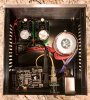
Allo has their new "Shanti" power supply. Kinda pricey, but maybe not considering what other people are paying for "audiophile" power supplies. If you are handy with a soldering iron, you could build one using the Twisted Pear Audio "Centaur" power supplies. I built a single box with two of the Centaur power supplies with separate transformers for galvanic separation to power both sides of the Digione Signature.

IMG_1472.jpg
FmJwSkgyb45FYQGw7
 
Last edited:
Sure that would probably work but an alternative might be a new battery supply device which is under development right now. It will use 2 long-life NMC Li-Ion batteries that supply clean power. The batteries are being charged nightly (at a time frame which is fully programmable via the device APP).

The device will operate on the users WiFi network. When in use the batteries are completely isolated from the charging and control circuit thus providing real clean power. The unit is fully fail safe and will restore itself and the programmed operation times after eventual power interruption and it reports operating status vi the APP.

As far as cost goes the device is expected to sell for less than $120 which is less than the Shanti. And, last but not least the device will be very small and designed to fit on top of the DigiOne Signature board using the standard RPi hole pattern. The replaceable batteries are expected to last at least 3 years.
 
Sure that would probably work but an alternative might be a new battery supply device which is under development right now. It will use 2 long-life NMC Li-Ion batteries that supply clean power. The batteries are being charged nightly (at a time frame which is fully programmable via the device APP).

The device will operate on the users WiFi network. When in use the batteries are completely isolated from the charging and control circuit thus providing real clean power. The unit is fully fail safe and will restore itself and the programmed operation times after eventual power interruption and it reports operating status vi the APP.

As far as cost goes the device is expected to sell for less than $120 which is less than the Shanti. And, last but not least the device will be very small and designed to fit on top of the DigiOne Signature board using the standard RPi hole pattern. The replaceable batteries are expected to last at least 3 years.

Seems like a neat idea, although somewhat complex. As for me, I built my own Li-ion battery pack and compared it to the linear power supplies that I built and there was no discernible difference in sound quality to me. I could definitely hear a degradation in quality using switched power supplies, however.
 
You are probably correct. Sound quality difference may be difficult to discern. My interest has been in developing a battery supply that require very little attention from the user. In fact user initially just set the time for each weekday when he expect to have clean power available (or set all days the same) and then the power supply handles everything (including charging) without user interaction. Not everyone will have the knowledge, interest or skills to build a linear power supply. If they do I think your solution is very good.
 
Back
Top Bottom