• The move to the new server is done. There are some software and database maintenance updates in process. This has us passing the hat around to help out. We appreciate any donations. Seriously, even a dollar helps. The payment page may be found here - https://www.audiokarma.org/support.html

MARANTZ 1070 PE01 TRANSISTORS 2SC1328 - 2SA763 VALEUR

100 years

New Member
Bonjour à tous,
novice dans ce domaine, je rencontre un problème avec mon nouvel amplificateur Marantz 1070.
Seul le canal droit fonctionne ; le canal gauche reste muet, que ce soit au casque ou sur les enceintes.
Je me trompe peut-être, mais le problème pourrait-il provenir de la carte de préamplification PE01 ?
Il ne présente aucun signe visible de dommage.
J'ai effectué des mesures sur les huit transistors, HE01 à HE08.
Voici les résultats obtenus (voir photo).
Les valeurs des transistors 2SC1328
HE01 et HE02 sont complètement différentes de celles des six autres :
1 µA pour HE01 et 0,96 µA pour HE02, alors que les autres affichent une consommation moyenne comprise entre 8 et 10 µA.
Pensez-vous que cela mérite d'être exploré ? Les valeurs de HE01 et HE02 devraient-elles être proches de celles des autres ?
Un remplacement des transistors pourrait-il résoudre le problème ?

Merci d'avance pour votre aide.
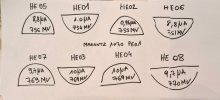
TRANSISTORS.jpg
 
Register to hide this ad
I made measurements on all eight transistors, HE01 to HE08.
I'm not sure what you measured?
First, to verify that your problem is in the Preamp or Main Amp, you can perform this simple test.
  • Connect the L PreOut to R Main In
  • Connect the R PreOut to L Main In
  • See if the bad channel changes sides. If it does then the problem is in the PreAmp, if not then it's in the Main Amp.
1782830667619.png

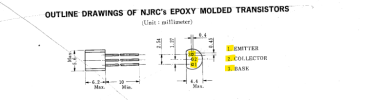
To measure transistor voltages, you need to measure the voltage at the 3 leads: emitter (E), collector (C), and base (B).
  • Turn the volume control all the way down when you measure the voltages,
  • Set you DMM to measure DC volts.
  • Black DMM lead on chassis ground. Red lead on each transistor lead.
  • Compare your measured voltages to those on the schematic.
Here are the transistor part numbers from the PL:
It looks like there are both NPN (2SC1328) and PNP (2SA763) transistors.
1782829358428.png

Compare your measurements to those on the schematic:
1782829141014.png
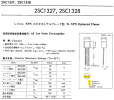
Transistor datasheets:
1782829740754.png
1782829844926.png

1782829904982.png
 
Last edited:
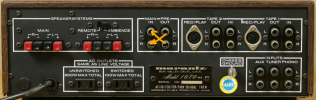
thanks for your help and reply, on my 1070 the jumpers of pre-main are wired and soldered inside. i don't have jumpers outside, it's righ for you ? i need to connect like you suggest with rca cable ? the both together L pre to R main and R pre to L main or step bye step first L to R and then R to L , thanks
 
I think the 1070 has built-in jumpers to internally connect the PreOuts to Main In.
When you insert an RCA cable, it will bypass the internal jumpers.
Just use a stereo RCA cable and cross-connect both L & R channels at the same time (with power off)
Then turn on the power and see if the same channel is bad, or if it changes to the other channel.
Let me know what you discover.
 
Last edited:
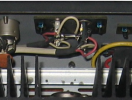
J'ai l'impression que la panne pourrait venir des soudures internes des jumpers. En effet quand branché les rca le canal à fonctionné à nouveau, en touchant un peu les soudures le son était par intermittence, une fois les cosses bien écartées le son est nickel. Je me demande si mon problème ne vient pas des soudures qui ont mal vieillies ?
 
Yes, there are two things:
  1. The internal jumpers are oxidized and need to be cleaned
  2. Wires soldered to the PreOut and Main In could have developed a poor solder connection.
1782849069346.png
There are some things that you can do:
  1. Get a can of Contact Cleaner or Deoxit D5 and spray the contacts inside the RCA PreOut and Main in RCA jacks
  2. If the wires are soldered to the RCA jacks, then get a soldering iron and some solder to heat and reflow the connections to the jacks
  3. If the wires are wire wrapped onto posts on the jacks, then try spraying contact cleaner on the wire wrap posts
1782848138992.png1782848198163.png
 
Last edited:
Merci infiniment pour votre aide j'ai l'impression d'avancer dans la bonne direction. J'ai l'impression que le centre de la balance est légèrement décalé vers la gauche, il faudrait que je compare avec un autre ampli pour en avoir le cœur net.
sauriez-vous comment régler le point du milieu ?
 
There is no adjustment for balance center. It means that the output of one channel is greater than the other channel. You can determine whether the difference is caused by the Main Amp or PreAmp by performing the cable test described earlier. With an RCA cable, connect the PreOut L to Main In R and PreOut R to Main In L. Listen to see if the balance sounds the same as before or did the louder channel switch sides. If it remains the same, then one of the Main Amps is outputting less power than the other. If the louder channel changes sides, then it is in the PreAmp circuit.
 
Back
Top Bottom