• The move to the new server is done. There are some software and database maintenance updates in process. This has us passing the hat around to help out. We appreciate any donations. Seriously, even a dollar helps. The payment page may be found here - https://www.audiokarma.org/support.html

Marantz 140 + Marantz 3600 combo - Left channel issues

labatt242

Active Member
Hello there,

I created a few post regarding my Marantz 140 under "Solid State" here in AK website and a user told me to submit my issue here. Here my situation :

I acquire a Marantz combo 140/3600 from eBay in the last 3 years, which is a very good combo and I really like it. But, for random reasons, the left channel give me some headache. Sometimes, the left channel is doing a buzzing/hum sound and is rumbling (i can see the woofer going back and forth and the VU meter going crazy on the Marantz 140 - left channel). I can temporary resolve the issue by touching/playing my turntable outlet, power off/power on the Marantz 3600 or last time I turned on my tapedeck Marantz 5020 and the buzzing/hum was disappear. It happened one or two time when I power on the combo for the first time of the day, I can hear the buzz/hum immediatly when the relay of the Marantz 140 kicks.

Here what I did on the Marantz 140 :

Replaced the filter/main cap for 2 x 15 000uF 63V Mundorf
New relay

LEFT CHANNEL :

All caps replaced
Replaced all TO-92 transistors including differential TO-92 thermal coupled and shrink tubed.
Replaced the two diodes
Replaced the BIAS transistor (had issues with BIAS adjustement in the past)
BIAS and DC adjusted
Checked for cracked solder joints (I may double check this one more time)
Re-solder/fixed the ground wire from the left heatsink.

RIGHT CHANNEL :

All caps replaced
Replaced the two diodes

Troubleshooting

Tried to swap the RCA cables from the Marantz 140. The buzz/hum still on left side.
Volume knob (pre-amp and the amp) have no impact
Push buttons (loudness, low/mid/high freq on pre-amp) have no impact

Seems like the only thing still untouched on the left channel is the pre-drivers, drivers and output transistors.

What other troubleshootings I can do to be able to fix my issue? I plugged another power amp for testing and all seems running fine for now. (Marantz 3600 with Yamaha MX-630)

Thanks in advance!

Guy
 
Register to hide this ad
Hello,

I'm checking again and again some post from AK here to see what can cause my rumble/hum issue and seems like a cold joint or loose screw on predrivers and/or drivers transistors/heat sink on the amplifier can cause this issue.

I desolder H711 and H712 and checked for HFE value. I can see around 400 hfe value on my multimeter. They seems looking fine.

I soldered them back and tighten the screws on pre drivers and drivers transistors. DBT passed, unplugged from DBT and adjusted DC and BIAS.

If the rumble/hum issue happens again, I will try to open the cover of the amp and gently tap on pre drivers and drivers transistors to see if it sound different. I guess that will give me an idea if a transistor is intermittent bad?

To be continued.

If there is anything I can try or test let me know.

Thanks,

Guy
 
Hello there,

I created a few post regarding my Marantz 140 under "Solid State" here in AK website and a user told me to submit my issue here. Here my situation :

I acquire a Marantz combo 140/3600 from eBay in the last 3 years, which is a very good combo and I really like it. But, for random reasons, the left channel give me some headache. Sometimes, the left channel is doing a buzzing/hum sound and is rumbling (i can see the woofer going back and forth and the VU meter going crazy on the Marantz 140 - left channel). I can temporary resolve the issue by touching/playing my turntable outlet, power off/power on the Marantz 3600 or last time I turned on my tapedeck Marantz 5020 and the buzzing/hum was disappear. It happened one or two time when I power on the combo for the first time of the day, I can hear the buzz/hum immediatly when the relay of the Marantz 140 kicks.

Here what I did on the Marantz 140 :

Replaced the filter/main cap for 2 x 15 000uF 63V Mundorf
New relay

LEFT CHANNEL :

All caps replaced
Replaced all TO-92 transistors including differential TO-92 thermal coupled and shrink tubed.
Replaced the two diodes
Replaced the BIAS transistor (had issues with BIAS adjustement in the past)
BIAS and DC adjusted
Checked for cracked solder joints (I may double check this one more time)
Re-solder/fixed the ground wire from the left heatsink.

RIGHT CHANNEL :

All caps replaced
Replaced the two diodes

Troubleshooting

Tried to swap the RCA cables from the Marantz 140. The buzz/hum still on left side.
Volume knob (pre-amp and the amp) have no impact
Push buttons (loudness, low/mid/high freq on pre-amp) have no impact

Seems like the only thing still untouched on the left channel is the pre-drivers, drivers and output transistors.

What other troubleshootings I can do to be able to fix my issue? I plugged another power amp for testing and all seems running fine for now. (Marantz 3600 with Yamaha MX-630)

Thanks in advance!

Guy
Can you help a newbie? I just picked up the same combo, and need a owners manual to ensure I set it up right. Never used a preamp/amp combo and can’t find a user’s guide anywhere.
 
Can you help a newbie? I just picked up the same combo, and need a owners manual to ensure I set it up right. Never used a preamp/amp combo and can’t find a user’s guide anywhere.
Sorry, been a while I wasn't connected here!

I'm assuming you found what you are looking for?
 
Hi there,

Still hunting for this rumble issue. I recaped my Marantz 3600 to see if this will help but I still have the issue.

I realised I do have the same issue when I plug a headphone into the "Phones" port of the Marantz 3600. I can hear the same thing from the speakers. Not sure if it's a sign of the amp section having the issue.

I heard that I can plug a smartphone / iphone / mp3 player directly to the amp if the issue will occurs. I will try that.
 
Hi there,

Still hunting for this rumble issue. I recaped my Marantz 3600 to see if this will help but I still have the issue.

I realised I do have the same issue when I plug a headphone into the "Phones" port of the Marantz 3600. I can hear the same thing from the speakers. Not sure if it's a sign of the amp section having the issue.

I heard that I can plug a smartphone / iphone / mp3 player directly to the amp if the issue will occurs. I will try that.
That's a good way to determine what piece of equipment is the problem.
Since the 140 has gain controls, you can just use the amp by itself without a preamp. My garage system is just a Crown power amp with gain controls, speakers, and an old smart phone to stream through the amp. I use the gain controls as volume controls.
 
That's a good way to determine what piece of equipment is the problem.
Since the 140 has gain controls, you can just use the amp by itself without a preamp. My garage system is just a Crown power amp with gain controls, speakers, and an old smart phone to stream through the amp. I use the gain controls as volume controls.
I use a Raspberry Pi with HiFiBerry DAC+ Light HAT connected RCA to the Marantz 140. Played internet radio for a few hours and I confirm there is something with the 140! I need to check what can cause this... I will continue from where I was : checking pre-drivers, drivers and output transistors.
 
I use a Raspberry Pi with HiFiBerry DAC+ Light HAT connected RCA to the Marantz 140. Played internet radio for a few hours and I confirm there is something with the 140! I need to check what can cause this... I will continue from where I was : checking pre-drivers, drivers and output transistors.
At leased you know now where the problem is. One of the 140's I restored a few years ago had a similar intermittent problem in one channel. It turned out to be a bad capacitor and one of the signal transistors on the amp board in one channel. I don't remember what transistor it was though.
This amp is pretty easy to work on. The amp boards are connected with a cable that just plugs into the board. There are two more wires with push on connectors also. Then 1, maybe 2 small wires to unsolder.
 
I realised I do have the same issue when I plug a headphone into the "Phones" port of the Marantz 3600.
I confirm there is something with the 140!
You have conflicting statements here. At first you confirmed that you hear the same issue with headphones on the 3600. But, in the next post you played audio directly into the 140 and said you confirmed it is the 140. It sounds like the issue may not be with either, but something external to both. Do you still hear the rumble through the headphones if you disconnect the 140 from the 3600 and play some audio?
I can temporary resolve the issue by touching/playing my turntable outlet, power off/power on the Marantz 3600 or last time I turned on my tapedeck Marantz 5020 and the buzzing/hum was disappear.
It sounds more like an intermittent grounding problem between the 3300 and the 140 on one of the RCA jacks or cables.
  1. Do the 3600 and 140 both have non-polarized AC plugs? If yes, try reversing one plug or the other and retest.
  2. Connect the 3600 to the 140 with a NEW RCA audio cable, your shielding of the cable may be bad.
  3. Thoroughly clean the RCA jacks/plugs on both the 140 and 3300 with isopropyl alcohol, inside and out. Check internally for cold solder joints on the wires to the jacks.
  4. Are you connecting your speakers directly to the 140 or from the 140 through the 3600 to the speakers?
 
Last edited:
You have conflicting statements here. At first you confirmed that you hear the same issue with headphones on the 3600. But, in the next post you played audio directly into the 140 and said you confirmed it is the 140. It sounds like the issue may not be with either, but something external to both. Do you still hear the rumble through the headphones if you disconnect the 140 from the 3600 and play some audio?

It sounds more like an intermittent grounding problem between the 3300 and the 140 on one of the RCA jacks or cables.
  1. Do the 3600 and 140 both have non-polarized AC plugs? If yes, try reversing one plug or the other and retest.
  2. Connect the 3600 to the 140 with a NEW RCA audio cable, your shielding of the cable may be bad.
  3. Thoroughly clean the RCA jacks/plugs on both the 140 and 3300 with isopropyl alcohol, inside and out. Check internally for cold solder joints on the wires to the jacks.
  4. Are you connecting your speakers directly to the 140 or from the 140 through the 3600 to the speakers?
If I remember right, the headphone feature won't work unless you run the speaker wires from the amp through the speaker selector speaker terminals on the back of the 3600. I don't think headphones will work with the 3600 by itself. Same for the 3200. So if he did run the speakers wires from the amp to the speaker terminals on the back of the preamp, then he would hear the problem using headphones since the signal for the headphones does come off the output of the power amp through resistors in the preamp, like so many receivers and integrated amps did it.
 
Hi there,

I am about to hunt that issue with an portable oscilloscope. The only thing is, I NEVER used that tool but I heard this can help to trace down where could be the issue. I don't really know where to probe exactly and what to check exactly on the screen. I'm willing to learn on that. It also have a capacitor/transistor tester so I can test each piece and compare with the original specs.

If there is any hints on how to test with the oscilloscope, let me know! I will check some videos on the net to give me an idea.

Thanks!

Guy
 
Hi there,

I started testing the ceramic / films capacitors and I found there is 3 ceramics caps that doesn't show any readings and not responding from a continuity test from my multimeter.

Is this a sign of bad ceramic caps? They looks fine physically, but the test seems wrong. I have reading on the other ceramic / film capacitors but did not test the continuity test tbh (will test that to be sure).

Thanks!

Guy
 
Small value capacitors will read open on a DMM, doesn't mean it's bad. What are the printed values on the caps?
 
I use a Raspberry Pi with HiFiBerry DAC+ Light HAT connected RCA to the Marantz 140.
Are you sure the noise isn't coming from leakage or grounding issues from this setup?
Have you tried swapping L/R channels into the 140? Or maybe a bad cable?

You can use your oscilloscope to check your audio source.
  1. Power off equipment
  2. Unplug the RCA cable from your amplifier
  3. Connect an oscilloscope probe to the BNC connector of the scope and select DC coupling
  4. Connect the oscilloscope probe to the center conductor of the RCA cable connected to your Raspberry Pi
  5. Connect the probe ground clip to the outer shield of the RCA cable... careful not to short them out
  6. Turn on your scope, set the time-base to something like 1msec. You should see a sweep on the screen
  7. If not, you need to set scope triggering to Auto and adjust the trigger level u/down
  8. Do you see a sweep yet?
  9. Now, set the Channel 1 input voltage selector to something like 1 or 2 volts
  10. Turn on your Raspberry Pi to generate a signal... do you see it on the scope yet?
  11. If you are generating a sine wave, then it should look like a graph of a sine, up and down
  12. Adjust the Chan 1 voltage so that the whole wave appears on the screen, then adjust the time base to view 5-10 cycles of the sine wave
  13. If you got this working, I need you to look at the bad channel scope waveform and compare it to the good channel waveform. If you have a dual-channel scope, you can connect to both channels and display both on the screen at once to compare them.
Let me know when you get this done. What make and model oscilloscope to you have? Most of the newer scopes are hard to use because all controls are buried in menus that you need to navigate to get to. I like the old analog scopes better since all control are knobs or push buttons.
CAUTION!!!: Never connect the ground clip of the probe to anything but ground, otherwise you will short something out and possibly damage components.
 
Last edited:
Small value capacitors will read open on a DMM, doesn't mean it's bad. What are the printed values on the caps?
C705 : KCK 100J
C709 : KCK 150J
C714 : KCK 220K (I have reading on the other caps which is very near to it and the same specs).

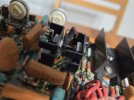
There is one thing I'm not sure is this thermistor (photo). Is this a leak?
 

Attachments

  • 153b21ad-918e-4c81-89a8-f1e82c73b9ea.jpg
    153b21ad-918e-4c81-89a8-f1e82c73b9ea.jpg
    81.2 KB · Views: 7
Are you sure the noise isn't coming from leakage or grounding issues from this setup?
Have you tried swapping L/R channels into the 140? Or maybe a bad cable?

You can use your oscilloscope to check your audio source.
  1. Power off equipment
  2. Unplug the RCA cable from your amplifier
  3. Connect an oscilloscope probe to the BNC connector of the scope and select DC coupling
  4. Connect the oscilloscope probe to the center conductor of the RCA cable connected to your Raspberry Pi
  5. Connect the probe ground clip to the outer shield of the RCA cable... careful not to short them out
  6. Turn on your scope, set the time-base to something like 1msec. You should see a sweep on the screen
  7. If not, you need to set scope triggering to Auto and adjust the trigger level u/down
  8. Do you see a sweep yet?
  9. Now, set the Channel 1 input voltage selector to something like 1 or 2 volts
  10. Turn on your Raspberry Pi to generate a signal... do you see it on the scope yet?
  11. If you are generating a sine wave, then it should look like a graph of a sine, up and down
  12. Adjust the Chan 1 voltage so that the whole wave appears on the screen, then adjust the time base to view 5-10 cycles of the sine wave
  13. If you got this working, I need you to look at the bad channel scope waveform and compare it to the good channel waveform. If you have a dual-channel scope, you can connect to both channels and display both on the screen at once to compare them.
Let me know when you get this done. What make and model oscilloscope to you have? Most of the newer scopes are hard to use because all controls are buried in menus that you need to navigate to get to. I like the old analog scopes better since all control are knobs or push buttons.
CAUTION!!!: Never connect the ground clip of the probe to anything but ground, otherwise you will short something out and possibly damage components.
I used other cables and different sound device and I do have the same issue on the same left channel.

This is something I can start with indeed.

When I touch/move another plug like AM/FM or turntable which plugged to the pre-amp stop the noise/hum sound. It looks like a ground issue to me, but I don't know where to start to diagnose this but by following the 13 steps that will give me an idea.
 
The first thing that you need to do is isolate the hum to the 140 Amplifier or 3600 Preamplifier.
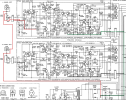
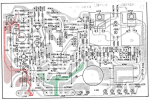
Check this grounding of the P700 Main Amp board in your 140. I think the 2270 had a similar issue (you can search for it).
This issue is that there are two ground paths on the board, but they are not connected on the board itself, but through wire shields that connect to a common point.
When you are testing, make sure that all of the cables are connected to the headers.
  1. Red line is at the input to the amp
  2. Green line is at toe output of the amp.
  3. Follow them to a common point to ground
So... maybe your hum is one of the ground wire (shield) connections between J710 and chassis ground. Something is different between the L & R.
Also, if you are running one of the P700 boards out of the chassis, I think that you need to connect ground to chassis ground.

1733194141658.png

1733194199623.png
 
The first thing that you need to do is isolate the hum to the 140 Amplifier or 3600 Preamplifier.
Check this grounding of the P700 Main Amp board in your 140. I think the 2270 had a similar issue (you can search for it).
This issue is that there are two ground paths on the board, but they are not connected on the board itself, but through wire shields that connect to a common point.
When you are testing, make sure that all of the cables are connected to the headers.
  1. Red line is at the input to the amp
  2. Green line is at toe output of the amp.
  3. Follow them to a common point to ground
So... maybe your hum is one of the ground wire (shield) connections between J710 and chassis ground. Something is different between the L & R.
Also, if you are running one of the P700 boards out of the chassis, I think that you need to connect ground to chassis ground.

View attachment 3360508

View attachment 3360510
Hi dankik,

Thank you so much for these schemas.

Since a few weeks, I resolder each component (listed in red and green) to make sure to have a good grouding.

I was still having the issue, but today, I tried something else : following the wires connected to the "Red" ground" and "Green" ground. I found the wire was connected to the volume potentiometer. I resolder the 3 wires and cleaned the potentiometer with Deoxit D5.

I also cleaned the J710 and J709 connectors with pen eraser to make sure I have a good contact. I also cleaned both ground wires on heatsinks.

I resolder the RCA connectors at the same moment.

For the first time since I have the Marantz 140, I have a clean / dead silence sound at 0 volume, no more "HUM" on the left channel.

Thank you so much for all the help here !
 
Back
Top Bottom