• The move to the new server is done. There are some software and database maintenance updates in process. This has us passing the hat around to help out. We appreciate any donations. Seriously, even a dollar helps. The payment page may be found here - https://www.audiokarma.org/support.html

Marantz 2230 Aux blowing fuse and no am sound

Audio_MGyver

New Member
Hello,

I'm new to the forum and hoping someone can help.

There two issues with my Marantz 2230 (thrift store find). So far I've replaced all lamps with leds, replaced the tuner cord and fixed one of each of a cap, resist, and rf coil. I also cleaned all boards with air and 99% alcohol. Before the work, I had an Aux issue but everything else worked. Now, I've introduced an am issue.

First, the Aux issue. When I turn the selector switch to Aux, it blows a 3amp fuse (front right top where there are 4 fuses in a row). I purchased new 3amp fast blow fuses and I can replicate the issue. Clearly, the previous owner had an issue as the fuse I replaced was blown when I got it. All panel LEDs work great, tuner light, meter light and stereo light and I can switch from am to fm to phono to tape without issue. But once I switch to Aux, it blows the 3amp fuse every single time.

I'm new to this and having a blast (when I'm not pulling out my hair)! I've looked to Audiokarma each time I have an issue but I can't find this one. Not even in a Google search of any receiver brand. Reading the 2230 service manual, it seems the wires go straight from the Aux jacks to the selector switch. From what I can trace by eye, all soldering seems ok. But I really do not have any desire to start snipping wires just to remove boards to see better and then have to solder them back on. Could this be a grounding short issue either with the selector switch or a bare wire where I cannot see? Or does it seem more like an ouput board issue (not sure how though).

Second, before cleaning the unit, the am tuner worked. I could hear sound and radio stations were coming in. After cleaning and waiting a few days there is no sound at all on am and the fm tuner meter is less responsive. I read one forum where someone said the fix is to resolder all of the board points on the bottom of the receiver but this is not the issue. Another person said that they had the exact same issue as me (exact) and after a month of using it daily, everything slowly came back to life. I'm hoping for the same but if not... Any ideas?

Thank you for any and all help.
 
Register to hide this ad
I would guess your blown fuse is an issue with the wiring to the Aux input bulb. Check for a short anywhere around that bi-pin bulb.
For the AM, check for 12.5V DC at J154 while input select is set to AM to make sure the board is getting power.
 
Thank you very much Steven. I will check both tonight or tomorrow and reply. The odd thing about the Aux is that the fuse was blown when I got the unit, before I added LEDs. Every LED I added works great but of course I cannot be sure on Aux as the fuse blows. If you're right, I would be very puzzled but very happy. Thanks again.
 
Look really well at the solder joints where the bulb is soldered into the circuit board. If someone changed that bulb in the past and got a solder bridge across traces or even bent pins that short out, that could do it.
 
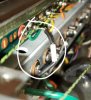
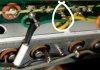
20210312_000356.jpg 20210312_000506.jpg 20210312_000356.jpg 20210312_000506.jpg Steven, you're onto something. While it is not a solder bridge, it is worse... but fixable. I always take pictures before working and in this case I soldered everything back the way it was. It was wrong. I've attched two pictures to show you the issue which could be one of two things, or both. Notice the jumper going from the bottom panel lights to the top selector lights. This was the only thing I removed and resoldered to get to the lights. This could be an issue if it is on the wrong pin (first long post when looking left to right facing the back of the panel). As you were alluding to, this is behind where the Aux light is. The other picture, which is where I think there is an issue for sure, shows that there was a wire attched to the second long post (beside the jumper) but the wire has been removed. I'm thinking either the green wire was soldered in the wrong place (first guess) or the jumper was in the wrong place. Or both. What do you think?
 
View attachment 2160300 View attachment 2160301 View attachment 2160300 View attachment 2160301 Steven, you're onto something. While it is not a solder bridge, it is worse... but fixable. I always take pictures before working and in this case I soldered everything back the way it was. It was wrong. I've attched two pictures to show you the issue which could be one of two things, or both. Notice the jumper going from the bottom panel lights to the top selector lights. This was the only thing I removed and resoldered to get to the lights. This could be an issue if it is on the wrong pin (first long post when looking left to right facing the back of the panel). As you were alluding to, this is behind where the Aux light is. The other picture, which is where I think there is an issue for sure, shows that there was a wire attched to the second long post (beside the jumper) but the wire has been removed. I'm thinking either the green wire was soldered in the wrong place (first guess) or the jumper was in the wrong place. Or both. What do you think?
This is what I think. ;) If you follow the trace on yours, you'll see you have a direct short.
AUX lamp wire.jpg
 
Thank you Steven! You are good, you. Being a newbie I can only guess you mean use a multimeter to find the short. My eyes tell me the green wire was soldered in the wrong spot and should go where I identified the missing wire. Please let me know if that is the only issue you see. How do I follow the trace to find a short? I can Google if you don't have time.

At least I know how to use the multimeter to check for 12.5V DC on J154 which I'll do today! Just have to get a 9V battery for the tester. Then I'll update.
 
I would try to match Skywatcher's photo above. It looks like your green wire from the Input Select switch is going to the same spot as the resistor coming from the main lamp board. It should be on the pin to the right (in the photo) of the Aux lamp, and next to the yellow wire. I would move that green wire and see if that fixes your problem. I think these lamps light by having + power all the time, and then getting grounded via the input select switch. From what I see, it looks like the green wire, which is probably grounded, is connected to the + power. That would be a direct short and blow a fuse when the switch was put in Aux mode.
 
I would try to match Skywatcher's photo above. It looks like your green wire from the Input Select switch is going to the same spot as the resistor coming from the main lamp board. It should be on the pin to the right (in the photo) of the Aux lamp, and next to the yellow wire. I would move that green wire and see if that fixes your problem. I think these lamps light by having + power all the time, and then getting grounded via the input select switch. From what I see, it looks like the green wire, which is probably grounded, is connected to the + power. That would be a direct short and blow a fuse when the switch was put in Aux mode.

Thank you Steven, I will do just that today!
 
Hi Steven and Skywalker,

You guys are genius Marantz pros. Removing the green wire from the first post and soldering it to the correct (second) post resolved the issue. Thank you many times over!

See pics.

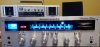
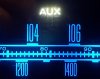
20210312_152005.jpg 20210312_152029.jpg 20210312_152105.jpg

I was able to test J154 and I'm getting 13V DC so there is power to the am 150 board. Any other ideas?
 
Hi Steven and Skywalker,

You guys are genius Marantz pros. Removing the green wire from the first post and soldering it to the correct (second) post resolved the issue. Thank you many times over!

See pics.

View attachment 2160787 View attachment 2160788 View attachment 2160789

I was able to test J154 and I'm getting 13V DC so there is power to the am 150 board. Any other ideas?
That's great news! Do you get any sound at all in AM mode? Any meter movement at all when you move the dial pointer? The fact that it worked before cleaning makes me wonder if a wire was broken loose either at the board or at the other end of one of the wires.
 
Hi Steven, yes very happy!

No sound at all. Silence. No meter movement at all. The funny part is, FM is fine but the meter is less responsive than it was before cleaning yet it still works. Again, I read about another guy who had this exact issue after cleaning and over time it came back to life. I will look closely at the AM board and maybe take some pics. I only lightly brushed each board with a toothbrush and 99% alcohol but you never know. Maybe some Nu-trol (DeoxIT) hit the board somehow.
 
I always check power to the involved boards first. You have 13V to the P150 board. How about at J106 on the P100 board? (the one with the big finned air caps). You can find it on the P100 board diagram in the service manual. If you have power there, double check all of the wiring from the AM stick antenna from the back of the unit to the P100 and P150 boards.
 
I always check power to the involved boards first. You have 13V to the P150 board. How about at J106 on the P100 board? (the one with the big finned air caps). You can find it on the P100 board diagram in the service manual. If you have power there, double check all of the wiring from the AM stick antenna from the back of the unit to the P100 and P150 boards.

Hi Steven,

So I checked all of the J connections on the P100 board. On J106 I'm getting very small readings like 4-5 mA and .04 - .05V DC The same with all the other J connections, between .03 - .05 V DC. Not sure if these values are correct. I could see the solder connections on all J points were old and not clean so I cleaned them all and resoldered them. Still silence and no tuner meter reading at all on AM. I also tried turning all tuning screws in both directions with no success, putting everything back the same as it was. I followed and checked all wires back to the antenna and I cannot see any issues.

What is most puzzling is that I definitely did not get any Nu-trol (DeoxIT) on the P100 board because it is has a metal cover and I also read not to spray it in there. I also did not clean the P100 board. I very gently used a toothbrush and 99% alcohol on most boards that I could get to without removing them and P100 was not a board that I cleaned. Very odd.

At this point, I'm quite proud of myself and I'm very grateful to you, Skywatcher and Audiokarma forums for your help. Before starting I knew nothing. Now I have successfully cleaned the whole unit, installed all new LED lights, replaced the tuner cord twice (the first time I went clockwise on the last turn around the flywheel, resulting in the pointer going in the opposite direction to the dial), fixed the Aux blowing a fuse issue, and installed several 3amp fuses. At the end of the day, if the only thing I can't do is get AM radio (that I never listen to), I'm happy. If I ever decide to sell the unit (not likely in this lifetime) then I may reconsider trying something else.

Thank you again for all of your help Steven!
 
Back
Top Bottom