AudioScout
New Member
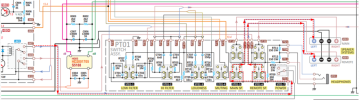
Receiver: Marantz 2275
Problem: No sound, left channel. (Both Speaker and Headphone)
What I've done so far:
Connected the main out and in via RCA and swapped the cables. Left Channel still out.
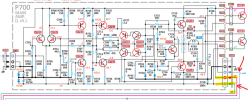
Swapped P700 Output board positions. left Channel still out.
Swapped Output capacitor positions. Left Channel still out.
Sprayed with Deoxit and thoroughly cleaned. Left Channel still out
Initial problem
Protection relay was kicking in after receiver warmed-up. Both channels were working at the time.
I replaced some caps, transistors and the relay on the board and the protection issue was solved.
Some time after, the left channel went out.
I am assuming the problem still lies on the protection board.
I've swapped out a couple of transistors and capacitors again to see if my components were bad with no change.
Thoughts on how to further diagnose?
Problem: No sound, left channel. (Both Speaker and Headphone)
What I've done so far:
Connected the main out and in via RCA and swapped the cables. Left Channel still out.
Swapped P700 Output board positions. left Channel still out.
Swapped Output capacitor positions. Left Channel still out.
Sprayed with Deoxit and thoroughly cleaned. Left Channel still out
Initial problem
Protection relay was kicking in after receiver warmed-up. Both channels were working at the time.
I replaced some caps, transistors and the relay on the board and the protection issue was solved.
Some time after, the left channel went out.
I am assuming the problem still lies on the protection board.
I've swapped out a couple of transistors and capacitors again to see if my components were bad with no change.
Thoughts on how to further diagnose?