
• The move to the new server is done. There are some software and database maintenance updates in process. This has us passing the hat around to help out. We appreciate any donations. Seriously, even a dollar helps. The payment page may be found here - https://www.audiokarma.org/support.html

Marantz Model 22 ~ THUMP

Zack Sainz

Active Member
Hey all!

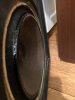
I have a Marantz Model 22 when I turn it on after selecting the main or remote (I tested both) I hear a “thump” and at the same time the left channel woofer pops forward.

I have attached an image of the protruding woofer.

I have tested it on two speakers same results.

Thank you in advance!
 

Attachments

  • A47FB054-7652-4914-B9CE-D27C593C4759.jpeg
    A47FB054-7652-4914-B9CE-D27C593C4759.jpeg
    45.9 KB · Views: 19
Register to hide this ad
Set speakers to OFF. Power ON then wait 10 seconds then select speakers, do you still get the thump.
Probably just start up transients, many causes like tired components

EDIT: Description says amp has protection relay so cap that does mute timing is a candidate along with other failures in protection cct.
EDIT: Check/replace C982 220uf/10V in sm.
 
Last edited:
The protection circuit not working properly. The protect relay should stay open for a few seconds after turn on, then close only after all offset voltage in the output is gone. Does the speaker stay extended, or does it go back to normal after a few seconds? If the speaker goes back to normal after a few seconds, and the unit plays OK, then the issue is just related to protect. If the speaker does not go back to normal in a few seconds STOP!!!! You have an issue with that channel of the amp as well as the protect circuit. That much DC on the speaker for more than a few seconds will likely damage the speaker (cook the voice coil). Since the other speaker does not do the same thing. I doubt the issue is the timing of the protect circuit , as both channels would likely present the same issue if it were timing. I have seen where one set of contacts in a protect relay have become "welded" and cause a pop in only one channel at turn on (and the unit plays properly after the pop).
 
Last edited:
Thank you so much for your help!

I found a recap kit with a power relay for $50.

Do you all think I should purchase the kit and do the work on my own? I’ve only done speaker soldering projects... I’m confident with my ability, just haven’t embarked on amps/receivers yet.

Is the Model 22 worth it?
 
The protection circuit not working properly. The protect relay should stay open for a few seconds after turn on, then close only after all offset voltage in the output is gone. Does the speaker stay extended, or does it go back to normal after a few seconds? If the speaker goes back to normal after a few seconds, and the unit plays OK, then the issue is just related to protect. If the speaker does not go back to normal in a few seconds STOP!!!! You have an issue with that channel of the amp as well as the protect circuit. That much DC on the speaker for more than a few seconds will likely damage the speaker (cook the voice coil). Since the other speaker does not do the same thing. I doubt it is the timing of the protect circuit , as both channels would likely present the same issue if it were timing. I have seen where one set of contacts in a protect relay have become "welded" and cause a pop in only one channel at turn on (and the unit plays properly after the pop).

The woofer does not go back to normal, it stays pushed out until it’s turned off.
 
Set speakers to OFF. Power ON then wait 10 seconds then select speakers, do you still get the thump.
Probably just start up transients, many causes like tired components

EDIT: Description says amp has protection relay so cap that does mute timing is a candidate along with other failures in protection cct.
EDIT: Check/replace C982 220uf/10V in sm.
Thank you!
 
The channel certainly has an issue, and there is also an issue with protection. The protection circuit should keep the speakers disconnected with that much offset. If you disconnect that speaker does the other channel play? If not, it is likely that the protect circuit is doing it's job, in not energizing the protect relay (keeping the right speaker disconnected), but the left side relay contacts are "welded" together.
 
For kicks you could check the DC voltage on the input to that protruding speaker, or to be safe, disconnect it and check the receiver output terminals. You'll find some voltage there which is not good. (DC offset should be down way below 50 mv IIRC).
 
For kicks you could check the DC voltage on the input to that protruding speaker, or to be safe, disconnect it and check the receiver output terminals. You'll find some voltage there which is not good. (DC offset should be down way below 50 mv IIRC).
Thank you! I’ll check with a meter!
 
With the speaker protruded that far, I suspect you have several volts of offset on that channel. That should keep the protect relay open. It may actually be de-energized, but have one set of contacts stuck together. If that is the case the other side would have no sound.
 
With the speaker protruded that far, I suspect you have several volts of offset on that channel. That should keep the protect relay open. It may actually be de-energized, but have one set of contacts stuck together. If that is the case the other side would have no sound.

I am able to play clearly with no pop on the right channel on both main and remote.
 
That is very weird. With the amount of offset you have to move the speaker that far, the protector should keep both speakers disconnected. Has someone bypassed the protect relay????? It should remain open for 4 or 5 seconds after you turn the unit on, then close. You should not have any sound until the relay closes, and it should not be closing because of the offset in that one channel.
 
That is very weird. With the amount of offset you have to move the speaker that far, the protector should keep both speakers disconnected. Has someone bypassed the protect relay????? It should remain open for 4 or 5 seconds after you turn the unit on, then close. You should not have any sound until the relay closes, and it should not be closing because of the offset in that one channel.
I don’t think anyone has bypassed the relay. The original owner said that the receiver is original.

No work done to it.

After powering on, the relay clicks on and stays on.
 
That is very strange. An offset great enough to move the speaker cone that far, should keep the protector from ever closing (which would prevent sound in the other channel). You must have two issues. The amplifier output stage causing a severe offset in the output, and the protect circuit not recognizing the offset.
 
Last edited:
Does the speaker thump the instant the unit is turned on, or when the relay clicks? If it is the instant the unit is turned on then it is very likely the relay contacts on that channel are "welded" (possibly from arcing because of the output stage failure). The output stage certainly has a failure as well. If it thumps when the relay closes, then there is some issue with the protect circuit causing it not to recognize the severe offset on the defective amplifiers output.
It thumps when the relay closes.

I’ll take it into the shop to get a diagnoses/estimate.

thank you!
 
Hello All!

I just heard from the shop, bad relay and a short somewhere along the left channel.

Repair work will cost more than I paid for the unit and I don’t know if it’s worth it to repair.

Get rid of it?
 
Last edited:
I was experiencing a pop sound when turning the power “On” and/or “Off”.

The protection relay has been replaced on this unit. However, the unit came in the wood case without the plastic feet. The owner had removed the feet and put the bolts all the way down into the chassis which was pushing on the new relay housing and keeping it engaged at all times! The problem was fixed by removing the bolt.

Anyhow, when the protection circuit is working as it should, there is no popping sound from the unit.

All parts and caps are original and the unit sounds great. Since the problem is resolved, I am planning to look at the problem transistors and a few caps on the power supply board.
 
Back
Top Bottom