• The move to the new server is done. There are some software and database maintenance updates in process. This has us passing the hat around to help out. We appreciate any donations. Seriously, even a dollar helps. The payment page may be found here - https://www.audiokarma.org/support.html

Miracord 50H II - Very faint signal

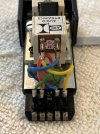
The above photo on the right is correct. The above left photo is wrong.

This diagram is an ADC 220. Don't know if the pattern is universal to all ADC's.

adc 220 cartridge pin out.PNG
 
I have a 50H, and it didn't ship with a separate ground wire. Is that something that got added with the 50H2... or did a previous owner maybe add it trying to fix a problem?

If the 50H2 didn't ship with a ground like the 50H, that might be part of the issue? The advice I saw for the 50H was to not add a seperate ground because the table was already grounded through the audio channels, and adding one might cause a ground loop.

You didn't respond to this, so just checking in.

Did you try completely unplugging the separate ground line? It's usually not supposed to be there on Miracords and can create a ground loop.
 
I guess that’s what I’m doing tomorrow. I’ll report back once I can test
Yes, a multi-meter with "continuity test" is a must have if you own a vintage turntable.

If you have it within you, please support any one of the dozen or so independent electronics suppliers instead of those conglomerates mentioned.

For example....

DIGIKEY


MOUSER


NEWARK

 
Last edited:
I have a 50H with an ADC brick and a 230XE stylus.

I experienced weak signal (out of phase?) upon install and determined an issue with the cart and came up with this wiring scheme.
 

Attachments

  • IMG_1077.jpeg
    IMG_1077.jpeg
    110.4 KB · Views: 9
  • IMG_1076.jpeg
    IMG_1076.jpeg
    100.4 KB · Views: 9
You will need at least a cheap multimeter to test the continuity from the tone arm wiring to the RCA plugs. You can buy one on Amazon or Harbor Freight for <$10. Spend more for better quality, whatever you can afford. We need to check for a short of the Left (blue) wire to ground on the turntable arm or chassis.
Hi, I have now picked up a multimeter and done some testing. Doing the continuity test, I found that it would sometimes be good, sometimes bad. I'm not really sure what this means. I'd test it, get a beep, try it again and get nothing. Am I doing something incorrectly?
 
If your multimeter has an Ohms setting, use that instead of a continuity "beep". Before testing the wire, make sure the meter reads 0 Ohms by touching the tips of the black/red lead together. You should get a reading very close to 0 Ohms. Next, touch one probe to the tip of the RCA cable and the other tip to the RCA connector in the turntable. It should read, again, very close to 0 Ohms. (Make sure that the turntable is unplugged when testing.) Do you have a picture of the DMM that you got?

If you are testing the continuity from the head shell to the RCA cable, you need to touch one lead of the DMM to the wire on the cartridge and the other to the tip of the RCA cable. Again, you should get close to 0 Ohms.

The last test would be to test for a short between the RCA cable center conductor (signal) to the outer conductor (Gnd) to make sure there is no short in the cable. Connect one lead of the DMM to the RCA center conductor and the other to the outer conductor and you should read and open circuit (OL) or infinite ohms.
 
Last edited:
I experienced weak signal (out of phase?) upon install and determined an issue with the cart and came up with this wiring scheme.
Your wiring does not look correct. Look at the annotations on the headshell near the connector: O (GRN) R (RED) L (BLUE) O (YELLOW).
RED = R Signal
GRN = R Gnd
BLU = L Signal
YEL = L Gnd

1744122504264.png 1744122589883.png
 
That was my point, my cart was not wired correctly.
Sorry, I thought the two photos that you provided in post #25 were showing your corrected wiring since you said that you "...came up with this wiring scheme".
 
Back
Top Bottom