• The move to the new server is done. There are some software and database maintenance updates in process. This has us passing the hat around to help out. We appreciate any donations. Seriously, even a dollar helps. The payment page may be found here - https://www.audiokarma.org/support.html

Mitsubishi DP-105 CD Player

djmtascam

Active Member
Here's another find....a Mitsubishi DP-105 (1984)
Looking for any info, knowledge or service manual/schematic
 
Register to hide this ad
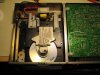
Well I have this player with a service manual now. It has a stuck transport mechanism and just displays an "E" in the display when trying to play a CD. After taking the cover off it appears the tray is jamming and catching on the top "spinner" plate that holds the CD in place and presses against the motor turntable below.
I have tried to adjust that upper plate but it just doesn't seem to have any adjustment or enough "lift" high enough to clear the plastic tray assembly. It just catches there as it opens or retracts and then stops movement. I can't figure out what might be the cause of this.
I thought maybe someone here would have some ideas on getting this to operate smoothly so I can move on to further tests!
Probably would be sheer luck if someone has ever worked on one of these or has some advice because it seems like a pretty odd model.
Attached is a photo of the top plate.
I'm hoping this sort of transport problem might be a common CD type design so perhaps someone will have some advice/fix.
Thanks for any comment...
 

Attachments

  • IMG_2700.jpg
    IMG_2700.jpg
    100.4 KB · Views: 37
Greetings;

Never seen that unit before but mechanics are just that. Possible the box has been dropped and warped the chassis. Might check those gears for something jamming in the teeth. Looks like there are four mounting screws to the chassis, I'd try to loosen the drive assembly and test it again. If no joy perhaps pull the unit out to examine further.

Good luck.
 
I know this thread is ancient and you probably don't even have this Mistubishi anymore, but I just picked up this exact model and experienced the same issue you were having once upon a time. The solution (for anyone else having this problem) was to lift up that spring loaded arm on top of the tray and pull it back. This will expose three small screws securing the laser assembly. Next, you need to actually loosen those three small screws. Back them off just a bit and it sinks the whole laser assembly just a hair so it drops beneath that ridge it is getting stuck on. It will continue reading discs. Hope this helps anyone else having this issue.
 
Back
Top Bottom