I started buying SSDs back around 2010, and other than some 2.5" drives for a RAID10 array in a backup server (Seagate ST4000LM024-2AN17V in the table), that's all I have bought since.
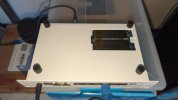
Through those 16 years, I've had three drives fail, two Samsung 2280 NVMe drives, and a KingSpec 2242 NVMe. The KingSpec wasn't a surprise so much. They're not a tier 1 vendor, and are no where close to it. It was also installed in a very small enclosure (MSI Cubi 2) where it ran hot.
The two Samsung drives were in servers. Servers I built that had no RAID1 set up for the system drive. One I determined was failing before it actually did. I was analyzing the smart data on the drives in a server before I rebuilt it and realized it was on the verge of failing so I pulled it. The other Samsung failure was one that took the server down.
I decided to set up a logging system where I wrote a script that collects smart data and writes it to the logging system, then use rsyslog to transfer those logs to a server and analyze the information there. I'll be setting up a dashboard in a service called Grafana, but decided to create a script that does it on the cli first.
Now I build systems with RAID1 arrays on the system drives, and will buy used enterprise SSDs whenever that is a viable option. Presently the two servers I have running are set up that way.
I'll expand this to include smart data from my laptops and whatever else that has SSD storage. These are the drives installed in servers, a router and a firewall.
'POH' in the table is power-on-hours.
The fields in smart data are somewhat different between consumer drives and enterprise drives as well as differences between manufacturers, which is why some show 'N/A'.
The servers have reasonably good air circulation so I'm not too worried about them from a temperature standpoint. The only one that I'd like to reduce the temp on is the Sabrent 2242 NVMe drive in msicubi. It's not showing any errors at this point, but I recently installed a service that allows me to run LXC containers on it and that tends to increase write cycles. On enterprise drives, I'd not be worried, but they have much higher read/write ratings than consumer drives.
I'm building this in order to avoid those surprises you get when drives fail. If you don't pay any attention to it you'll never know they're going bad until it is too late.
Through those 16 years, I've had three drives fail, two Samsung 2280 NVMe drives, and a KingSpec 2242 NVMe. The KingSpec wasn't a surprise so much. They're not a tier 1 vendor, and are no where close to it. It was also installed in a very small enclosure (MSI Cubi 2) where it ran hot.
The two Samsung drives were in servers. Servers I built that had no RAID1 set up for the system drive. One I determined was failing before it actually did. I was analyzing the smart data on the drives in a server before I rebuilt it and realized it was on the verge of failing so I pulled it. The other Samsung failure was one that took the server down.
I decided to set up a logging system where I wrote a script that collects smart data and writes it to the logging system, then use rsyslog to transfer those logs to a server and analyze the information there. I'll be setting up a dashboard in a service called Grafana, but decided to create a script that does it on the cli first.
Now I build systems with RAID1 arrays on the system drives, and will buy used enterprise SSDs whenever that is a viable option. Presently the two servers I have running are set up that way.
I'll expand this to include smart data from my laptops and whatever else that has SSD storage. These are the drives installed in servers, a router and a firewall.
'POH' in the table is power-on-hours.
Code:
root@morrigan:~# disk-report.py /mnt/storage-logs/hosts
HOST       DEVICE       MODEL                    CUR(°C)  MIN/MAX    POH        USED%    SPARE%   HEALTH
-------------------------------------------------------------------------------------------------------
anand      /dev/nvme0n1 Micron_3400_MTFDKBA512TF 38       35/39      1,984      5%       100%     OK
anand      /dev/nvme1n1 Micron_2400E_MTFDKBA512Q 40       38/42      326        0%       100%     OK
macha      /dev/sda     WDC  WDS500G1R0B-68A4Z0  44       42/45      21,672     N/A      N/A      OK
morrigan   /dev/sdb     MKNSSDRE2TB              38       35/40      515        N/A      N/A      OK
morrigan   /dev/sda     Samsung SSD 850 EVO 1TB  29       27/30      35,816     N/A      N/A      OK
morrigan   /dev/nvme1n1 SAMSUNG MZ1LB1T9HALS-000 41       39/42      1,141      0%       100%     OK
morrigan   /dev/nvme0n1 SAMSUNG MZ1LB1T9HALS-000 38       36/39      1,141      0%       100%     OK
msicubi    /dev/nvme0n1 Sabrent Rocket nano      50       45/50      35,499     2%       100%     OK
msicubi    /dev/sda     Samsung SSD 860 EVO 500G 38       35/39      60,662     N/A      N/A      OK
scathach   /dev/sdc     INTEL SSDSC2BB160G4T     33       33/35      63,758     N/A      N/A      OK
scathach   /dev/sdb     INTEL SSDSC2BB160G4T     34       34/36      63,754     N/A      N/A      OK
scathach   /dev/sda     ST4000LM024-2AN17V       31       31/33      2,674      N/A      N/A      OK
scathach   /dev/sdf     ST4000LM024-2AN17V       32       32/34      2,368      N/A      N/A      OK
scathach   /dev/sdd     ST4000LM024-2AN17V       31       30/32      2,425      N/A      N/A      OK
scathach   /dev/sde     ST4000LM024-2AN17V       33       32/34      2,404      N/A      N/A      OK
The fields in smart data are somewhat different between consumer drives and enterprise drives as well as differences between manufacturers, which is why some show 'N/A'.
The servers have reasonably good air circulation so I'm not too worried about them from a temperature standpoint. The only one that I'd like to reduce the temp on is the Sabrent 2242 NVMe drive in msicubi. It's not showing any errors at this point, but I recently installed a service that allows me to run LXC containers on it and that tends to increase write cycles. On enterprise drives, I'd not be worried, but they have much higher read/write ratings than consumer drives.
I'm building this in order to avoid those surprises you get when drives fail. If you don't pay any attention to it you'll never know they're going bad until it is too late.