• The move to the new server is done. There are some software and database maintenance updates in process. This has us passing the hat around to help out. We appreciate any donations. Seriously, even a dollar helps. The payment page may be found here - https://www.audiokarma.org/support.html

My Advent Baby IIs are misbehaving

Dis da’ guy? Clearly external, but could this still be something to consider as the source of the issue? View attachment 1138627

This model of Marantz doesn't have the internal switching that I mentioned, but as Spark1 mentioned this external jumper can have flaky connections as well as it rarely gets removed and replaced. Can't hurt to remove it and replace it a few times to clean the contacts and exercise the spring of the plugs/contacts.
 
Thanks! So what was the issue on yours when you had it serviced?

Actually never bothered to get it properly service. Removed it from the walnut enclosure, boxed both up and shelved them over a decade ago. I inherited several more modern and powerful receivers - especially 5.1 AVRs - so I never looked back on the antique. That plus I only have room to run one "entertainment room" - so it stays in storage for the time being.
 
Never owned one, but they're gorgeous with that gyro-tune wheel hanging out !

The only Marantz I own is a small, bookshelf receiver with a standard looking tuning knob. It's cool, but not really valuable.
 
You paid $325 for a 2245 WITH the WC22 case? That is a SCORE!

A problem that comes and goes sounds like a dirty switch to me. Does the drop out of the channel happen when running all four speakers at higher volumes? IF that is happening then that could be an overheating problem. I own a 2220B and have run 4 OHM Small Advents and it drove them without strain even at decently high volumes. Marantz 22XX series units are well built and robust but dropping below a 4ohm load is something I would never do. Even products that have the rep of being overbuilt like these units age, and pushing them hard when 40 years old is a lot different than pushing them hard when new.

26169673_1760850773934862_8787639101197647874_n.jpg
 
Some receivers and amps tell you on the back panel what you can run as speaker loads. Yours doesn't. Google up the manual on the web or search "make+model+specifications".

That antenna is an AM ferrite rod and can be moved about if you're listening to AM and need better signal. The switch next to it is if you have overly strong local stations that overload the front end of the radio amp, or very weak ones you want to bring in. Set it where you like it. The antenna jacks including Ground are for external antennas and if you don't have those don't worry about grounding it.
 
Impedance rating was addressed earlier in this thread.

If the OP wants to run both pairs of his little Advents simultaneously, he should either a) run them in series, which reduces the power the amp can deliver, or b) obtain a speaker selector box with impedance protection. These can be had quite inexpensively on the used market, and there is little risk that they will not be in good working order, as they are simple devices with no active components.
 
Last edited:
Also noticing a chassis ground.. should I be grounding the receiver?
The ground screw is for connecting a separate ground wire that some turntables have to reduce hum. No mention of any other use for it in any of the OMs for the three Marantz 22xx receivers I have.
 
Oops missed the ground screw for the TT, I thought we were talking about antennas.

As for the specs, yes, we have covered impedance thoroughly. I was just giving the OP the easiest way to find specs (for future reference) or a manual for his current one.
 
Anyway, shouldn't the 2245 trip the relay if anything was too hot or out of control like, output transistors going overboard in managing all that current in a quasi 2 ohms load ?

Distortion in one channel only is likely improbable with this situation, me think.
 
Last edited:
Anyway, shouldn't the 2245 trip the relay if anything was too hot or out of control like, output transistors going overboard in managing all that current in a quasi 2 ohms load ?

Distortion in one channel only is likely improbable with this situation, me think.

I believe that the protection relay in this case is for DC only...not thermal.

EDIT: After looking at service manual, I am wrong. In addition to the protection relay, this unit does have a protection circuit which appears to limit power in various error conditions, thereby protecting the output transistors
 
Last edited:
It figures... oftenly, the relay is present and active for too high dc offset only.... Where was I ?:boring:
 
If forced to guess, based on the limited info provided, it would be pre-driver/driver transistors.

It is still unclear to me whether the problem can be temporarily corrected as a result of activating switches or pots....but from what I can glean so far, this doesn't appear to be the case. Thats why I think deoxit is not likely to solve the problem.
 
Ok gang, I have an update for you, but it’s not a good one :(. So I opened up the receiver and sprayed all the switches and buttons with D5 worked them over real good, and also blew out the dust with some canned air. I even cleaned the speaker relay contacts. So after all that and getting it out back together I decided to take it for a test spin... my heart sunk- now the left channel doesn’t work at all and the sound from the RCA inputs(the DAC in this case) comes through every input selection- even FM! Thinking it’s time to pay the piper and go to get it serviced, but does this sound like a familiar issue that’s fixable DIY?
 
Which inputs is the DAC plugged into? Tape?

I assume you let the Deoxit dry before turning the unit on? Did you follow the instructions in the Deoxit thread? Where did you spray the "knobs"?

Clearly there is a problem with your selector switch - it may be something very simple (I need the answer to my first question, above, to determine) II don't know if it's a new problem, or related to your previous problem. Did the source selector work fine previously?

Also, just because I'm not clear on whether or not we've narrowed it down to the receiver yet, please swap the R and L leads from the DAC into the receiver. Is the dead channel still on the left?
 
Last edited:
Which inputs is the DAC plugged into? Tape?

I assume you let the Deoxit dry before turning the unit on? Did you follow the instructions in the Deoxit thread? Where did you spray the "knobs"?

Clearly there is a problem with your selector switch....I don't know if it's new, or if was the source of your previous problem. Did the source selector work fine previously?

Also, just because I'm not clear on whether or not we've narrowed it down to the receiver yet, please swap the R and L leads from the DAC into the receiver. Is the dead channel still on the left?
Which inputs is the DAC plugged into? Tape?

I assume you let the Deoxit dry before turning the unit on? Did you follow the instructions in the Deoxit thread? Where did you spray the "knobs"?

Clearly there is a problem with your selector switch - it may be something very simple (I need the answer to my first question, above, to determine) II don't know if it's a new problem, or related to your previous problem. Did the source selector work fine previously?

Also, just because I'm not clear on whether or not we've narrowed it down to the receiver yet, please swap the R and L leads from the DAC into the receiver. Is the dead channel still on the left?

I sprayed inside the pot cassings through the small holes. 2 bursts. Waited at least two hours if not more. The DAC has been ruled out as a problem. Works fine on the substitute Dayton amp I’m using while the marantz is on IR. I tried it in the Aux this time. Weird thing is when I pressed the tape monitor button, sound went out completely. Yes, still on the left channel. The selector switch had been working fine until I cleaned everything. I see NOW that deoxit isn’t to be used on the relay, which I did(idiot!), so I’m thinking that might be the issue? I don’t see what I could have done wrong on the selector switch. Pretty straight forward there. Thanks again for your help.
 
Did you answer my first question? If you have the DAC plugged into the "tape in" connections and press the tape monitor button, you will hear the DAC regardless of which input you select.

The tape monitor overrides the selector switch.

What relay are you talking about?
 
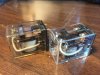
No, it was in the AUX input this time. I was just pressing the tape monitor button(as well as others) as a test to see if it was a source of the issue as one AK member mentioned it could be. Last night I was getting sound from all sources on the selector switch with the button deactivated and when I activated it during the test, all the sound went a way. Also, on the radio inputs I was getting both the DAC signal and a faint radio signal at the same time. I dunno how to better explain the relay... every video and website I've seen just refers to it as a speaker relay. Here's a pic to hopefully help. I'm not sure if these are the exact ones my 2245 uses but they look similar, so the pic will hopefully give you and idea. One of the marantz service videos I watched had a guy use a deoxit soaked biz card to clean the contacts, but I realized in hindsight the thread on AK says specifically NOT to use deoxit there. Hopefully all I did was ruin the relay, which can be replaced and often is vs. cleaning it(cause it's a pain in the ass to get into and hard to clean). Please let me know if you need more clarification and sorry if I'm coming off as a dunce... learning all of this stuff on the fly. Thanks for your help.

relay.jpg
 
Is it possible to post video on here? I feel like that would help as I feel I'm muddying the waters a little trying to explain it in text.
 
I'll try one last time. Can you please just answer the questions so that I can understand where we are at this point?

First, was the DAC plugged into the TAPE input when you noticed the problem with the selector switch? If yes, did you have the tape monitor button activated?

Now that you have the DAC plugged into the AUX input, does the selector switch work correctly (the tape monitor button should NOT be activated)?

One other question...do you understand the function of the tape monitor? If nothing is connected to the TAPE input and it is activated, all you will hear is NOTHING, no matter what source you select. If something is connected to the TAPE input and the monitor function is activated, all you will hear is what is plugged into the TAPE connections....no matter what position the selector switch is in. Let this sink in.

Now, with this understanding, are you still having a problem with the selector switch, or was that problem all due to user error?

I don't need any information more than the specific answers to these specific questions for now.

 
Last edited:
I'll try one last time. Can you please just answer the questions so that I can understand where we are at this point?

First, was the DAC plugged into the TAPE input when you noticed the problem with the selector switch? If yes, did you have the tape monitor button activated?

Now that you have the DAC plugged into the AUX input, does the selector switch work correctly (the tape monitor button should NOT be activated)?

One other question...do you understand the function of the tape monitor? If nothing is connected to the TAPE input and it is activated, all you will hear is NOTHING. If something is connected to the TAPE input and the monitor function is activated, all you will hear is what is plugged into the TAPE connections....no matter what position the selector switch is in. Let this sink in.

Now, with this understanding, are you still having a problem with the selector switch, or was that problem all due to user error?

I don't need any information more than the specific answers to these specific questions for now.

The input I used after the cleaning-when this turned into a problem with the selector switch- was the Aux in. Thank you for clarifying the tape monitor button. That at least explains to this dummy why the sound disappeared when activated.

Now that we got that part clarified, any idea why the sound(from DAC>aux input, not tape) would bleed into the different selections I.e. radio, phone, tape, etc. instead of cutting out like it should when I select other sources other than the aux?
 
Back
Top Bottom