
• The move to the new server is done. There are some software and database maintenance updates in process. This has us passing the hat around to help out. We appreciate any donations. Seriously, even a dollar helps. The payment page may be found here - https://www.audiokarma.org/support.html

My Mysterious 8-Track Deck Has Auto Stop Issues... Maybe

Justin Hogan

New Member
A little while back, I picked up an 8-track deck from a thrift store. It's a Probe(?) DX-5000. I can't find any information on the company that made it, let alone any manuals. This is what it looks like:
20200401_213024.jpg It plays and records fine, and both sound pretty decent for 8-track standards. However, it looks like this deck is supposed to have some sort of auto stop functionality? If so, there are apparently 2 auto stop options. Here's a closer look at the button to switch between them20200401_213047.jpg
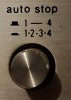
I'm not sure what "1.2.3.4" and "1-------4" are supposed to mean. No matter what position the button is in, auto stop doesn't engage; the tape keeps running in an infinite loop. Any ideas on how to fix?
 
Register to hide this ad
Program 1-4 means, it plays the tape until the last program, then stops. Program 1,2,3,4 means the machine stops at the end of each program.
 
A little while back, I picked up an 8-track deck from a thrift store. It's a Probe(?) DX-5000. I can't find any information on the company that made it, let alone any manuals. This is what it looks like:
View attachment 1814684 It plays and records fine, and both sound pretty decent for 8-track standards. However, it looks like this deck is supposed to have some sort of auto stop functionality? If so, there are apparently 2 auto stop options. Here's a closer look at the button to switch between themView attachment 1814686
I'm not sure what "1.2.3.4" and "1-------4" are supposed to mean. No matter what position the button is in, auto stop doesn't engage; the tape keeps running in an infinite loop. Any ideas on how to fix?

Is your heads, guides, and tape path clean? Is your electrical program sensing switch, clean, and working? Do your Stereo 8 cartridge tapes have good, fresh sensing tape applied with the old removed, good pressure pads making good tape to head contact?
 
The stops are triggered by a conducting piece of tape within the 8-track (loop) tape itself. You might want to clean the heads on the unit (which would include the tape sensor), and even the conducting tape on the 8-track tape itself, it’s usually about 1/2” long and you’ll have to remove the tape from the player at the exact right time in order to access it. You might also just want to try other tapes.

This is the easy test part, if this doesn’t eliminate the problem, the you are likely into electronic component issues (out of spec capacitors, etc). Good luck on your project!
 
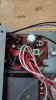
Well, I cleaned the heads and the tape sensor as well as spraying some contact cleaner in the switch. Nothing worked. Then, I decided to follow the wires from the switch to see where they went. They go into a board with a trimpot on it (pictured below). Could said trimpot hold all the answers, or is it for something else?
20200402_101818.jpg
 
Depending on how much time/effort/expense you want to put into this, if I were you, I’d probably start with replacing the ancient capacitors in the board that you have photographed. I’d (personally) be reluctant to mess with the trim pots without the appropriate test equipment/knowledge, in the fear that you might make things worse.

Another thing to check is the physical apparatus that gets triggered to stop the tape at the end of the loop. This would likely be a solenoid that either engages it disengages the play head. There could be an issue there too.

Have you thoroughly cleaned the control pot (behind the knob of the auto stop dial)? If not due this first! Use a good contact cleaner and work the pot aggressively, turning to every possible setting multiple times.
 
Forgot to mention, as you are cleaning the auto stop selector (even if it’s for a second time), thoroughly clean all of the push button stitch contacts as well. The “channel button” on your unit also likely also engages and disengages the movement of the head, and it might be connected in some way to the auto stop switch. Clean them all throughly, as well as any switches that may be triggered (along the physical tape entry path) into the unit.

An amazing amount of this old equipment is found to be disfunctional, simply due to dirty contacts. Clean, clean, clean, and maybe the issue will be resolved. The unit will likely work better overall even if it doesn’t fix the issue you are working on.
 
How many cartridges have you tried?

I’ve reconditioned a lot of 8 track tapes (and that should be done before even inserting one into a deck for the first time) and have periodically found factory splices that no longer conduct. Metalized Mylar was used and sometimes that just plain old wears out.

On occasion, I’ve encountered cartridges where someone used ordinary Scotch tape to fix a splice so will not trigger any track change mechanisms.
 
I've tried three cartridges thus far. None of them auto stop. They still change automatically while running. Or at least it did. I now have another problem: it won't change programs anymore. I took the metal wheel that the belt goes (that also has the capstan) around off so I could clean the heads. When I put it back on, it stopped changing tracks. On the very end of the rod, under the capstan, there's a rubber wheel that goes around with the metal wheel. When I watch it work after I press the program button, the weird-looking white thing will move a little bit so it's up against the rubber wheel, but then the rubber wheel gets stuck and I have to move things with my finger. I've taken things on and off and put them back together in every combination I can think of. How do I fix this issue?
 
Taking another look at things, there's a plastic thing that the rubber goes around. That plastic piece has cracks in many places. Could that be part of the issue?
 
What you describe might be an insurmountable problem.

I was once asked to try fixing an Admiral 8 track receiver belonging to a friend of a friend which too would not change programs. It's change mechanism, I discovered, employed a rubber rimmed wheel driven by the capstain flywheel to accomplish that. In the past, I have managed to get several 8 track machines working but have never before encountered that method of moving the head from program to program.

At the time, it seemed logical that the rubber was slipping so could benefit from the same process I use on turntable idlers. But removing that wheel from the deck caused the plastic material it was made from to just crumble.

If your deck shares the same or similar transport of that Admiral, those cracks you mention may mean that wheel, therefore the transport, is unsalvageable.

Personally, I think the 8 track format is worth pursuing. If it were me, I'd look for a different deck (almost any deck) with a more conventional mechanism. In my case, the ratio was about 25:1. Meaning out of twenty-five 8 track decks that crossed my path, only the one had that rubber tyred wheel. And that included some obscure and department store brands.
 
If it were me, I'd look for a different deck
As chance would have it, I have another 8-track recorder. Unfortunately, it's a crappy Soundesign (model 4669, I think) receiver that has no pause, fast forward, or auto-stop for the 8-track. Also, it doesn't appear to work in stereo. But that one's probably not worth fixing given the brand name, so whatever I guess.
 
Back
Top Bottom