• The move to the new server is done. There are some software and database maintenance updates in process. This has us passing the hat around to help out. We appreciate any donations. Seriously, even a dollar helps. The payment page may be found here - https://www.audiokarma.org/support.html

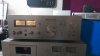
My Pioneer sa 708

ecsora

New Member
Hi,

This is my first post in this forum, my name is Hamza from algeria I am new in the vintage domain.

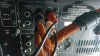
I recently bought a Pioneer SA 708 with the tuner SX608L, when i put the amp function to tuner and the mode to ST (stereo) the two output L/R works fine, but when i switch to AUX from my PC and the mode always on ST only the left output work the right is very very low I tried to switch from ST to MONO and every thing worked fine.

Is it normal or this is an issue of reversed switch in AUX.

thanks for you help.
 

Attachments

  • 16835810_10211526060845440_931286160159314294_o.jpg
    16835810_10211526060845440_931286160159314294_o.jpg
    45.5 KB · Views: 7
Register to hide this ad
Hello....welcome.
This is not normal.
What type of connection is from your PC to the AUX inputs?
You can try another set of inputs on your receiver.
 
Hello Hamza. What kind of cable are you using to make the AUX connection? Sounds like a cable issue, maybe?
 
Hi thanks for your interest to my question, in the picture below you can see the cable that i am using, i used the same cable with my second amp kenwood ka5500 and it work correctly in stereo mode
 

Attachments

  • cable 1.jpg
    cable 1.jpg
    45.6 KB · Views: 18
  • cable.jpg
    cable.jpg
    70.6 KB · Views: 18
  • kenwood.jpg
    kenwood.jpg
    41 KB · Views: 18
Could be a dirty connection on the selector switch. Have you cleaned your internal connections?
 
Hi,
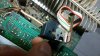
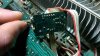
i cleaned the switch with no result, i checked the wires and every thing seams OK
 

Attachments

  • 16934136_10211534621459450_560402248_n.jpg
    16934136_10211534621459450_560402248_n.jpg
    78 KB · Views: 20
  • 16923494_10211534622219469_941393191_n.jpg
    16923494_10211534622219469_941393191_n.jpg
    79.2 KB · Views: 19
  • 16924293_10211534621739457_1696069944_n.jpg
    16924293_10211534621739457_1696069944_n.jpg
    52.2 KB · Views: 19
Try using the tape input or if you have a CD player try that in the aux to see if it's the cable or input.
 
Back
Top Bottom