• The move to the new server is done. There are some software and database maintenance updates in process. This has us passing the hat around to help out. We appreciate any donations. Seriously, even a dollar helps. The payment page may be found here - https://www.audiokarma.org/support.html

NAD 7130, with low cirka 200 hz noice in all channels. Newbie thinks of a rebuild with cherrypicking

Nussemys

New Member
Sorry about my English, Im totally fluent speaking and reading it, but Im not that used to writing in English. Im Swedish by the way. Living in Norway.

Okey. So I got this NAD 7130 for free when I bought a NAD6100 cassette <3 and a NAD5320 CD for 500 NOK (about 60$)

For you it may sound expensive, but Norway is one of the most expensive countries in the world.

Anyway. The seller was unsure that the Amplifier worked and thats why i got it. so i just brought a cheap mid-element with to cabels and connected to try it out. He said that it played so low volyme. But he had muted it, so we laughed a lot about it when we got it to play at "normal" volyme after just the press of a button.

Im in the middle of building a pair of hi-end speakers and really dont have anything to really test the amp on. But I bought this polish column speakers from 1975 earlier that day (the were in really really good shape and 1975 they were the finest ones to get in communistic Poland. 300 Nok (35$) for something they had to drive almost to Ukraine to get for this exchangestudent. And they were reserved for the elite)

Anyway. I digress.

I rigged it all upp and it sounded like **** on low volume because of this somewhat 200 hz noise were in the background. If I pumped up the volume somewhat it disappered because I couldnt hear it.

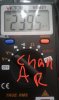
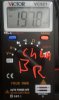
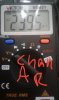
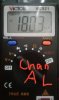
I did a Measuring of the channels A-left A-right B-left and B-right and the following pictures were what i got. They show between 180 and 240 mV. Where is this **** coming from? Is something dead or do i Need to do some soldering?

Here in Norway we have 220 v AC, could it produce the sound the amp is disorting with?

I will later tonight look inside it a bit, but I need your guidance. What should I look after?

Im thinking about if it is the part of the AMP that is Powering the AMP. (dont know the word for it) Could one in someway plugg it out and buy a replacement - OR build a new inplugg for a ADAPTER that does the same thing. No I dont know what kind of adapther that would be and what volt. But would it be possible?

Here in Norway the closed down the FM-net and everything is in DAB right now. Digital Audio Broadcasting.
Could I in someway just cherrypick the NAD effect part - and give it life through a adapter and put it in somekind of other nice casing?

My skills are the one of a guy that is new to all this, but I really know how to build speakers at least.

Whit this i Need ALL help I can get!

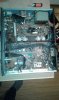
Update tonight when I opened her.
 

Attachments

  • CHANNEL A LEFT.jpg
    CHANNEL A LEFT.jpg
    34.7 KB · Views: 19
  • CHANNEL A RIGHT2.jpg
    CHANNEL A RIGHT2.jpg
    33.7 KB · Views: 17
  • CHANNEL B LEFT.jpg
    CHANNEL B LEFT.jpg
    35.6 KB · Views: 16
  • CHANNEL B RIGHT2.jpg
    CHANNEL B RIGHT2.jpg
    34.9 KB · Views: 15
Register to hide this ad
go to hifiengine and download service manual. start there.

try to isolate noise
1. use portable CD player into AUX play CD, noise/volume OK?
2. at the back, disconnect pre-out jumper from main-in. noise?
3. attach #1's CD to main-in (make sure CD volume LOW)
play CD and increase volume. Noise/volume OK?
4. work the switches (lots of times) - could be "crud" in the signal path.

if no noise @ #2 then its in preamp side. if noise then could be
power supply and/or amp side. (if you have the equipment,
try pre-out to another amp. any noise means pre-amp also
confirms it has problems).

lots of conditions to identify.

post discoveries here with description. BTW nice unit - has MC phono input.
 
Instructions from Bob above are the proper way to narrow down the problem.

Based on my experience with other NAD receivers of a similar design, as well as a few others I have seen here, I'd almost be willing to bet money (almost, I said) that one or both of the 2nd largest capacitors on the main board failed. For your unit, they are C507 and C508, both are 330µF/50V. These filter the output of one of the rectifiers, and when they fail, you get hum. I don't know why they seem to be the most common failure on these NADs, but it seems it is usually them, and not the big power supply caps.

You can have a look at a recent similar case to see if it sounds similar to your case, to see how to verify if these are the culprits (measuring AC voltage across those two caps while the unit is powered up), and how to go about changing them out if they are bad:
http://audiokarma.org/forums/index.php?threads/nad-7220-pe-hum.789532/
As Bob pointed out, you will need the service manual so that you can identify locations of components inside. Most helpful are the Layout diagrams and the schematic diagrams in the manual, which you use in concert with each other.
 
I forgot to add that NADs seem to have solder problems. once you've fixed the problem,
consider resolder/reflowing all the solder joints in the NAD.

good news, no stinking relay that gets its contacts corroded.

and @northpaw is absolutely correct about power supplies. I have 4 NADs on my bench with
3 of them refusing to power up. my wildest guess is its in the power supply - SURPRISE!
 
go to hifiengine and download service manual. start there.

try to isolate noise
1. use portable CD player into AUX play CD, noise/volume OK?
2. at the back, disconnect pre-out jumper from main-in. noise?
3. attach #1's CD to main-in (make sure CD volume LOW)
play CD and increase volume. Noise/volume OK?
4. work the switches (lots of times) - could be "crud" in the signal path.

if no noise @ #2 then its in preamp side. if noise then could be
power supply and/or amp side. (if you have the equipment,
try pre-out to another amp. any noise means pre-amp also
confirms it has problems).

lots of conditions to identify.

post discoveries here with description. BTW nice unit - has MC phono input.

Thanks alot for your quick answer. I have followed your steps but nothing changes the background-noise.

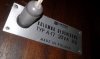
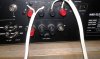
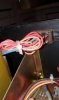
After following these steps I removed the cover for a quick inspection. It all looks alright, but the 4ohm-8ohm-switch on the back of the amp was set on 4 and on the inside it seems a bit rusty.

I then changed the manual screw-locked switch to 8 Ohm and plugged in my Polish speakers for som Händl - Sarabande. And you know what?

It sounded pretty good. At least it sounded better now in 8 ohm. Still this background noice, low around 200 hz something. But its less of it. Less background humming now. But its always there. And the balance-nod inside the volume nod is making scratchy noices.

And one weird thing i Noticed no is that the right side has more power then the left using the balance-nod inside the volume nod. I dont know if it is because of the Polish vintagehipsterspeakers because I dont have anything other to try the balance-nod on right now.

Okey.

Progress so far. A bit lower background 200hznoice with impendance set on 8 Ohm. But I dont know about the amplifier. It is weak. I can give it 100% volume when listen to Händl.. Through the Polish speakers of course, maybe they are rated 20 dB or something :D But still.. It feels week and the left side is weak. Maybe speaker related.
Thanks alot for all your help!
 

Attachments

  • Channel B needs a replacementnod.jpg
    Channel B needs a replacementnod.jpg
    66.2 KB · Views: 16
  • 4-8ohm switch rusty inside case.jpg
    4-8ohm switch rusty inside case.jpg
    38.5 KB · Views: 17
  • Oh yeah 20 VoltAmpere.jpg
    Oh yeah 20 VoltAmpere.jpg
    58.4 KB · Views: 16
  • the 4 metalthingies.jpg
    the 4 metalthingies.jpg
    50.2 KB · Views: 17
  • kondensator touched - crushing of glass was inside topp.jpg
    kondensator touched - crushing of glass was inside topp.jpg
    51 KB · Views: 19
  • can i remove the lower FM-radio-half.jpg
    can i remove the lower FM-radio-half.jpg
    53.8 KB · Views: 19
  • Impendance set on 8OHM!.jpg
    Impendance set on 8OHM!.jpg
    54 KB · Views: 16
Okey, so I measured the Channels after I changed from 4 to 8 Ohm. Can you spot the difference? This is 4 Ohm... 239.5 mV signal when on.. The fffff..
CHANNEL A RIGHT2.jpg

This is Amp at 8 Ohm. It feals almost normal. Is it? Is this normal for a NAD? 18.6 mV...What do you think? And what should I do?
CHANNEL A RIGHT 8 OHM.jpg
 
Also removed the and play music through the main in, But still the noice.
Im gonna start studying the service manual now. So I can decide what to do next.
 
I put back the subwoofer pre - out hooks and I can hear a change in the background sound when ****ing with the hooks..
Maybe it is the preamp? Or the power supply..
 
You seem to have little electrical knowledge So I don't know if you have any soldering skills etc. No shop near you?

https://www.hifiengine.com/manual_library/nad/7130.shtml See page 5 of 25 and test /check /adjustment instruction (very slowly)
see if that affects the offset readings as there is center adjust and idling current adj.

AC is 50hz in Nor. (might read the owners manual and troubleshooting
20hz , Could be a ground loop. Using phono? ground lug. Any crackles when changing selector switch? or knobs turned.
------
Above noted posts for solder and close up pics of board would help us identify caps types for you. If bulged on top then sure a problem, age of unit one thing but Nads are noted for poor caps and consider age. Parts list doesn't identify type like 'es'
 
And the balance-nod inside the volume nod is making scratchy noices.

Between this and the rust you noticed, you will need to treat switches and pots with a cleaner that can also go after the corrosion. DeOxit products are what are commonly used here, and probably available to you. As Bob indicated, working the switches and pots well can help in cleaning them, but a bit of DeOxit added to that can make quite a difference. These kind of problems (oxidation of contacts) can cause scratchiness, low/intermittent/no volume (often in one channel), and could be involved in what you are observing with the 4 vs 8 ohm switch (my understanding is the 4 ohm setting limits some of the power output of the amp to avoid an overload), but are unlikely to be the cause of hum.

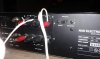
Not a good idea to play with the pre out -- main in jumpers while playing music. Yes, moving them under those conditions will make sounds, including loud hum. With the unit off, you can remove them and inspect to make sure they are not corroded (your photos of the back panel look very good, though), and moving them in and out repeatedly, and using some DeOxit, can help wipe the jacks as well.

You can switch your speaker connections left-for-right. If the low output stays with the speaker, it is the speaker. If you speakers are iffy, you can switch to headphones if you have a pair.

The crackling you heard when pressing the top of the large power supply cap (is that correct?), might be nothing or might indicate internal problems with that cap. You should measure the AC volts across those caps, as detailed in the other thread I provided a link for. That is the simplest way to check their health and operation.

I'm not sure what you are measuring, but if it is AC volts on the speaker outputs, I don't think there is much diagnostic value in that. Once you get the hum issue resolved, the DC offset (or centering) and the Idle adjustments (in the manual, as Bink indicates) should be made, but those are both DC volts measurements.
 
You seem to have little electrical knowledge So I don't know if you have any soldering skills etc. No shop near you?

https://www.hifiengine.com/manual_library/nad/7130.shtml See page 5 of 25 and test /check /adjustment instruction (very slowly)
see if that affects the offset readings as there is center adjust and idling current adj.

AC is 50hz in Nor. (might read the owners manual and troubleshooting
20hz , Could be a ground loop. Using phono? ground lug. Any crackles when changing selector switch? or knobs turned.
------
Above noted posts for solder and close up pics of board would help us identify caps types for you. If bulged on top then sure a problem, age of unit one thing but Nads are noted for poor caps and consider age. Parts list doesn't identify type like 'es'
I have some experience of soldering but little electrical knowledge. The biggest caps have somewhat bulged tops. I will give you highq pics of caps tomorrow and also flip this baby and look at the soldering. None of the switches or nods have any problems. Only balancenod inside volume seem to give more power to right channel.

I will now read manuals and look at similar threads.

Thx you guys for all the help. Do you know were to buy spareparts. the powerbutton for this baby is missing. The classic Green one.

I got a great dealer on high quality caps so replacement wouldn't be a problem.

But there is a crack in the front and im speculating about removal of the FMradio part and replacement of the power supply with rebuilding of it so you can use a regular adapther for power and then putting everything in a new suiting chassi.. maybe just a stupid idea. I could just buy a couple quad405s.

What's your opinion guys?
 
Those capacitors are not bulging. They have a plastic cap on top being held on by the outer wrap. Underneath, they are a metal can. Now if you were to remove the outer plastic and the can is actually bulging, then you have a cap that has been overheated and needs to be changed before it vents or goes bad completely.

It probably wouldn't hurt to recap it but isn't this amp too new to really warrant it? You can check capacitors with a capacitor checker but if you are not too experienced with doing this, then have someone else do it for you.

It is also a great idea to redo or reflow ALL solder joints especially if they look dull and grey instead of shiny and silver.
 
Those capacitors are not bulging. They have a plastic cap on top being held on by the outer wrap. Underneath, they are a metal can. Now if you were to remove the outer plastic and the can is actually bulging, then you have a cap that has been overheated and needs to be changed before it vents or goes bad completely.

It probably wouldn't hurt to recap it but isn't this amp too new to really warrant it? You can check capacitors with a capacitor checker but if you are not too experienced with doing this, then have someone else do it for you.

It is also a great idea to redo or reflow ALL solder joints especially if they look dull and grey instead of shiny and silver.
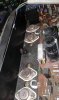
I will. And I will replace caps that look sketchy. I can solder and use a multimeter. Somebody mentioned corrosion. I will try to fix that as well.. But my fealing is that the amp sound week. Maybe some of the four metal transistors are bad..
 
Instructions from Bob above are the proper way to narrow down the problem.

Based on my experience with other NAD receivers of a similar design, as well as a few others I have seen here, I'd almost be willing to bet money (almost, I said) that one or both of the 2nd largest capacitors on the main board failed. For your unit, they are C507 and C508, both are 330µF/50V. These filter the output of one of the rectifiers, and when they fail, you get hum. I don't know why they seem to be the most common failure on these NADs, but it seems it is usually them, and not the big power supply caps.

You can have a look at a recent similar case to see if it sounds similar to your case, to see how to verify if these are the culprits (measuring AC voltage across those two caps while the unit is powered up), and how to go about changing them out if they are bad:
http://audiokarma.org/forums/index.php?threads/nad-7220-pe-hum.789532/
As Bob pointed out, you will need the service manual so that you can identify locations of components inside. Most helpful are the Layout diagrams and the schematic diagrams in the manual, which you use in concert with each other.

Hello Guys and Gals .
i know the Post is a few years old .
I have fixed a lot of old and ancient NAD's up here in Norway and i must concur with what that has been written here.

The filtering CAPS for the "pre/driver" side is 99% of the time the culprit for low freq Hum.

Have a Great summer

-- Lars
 
Glad to hear that you are able to confirm my suspicions through your more extensive repair experience with these units.

Welcome to AK.
 
Back
Top Bottom