
• The move to the new server is done. There are some software and database maintenance updates in process. This has us passing the hat around to help out. We appreciate any donations. Seriously, even a dollar helps. The payment page may be found here - https://www.audiokarma.org/support.html

NAD C316Bee Left Channel (speaker out) Dead

grbr

New Member
Hi, I wonder if anyone can help me. I have a Nad C316bee, suddenly the left channel stopped working. On all inputs. But the headphone out works on both channels. Ive opened it up and had a quick look around (just the top cover), nothing looks untoward to my untrained eye. I should also add that I have have swapped left and right channels to eliminate speaker/cable problems etc.
Any help is greatly appreciated.

Thanks, Greg
 
Register to hide this ad
Hi!
If you have music on phones that means that both of the left and right power amp are working!
so the only thing between the headphones and the outputs is the relay RL301!
So the relay need to be cleaned or best to be changed!
also you cand crank up the volume and see if the chanel will come back!
 
Hi!
If you have music on phones that means that both of the left and right power amp are working!
so the only thing between the headphones and the outputs is the relay RL301!
So the relay need to be cleaned or best to be changed!
also you cand crank up the volume and see if the chanel will come back!
Hello dimanag! I was hoping it would be something like that... I'll give cleaning it a go, and see if that helps. If not then I guess replace that relay! Will see if I can locate it, if not I'll be back here for help! Thanks!
 
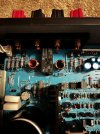
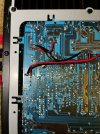
Cranking it didn't help - still nothing. Opened it up cleaned around RL301, and on the underside... Not sure if it looked dodgy or not. What do you think?IMG_3096.jpgIMG_3098.jpg
 
I gave it a clean with IPA - no luck. Still only right channel working... But headphones fine. Perhaps there could be a cold solder joint? There is some suspicious looking solder and discolouration around those red and black wires - Red speaker left and black speaker left. Is that normal?

Is it possible to open this particular relay without desoldering?
 
Last edited:
Turn it on, be careful. Tap on the relay with something that won't short anything if you accidentally drop it in there, to see if the dead channel stars to work.

If it starts to work, your relay needs to be replaced. Cleaning it is only a temporary fix.
 
Hi again!
I don't see anything obviusly wrong with the black and red wires! also maybe some solder joins are not the best but you have sound on the phone witch , as i say before, they are directly to the output of the amplifier module!
So yes the solder joins are not look the best but it is not the problem for now!
From the picture i can't tell if you can open the relay or not!
And the contacts on the pcb are covered with the black/red wires so i can't tell

Also you can short the coresponding pins on the relay for this channel and see if you have sound! This will confirm that your relay is bad!
Please do this only if you confortable with and extremely carefull not to short something else!
 
Hi, I wonder if anyone can help me. I have a Nad C316bee, suddenly the left channel stopped working. On all inputs. But the headphone out works on both channels. Ive opened it up and had a quick look around (just the top cover), nothing looks untoward to my untrained eye. I should also add that I have have swapped left and right channels to eliminate speaker/cable problems etc.
Any help is greatly appreciated.

Thanks, Greg
Greg, welcome to AK!

Agree with all who posted that it has to be the relay. No idea of you skill level, but you can try to reflow the solder joints on the relay. But it most likely needs to be replaced.

Do a search for JQX-115/F24 relay.
 
Hi kwayde, tried as per your suggestion. Tapped it a few times while turned on. Nothing.
Hi there GRBR,

I was wondering if you managed to get this problem sorted. I have exactly the same problem. I want to replace the relay but am finding it extremely hard to track down a replacement as so many companies are saying they dont have one.

Cheers
 
AH ha and did this one work alright in your Amp, everything working? Did it have the correct number of pins or did you have to cut off two of them?
Cheers
 
ah ha sorry, I got confused. I thought that was the part that you had used to replace your faulty one.

Thanks though, ill get it ordered All the best
 
Back
Top Bottom