• The move to the new server is done. There are some software and database maintenance updates in process. This has us passing the hat around to help out. We appreciate any donations. Seriously, even a dollar helps. The payment page may be found here - https://www.audiokarma.org/support.html

Need help diagnosing an SR-303 Reverb

jcnash

BUSTED!!
Hello Pioneer AK

I finally found some time to open up my non-working SR-303 Reverb to see whats up. The unit powers up (pilot LED above the power switch lights up) but nothing on the green scope display.

Took some voltage readings off the pins and based on suggestions from another thread on this forum, I replaced the main power supply filter capacitors (C41, C42, C43, C44, C45, C46) with appropriate replacements hoping that this would fix the issue but no luck.

I think Ive reached the depth of my knowledge in terms of diagnosing this issue, so hoping the AK gurus like @markthefixer will help out. Here are the voltage readings after replacing the filter caps:

Pin #: Voltage
1: 0
2: 13.9mV
3: 31.39V
4: 0.6mV
5: 31.37V
6: 31.34V
7: 31.35V
8: 31.37V
TP2: 0
TP3: 0
TP4: 14.9V
TP5: -14.7V
 
Register to hide this ad
Been doing some more research and found that there are multiple versions of the SR-303 main board. The version Im dealing with is the GWM-133-O.

Thoughts on finding the culprit component anyone?
 
Hi Mark,

Thanks for chiming in, and great to be back in touch after all these years! Hope you're doing well.

So I did some testing on the SR-303 based on your comment. SURPRISE SURPRISE the scope display lights up and bounces with the music as it should as soon as I apply an audio signal to the unit. Audio output is also fine with the reverb effect as expected.

Strangely though, when I turn the 'Depth' control on the reverb unit down to ~2 on the scale, the entire display turns off even though the audio signal continues to be output as expected. When these units are powered up without an audio signal being applied, only the inner-most layer of the concentric scope display lights up. The outer layers only light up as the strength of the input signal increases.

I think whats going on here is that the circuit powering the inner-most layer of the display is malfunctioning causing it to not light up when powered on but when a strong audio signal is applied, the outer layers kick-in and light up.

Thoughts?

Based on my rudimentary analysis of the schematic and kindergarten style pattern recognition, seems like the voltage on Pin 4 (0.6mV) should be higher - no idea which component might be causing it though...or alternatively, the bulb powering the inner-most layer of the display is toast.

Appreciate your input / suggestions.
 
first I would check the bulb (actually there are TWO bulbs) of the inner-most layer.. probably PL5 & PL6.

Does the power on the (two!!) bulb layer work - it is a constant on while power is present. +30v to ground. PL7 & PL8.

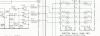
The circuit for illuminating the layers is extremely small:
The DC level at the emitter of Q23 determines which of the three are on:
PL5 & PL6 come on at about 1.6 volts
PL3 & PL4 come on at about 2.46 volts
PL1 & PL2 come on at about 3.4 volts.
all bulbs are run by 30v raw dc.
a open bulb will not read 30v at pin 5, or pin 6, or pin 7.

upload_2023-3-2_12-12-33.png
 
Hi Mark,

Your previous post sent me down a rabbit hole. Did a bunch of digging and testing...and you were right...it was the PL7 bulb that was blown causing the PL8 bulb to stop working as well since they are wired in series.

Once I knew the source of the issue, I did some searching on the forum and found a bunch of other threads with the same issue...seems like a common problem on the SR-303 especially for the 'always on' pair of bulbs.

In particular, I found this thread that you had contributed to back in 2016 and user @1TUFSS replaced the bulbs with blue LEDs. I think I might give that a try. Will post back with the results and maybe even a guided picture tutorial on how to do this LED conversion if it all works out.

Thanks much for your help in pointing me in the right direction!
 
Back
Top Bottom