

You are using an out of date browser. It may not display this or other websites correctly.
You should upgrade or use an alternative browser.
You should upgrade or use an alternative browser.
Now, for my next trick
- Thread starter BadassBob
- Start date
Thanks. Figured it out eventually.
I have it up and running!! Once Squeezeslave was installed, I could stream Pandora with no problem. It's running into my TV now from the HDMI cable. Maybe my ears are shot, but it sounds pretty decent for a TV!
Two more questions:
-- How do I get the sound from the HDMI cable to my stereo. I have an ODAC. My brute force solution would be to unplug the HDMI cable, plug the ODAC into a spare USB port on my powered hub and connect the ODAC to my amplifer. Will that work, or do I need to do something else?
-- Any idea how to get it to work with a wifi adapter? I have one of the edamax dongles. MrEngman's script worked great for Raspian, but I'm a little leery to try it on this OS.
I guess one more: Did you find it more advantageous to run the DarkBasic OS? This seems pretty straightforward to me. Curious as to why you went the extra mile.
Thanks for all the help.
Jack
I have it up and running!! Once Squeezeslave was installed, I could stream Pandora with no problem. It's running into my TV now from the HDMI cable. Maybe my ears are shot, but it sounds pretty decent for a TV!
Two more questions:
-- How do I get the sound from the HDMI cable to my stereo. I have an ODAC. My brute force solution would be to unplug the HDMI cable, plug the ODAC into a spare USB port on my powered hub and connect the ODAC to my amplifer. Will that work, or do I need to do something else?
-- Any idea how to get it to work with a wifi adapter? I have one of the edamax dongles. MrEngman's script worked great for Raspian, but I'm a little leery to try it on this OS.
I guess one more: Did you find it more advantageous to run the DarkBasic OS? This seems pretty straightforward to me. Curious as to why you went the extra mile.
Thanks for all the help.
Jack

ldatlof
We are all steak
That should work. That is how I got output to my stereoThanks. Figured it out eventually.
I have it up and running!! Once Squeezeslave was installed, I could stream Pandora with no problem. It's running into my TV now from the HDMI cable. Maybe my ears are shot, but it sounds pretty decent for a TV!
Two more questions:
-- How do I get the sound from the HDMI cable to my stereo. I have an ODAC. My brute force solution would be to unplug the HDMI cable, plug the ODAC into a spare USB port on my powered hub and connect the ODAC to my amplifer. Will that work, or do I need to do something else?
Just plug it in an go for it. You'll probably need to just download the correct driver.-- Any idea how to get it to work with a wifi adapter? I have one of the edamax dongles. MrEngman's script worked great for Raspian, but I'm a little leery to try it on this OS.
I found no advantages to Dark Basic and had to download a couple of utilities to get it to work properly.I guess one more: Did you find it more advantageous to run the DarkBasic OS? This seems pretty straightforward to me. Curious as to why you went the extra mile.
Thanks for all the help.
Jack

BadassBob
Digitally rendered
Well, here we are a few months down the line, and the RPi has been the perfect Squeezebox replacement since I started using it full time a few months ago. A couple of things I discovered really got me off and running. First off, was the power supply. If youre not running a powered hub, you will need something more beefy than a 5V 1a power supply, especially with a wifi adapter. Being one who doesnt like clutter, I omitted the powered hub. Instead, I purchased a 5.2V 2a HP Touchpad power supply. Theyre relatively cheap, and readily available on eBay for $10 to $15. The beefier power supply resolved all of the intermittent boot issues I was having. When I ran on 10/100, the smaller power supply worked fine, but add wifi to the mix, and having to power that radio plus a USB transport, the extra juice really helps.
The other issue I was having involved hiccups in my audio stream. After messing around with various network settings and still having the hiccups, I bought a cheap N150 wifi adapter to see if it would be of any difference. I needed one anyway, as Im moving soon and my main system will be away from the router. On eBay, I ended up buying an adapter with the Realtek RTL8188CUS chipset. Most wifi adapters sold for the RPi use this chipset, but some retailers mark them up based on RPi compatibility alone. I bought mine for a whole $7 shipped, while many of the hobby electronics outlets sell them for $12 to $20. Once I set up the wifi adapter, the hiccups were nearly non-existent. I get one once every month or so, thats way beyond tolerable for me.
I also ended up getting a DAC for the RPi, the HiFimeDIY Sabre DAC, it can also be used as a USB to S/PDIF converter, which I implement to use my Benchmark DAC1. Found inside is the same Tenor TE2022L/Sabre ES9023 combo found in the Objective DAC (ODAC). That being said, the HiFimeDIY unit is 24/96 capable, however I havent tried it with high resolution tracks as of yet. Running the optical out to my Benchmark DAC1 is a noticeable improvement over the optical out on my Squeezebox Duet, everything seems more focused than the former. The analog-out on the DAC is very good yet, but not up to that of my Benchmark. This unit would also be good for somebody looking to upgrade the sound on their PC cheap.
Lastly, although not plug and play, it is a cheaper and better sounding alternative to the Squeezebox. Total cost on mine, as shown was ~$150. That includes the RPi, steel case, wifi adapter, DAC, 8GB SD card, and the Touchpad power supply. The best part is, it all functions exactly like a Squeezebox. Aside from Raspbian, Im also running Squeezelite, which is a Squeezebox emulator for ARM and x86/64 architectures. It runs in the background on boot, and shows up in LMS just as another Squeezebox. I run MOG, Pandora, and play all of my music just as I always did. While not for the faint of heart, this wasnt overly difficult to set up, and I feel even a rather new-ish Linux user could have it up in short order. Ive found the Raspberry Pi to be a well worthy replacement of the venerable Squeezebox.
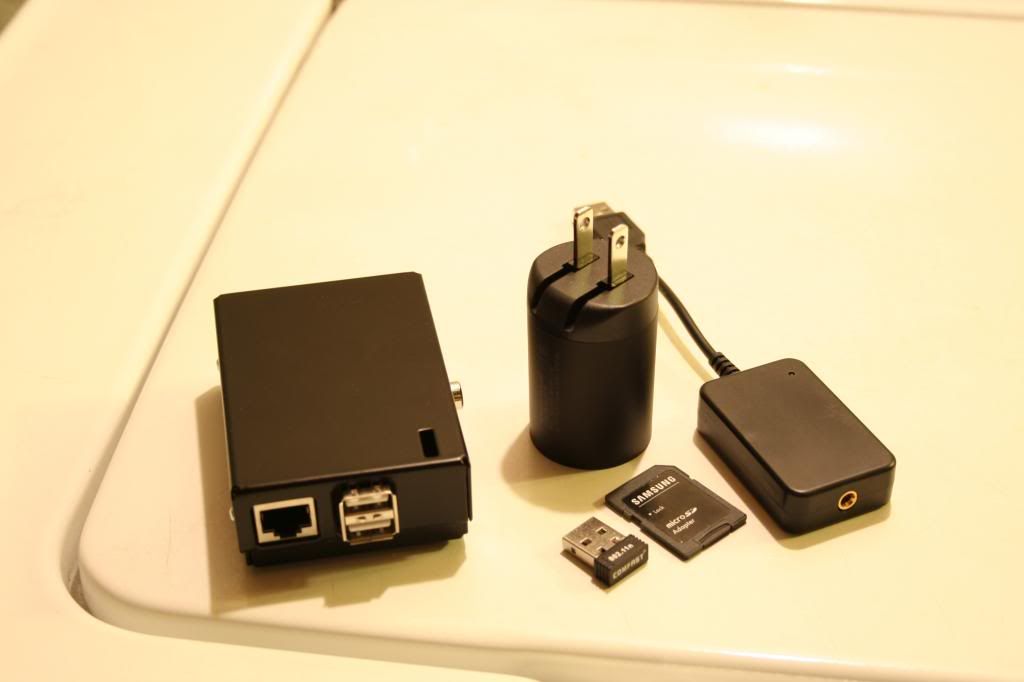
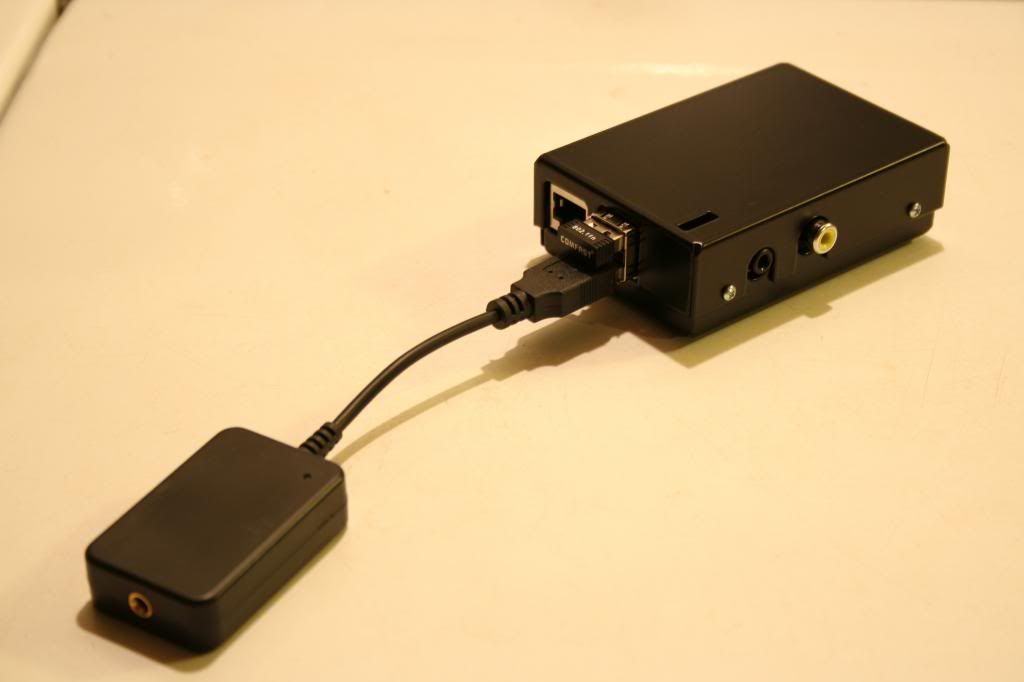
The other issue I was having involved hiccups in my audio stream. After messing around with various network settings and still having the hiccups, I bought a cheap N150 wifi adapter to see if it would be of any difference. I needed one anyway, as Im moving soon and my main system will be away from the router. On eBay, I ended up buying an adapter with the Realtek RTL8188CUS chipset. Most wifi adapters sold for the RPi use this chipset, but some retailers mark them up based on RPi compatibility alone. I bought mine for a whole $7 shipped, while many of the hobby electronics outlets sell them for $12 to $20. Once I set up the wifi adapter, the hiccups were nearly non-existent. I get one once every month or so, thats way beyond tolerable for me.
I also ended up getting a DAC for the RPi, the HiFimeDIY Sabre DAC, it can also be used as a USB to S/PDIF converter, which I implement to use my Benchmark DAC1. Found inside is the same Tenor TE2022L/Sabre ES9023 combo found in the Objective DAC (ODAC). That being said, the HiFimeDIY unit is 24/96 capable, however I havent tried it with high resolution tracks as of yet. Running the optical out to my Benchmark DAC1 is a noticeable improvement over the optical out on my Squeezebox Duet, everything seems more focused than the former. The analog-out on the DAC is very good yet, but not up to that of my Benchmark. This unit would also be good for somebody looking to upgrade the sound on their PC cheap.
Lastly, although not plug and play, it is a cheaper and better sounding alternative to the Squeezebox. Total cost on mine, as shown was ~$150. That includes the RPi, steel case, wifi adapter, DAC, 8GB SD card, and the Touchpad power supply. The best part is, it all functions exactly like a Squeezebox. Aside from Raspbian, Im also running Squeezelite, which is a Squeezebox emulator for ARM and x86/64 architectures. It runs in the background on boot, and shows up in LMS just as another Squeezebox. I run MOG, Pandora, and play all of my music just as I always did. While not for the faint of heart, this wasnt overly difficult to set up, and I feel even a rather new-ish Linux user could have it up in short order. Ive found the Raspberry Pi to be a well worthy replacement of the venerable Squeezebox.
Last edited:

JimmyNeutron
Super Member
Now that is too cool!
How does it sound? Done any critical listening yet?
Jimmy
How does it sound? Done any critical listening yet?
Jimmy
BadassBob
Digitally rendered
I have, and while not a night and day difference, there definitely is one. The Benchmark DAC1 is notoriously picky about sources. Even though it supposedly corrects jitter, its still very much garbage-in/garbage-out. The only thing I can attribute to the better sound would be the USB transport having less jitter than the Squeezebox Duet. It definitely sounds more focused, and a hair smoother. For the total amount I have vested into it, its functionally superior to my Squeezebox Duet, for a lot less scratch :yes:
ldatlof
We are all steak
I am running squeezelite on a RPi and on a laptop and both work very well. Just like regular squeezeboxes really.  It is a cheaper and worthy successor to the squeezebox line of players.
Squeezelite is also more like the Touch than the Duet because it can play 196/24 bit files. I think the duet is limited to 96/24.
Like BadAssBob said the power supply is very important. Luckily I bought the robust power supply the first time. I got a wireless USB dongle on ebay for $5. It uses a Ralink RT5370 chipset. I bought a plastic see through case for $10 which replaced the original case ($18) that the kiddies broke. I use a 4gb class 10 SD card.
The RPi is hooked up to a receiver in my son's room via HDMI.
I am fairly new to linux so I think almost any one can set it up. :thmbsp:
It is a cheaper and worthy successor to the squeezebox line of players.Squeezelite is also more like the Touch than the Duet because it can play 196/24 bit files. I think the duet is limited to 96/24.
Like BadAssBob said the power supply is very important. Luckily I bought the robust power supply the first time. I got a wireless USB dongle on ebay for $5. It uses a Ralink RT5370 chipset. I bought a plastic see through case for $10 which replaced the original case ($18) that the kiddies broke. I use a 4gb class 10 SD card.
The RPi is hooked up to a receiver in my son's room via HDMI.
I am fairly new to linux so I think almost any one can set it up. :thmbsp:
BadassBob
Digitally rendered
Squeezelite is also more like the Touch than the Duet because it can play 196/24 bit files. I think the duet is limited to 96/24.
The Duet will do 24/96 on the analog-out only, if youre running digital out, youre limited to 24/48. The Touch will do 24/96 via analog or digital :thmbsp:

Thanks for the thread Badassbob! I have been interested in doing this since reading your posts.
I haven't used a squeezebox device in the past so I wanted to play around with it. Mainly to see the interface and see how I liked it.
I wanted to end up running squeezelite on the RPi and have it access the music files on my NAS device with no other hardware besides a DAC. Here's what I encountered.
1. Ran squeezelite on my linux laptop. Everything up and running.
2. Ran a squeezebox controller on my android and apple devices. All said that it couldn't find the player.
3. Did some research and found that there's music server software from Logitech. Ran it on a windows box on my network.
4. Fired up the controller app and it found the player on my linux laptop and played my music files from the NAS on the laptop. :thmbsp:
My question:
Do I have to run the music server software on a separate computer that has to be on all the time or can the RPi handle running the music server software too? I saw that there's a port to linux for the music server software.
Thanks to everyone who contributed to this! Very exciting to see the many uses for the Pi
I haven't used a squeezebox device in the past so I wanted to play around with it. Mainly to see the interface and see how I liked it.
I wanted to end up running squeezelite on the RPi and have it access the music files on my NAS device with no other hardware besides a DAC. Here's what I encountered.
1. Ran squeezelite on my linux laptop. Everything up and running.
2. Ran a squeezebox controller on my android and apple devices. All said that it couldn't find the player.
3. Did some research and found that there's music server software from Logitech. Ran it on a windows box on my network.
4. Fired up the controller app and it found the player on my linux laptop and played my music files from the NAS on the laptop. :thmbsp:
My question:
Do I have to run the music server software on a separate computer that has to be on all the time or can the RPi handle running the music server software too? I saw that there's a port to linux for the music server software.
Thanks to everyone who contributed to this! Very exciting to see the many uses for the Pi
BadassBob
Digitally rendered
Thanks for the thread Badassbob! I have been interested in doing this since reading your posts.
I haven't used a squeezebox device in the past so I wanted to play around with it. Mainly to see the interface and see how I liked it.
I wanted to end up running squeezelite on the RPi and have it access the music files on my NAS device with no other hardware besides a DAC. Here's what I encountered.
1. Ran squeezelite on my linux laptop. Everything up and running.
2. Ran a squeezebox controller on my android and apple devices. All said that it couldn't find the player.
3. Did some research and found that there's music server software from Logitech. Ran it on a windows box on my network.
4. Fired up the controller app and it found the player on my linux laptop and played my music files from the NAS on the laptop. :thmbsp:
My question:
Do I have to run the music server software on a separate computer that has to be on all the time or can the RPi handle running the music server software too? I saw that there's a port to linux for the music server software.
Thanks to everyone who contributed to this! Very exciting to see the many uses for the Pi
You can run both LMS and Squeezelite on the same RPi unit simultaneously. The main issue you will have is the amount of USB ports, which can be remedied by a powered USB hub. Im not sure how well 24/96 audio would work with so many USB devices, as the ethernet on the RPi is shared with the USB. To complicate things even more, the total throughput on the RPi USB bus is about 80Mb (megabits) per second, or 10MB (megabytes), so you may have trouble playing high resolution audio files with so many devices connected. Running only Squeezelite on my Pi, I only see about 5% to 7% CPU usage while playing music, and about 30MB of RAM.
Last edited:
Thanks again BA-Bob!
I'm confused why the number of USB ports would be different with this configuration - but I haven't tried running the server and player together.
I thought the hardware would be the same for both. One USB port for the DAC and one for the WiFi connection. Do I have to have two network interfaces if I run LMS and the player together? Do they have to be on different IP addys?
I'm confused why the number of USB ports would be different with this configuration - but I haven't tried running the server and player together.
I thought the hardware would be the same for both. One USB port for the DAC and one for the WiFi connection. Do I have to have two network interfaces if I run LMS and the player together? Do they have to be on different IP addys?
BadassBob
Digitally rendered
Thanks again BA-Bob!
I'm confused why the number of USB ports would be different with this configuration - but I haven't tried running the server and player together.
I thought the hardware would be the same for both. One USB port for the DAC and one for the WiFi connection. Do I have to have two network interfaces if I run LMS and the player together? Do they have to be on different IP addys?
If you dont store the music on a USB hard drive, you will have to store it on the SD card. You could also set up a NFS share from another system and use that while running LMS from the Pi. If you go the NFS route, you may as well just use the NFS host as the server. Lots of ways to skin a cat

Ahh... that explains it. Where the music is stored is on the NAS device. It provides an SMB based mount point I believe. It stays on at all times so that storage is available to all devices on the network. What I was trying to accomplish was having it serve up the files since it's always on.
I know my SMB mounts are available on my linux boxes.
So I should be able to have the SMB mount available to the RPi and run the server and player on the RPi as well, with one network interface. If I'm following things correctly.
Do you see any throughput issues with this configuration? Either on the USB, CPU or network side...
Side question... my NAS device has the ability to run an iTunes server built-in. I've used it just to test functionality but really only use iTunes for syncing with devices not for listening. I saw in the LMS software a check box for "use iTunes"... didn't do any research into it, just unchecked it. Could my iTunes server on the NAS be used to feed the LMS software? Any gotchas there? I'm thinking that could make the NAS become the bottleneck in the whole architecture.
I know my SMB mounts are available on my linux boxes.
So I should be able to have the SMB mount available to the RPi and run the server and player on the RPi as well, with one network interface. If I'm following things correctly.
Do you see any throughput issues with this configuration? Either on the USB, CPU or network side...
Side question... my NAS device has the ability to run an iTunes server built-in. I've used it just to test functionality but really only use iTunes for syncing with devices not for listening. I saw in the LMS software a check box for "use iTunes"... didn't do any research into it, just unchecked it. Could my iTunes server on the NAS be used to feed the LMS software? Any gotchas there? I'm thinking that could make the NAS become the bottleneck in the whole architecture.
Last edited:
Have you considered running NFS instead of SMB? Its incredibly easy to set up, and provides performance thats about 25% faster than SMB.
I'm not 100% sure it's doing SMB... I set up the mounts years ago when I first got it. The device is a D-Link product. Here's a link to the product on D-Link's web site:
http://www.dlink.com/us/en/support/product/dns-343-sharecenter-4-bay-network-storage-enclosure
I see that it does support NFS and that might be how I configured it. I did get it working and playing a FLAC files that I had stored on the NAS. I didn't play them very long... maybe an hour or so but there were no hiccups that I could hear. This was more of a proof of concept trying to use squeezelite without a dedicated computer for the server software. That worked great and the sound quality sounded good. I'm sure something other than SMB (if that's what I'm using now - I've been trying to remember what I did... it might be CIFS but of course that uses the SMB protocol) would provide better performance and would probably be required for hi-def tracks.
In the end I didn't care for the UI and I definitely need to clean up duplicate files before implementing something like this.

marantzfan
...
I'm really considering building one (and if it works well, two more) of these to replace my squeezebox touch.
I have built a vortexbox out of an old PC I had laying around and would like to use one of these to stream files from the vortexbox to my system.
I'm not very good with Linux though, so this would be a big learning experience but I'm not afraid to jump in and give it a shot if I can lean on you guys a little bit.
I have built a vortexbox out of an old PC I had laying around and would like to use one of these to stream files from the vortexbox to my system.
I'm not very good with Linux though, so this would be a big learning experience but I'm not afraid to jump in and give it a shot if I can lean on you guys a little bit.
BadassBob
Digitally rendered
I'm really considering building one (and if it works well, two more) of these to replace my squeezebox touch.
I have built a vortexbox out of an old PC I had laying around and would like to use one of these to stream files from the vortexbox to my system.
I'm not very good with Linux though, so this would be a big learning experience but I'm not afraid to jump in and give it a shot if I can lean on you guys a little bit.
If you run into any troubles or just have general questions, you know where to find me
:yes:
I'm really considering building one (and if it works well, two more) of these to replace my squeezebox touch.
I have built a vortexbox out of an old PC I had laying around and would like to use one of these to stream files from the vortexbox to my system.
I'm not very good with Linux though, so this would be a big learning experience but I'm not afraid to jump in and give it a shot if I can lean on you guys a little bit.
Like Bob sez... we're happy to help you out.
I just built one last week. I'm going to be posting detailed instructions with scripts, photos (of course!!) etc. in a few days. Bob's instructions on here were great. Really made getting everything running very easy. The only install hurdle I ran into was that the Raspberry Pi that's available now is revision 2 with a new chip. The raspbian distro linked to earlier in this thread won't work with the new Pi. It won't boot with the older image. It was easy to resolve after I did an internet search with my symptoms. If you only get a power light (no ACT light) then the image isn't bootable for some reason.
The only playback issue I've had to date is when the player is first used in the morning it doesn't play but produces a terrible stuttering, electronic noise. It was referenced in an earlier post on here I think. Anyway... for now I've gotten around it by restarting the squeezelite daemon on the Pi every morning. This morning when I used the Pi it played fine. I'm going to wait a few days before I declare success and post all the details on here.
In the meantime I'll PM you with contact info in case you get stuck.
I think you're going to love it!! :yes: :thmbsp: :yes: