


Wolfwood
In the Valley of the Sun
For the last few weeks , I have been experimenting with the " Auto - Setup " function ( on my Yamaha RX - v2500 ) via the Opitimizing Microphone that came with the receiver. I have owned this receiver for almost a year now, and before this , I had its little brother ( the Yamaha RX - v2400 ). Until now, I havent spent much time taking advantage of the RX - v2500's real potential !
To start off , I love this receiver. I could spend hours explaining why, but Ill just take a few moments to explain some of the features that are first's and favorites for me.
1. - On Screen Menu
2. - (dare i say it) 7 Channel Stereo
3. - Pure Direct* 2 Channel Stereo
4. - Automatic Room Calibration via Optimizer Microphone
The journey began when I plugged an video cable from the " Monitor " out to my T.V. Upon pressing the Menu button on the remote, a lovely background screen pops up on the T.V. as well as a menu screen. Avoiding all the other options at the moment, I select " Auto Setup " . You have a menu that lets you choose what exactly you want the optimizer to configure. The list goes as follows
- Wiring , Distance, Size , Equalizing and Level
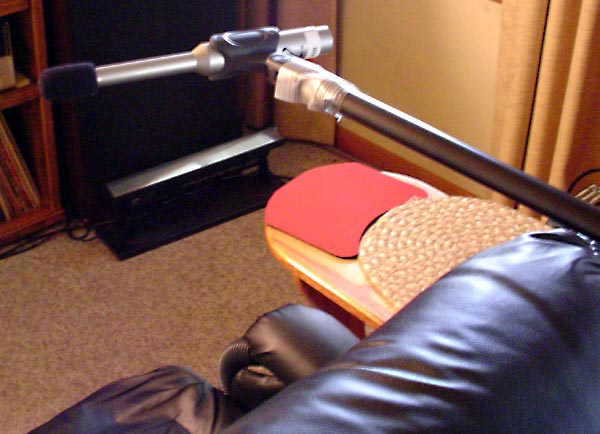
I select all of the above and press " Start " which wouldve activated the optimizer process, but we forgot one vital thing, the mic ! After plugging the mic in I was trying to figure out what to set the mic on, and stumbled upon the perfect solution. A standard camera tripod , which happens to screw into the bottom of the microphone !! Setting the tripod on my usual listening position, I level out the Micrphone to where my head sits and declared the whole house silent as I press the " Start " option !
During the Distance , Size and Level portions of the setup , you hear some scary sounds , but you press on ! Given everything went ok during the setup, a screen pops up displaying which speakers are in normal phase or reverse phase. Oddly enough, the manual states that the process might say that your speakers are in Reverse Phase , when they actually might not be ( which is usally the case ). The next screen is really cool ... It actually shows you a graph of each speakers response( at least thats what I believe it is ) It doesnt really explain on the menu screen. Moving on to the next screen reveals the distance of your speakers from the microphone, Immediately followed by a screen that reveals each speakers level tweaking. Example : Front Left + 0.5 db / Surround Right - 1.0
With the setup complete, you test out the new configuration with one of your favorite songs... and WOW! What a difference it makes in sound. I was enveloped in a totally new world. A much more open and round soundstage. It revealed that my previous ( manual ) tweaking made my setup sound very condensed and boxed up, like my listening space was a box ( which it is ). As if I could close my eyes and pick out where each speaker was located. I close my eyes now and its all vanished ! Where did you go speakers !? I also can describe it as , the point of origin of the sound extends out beyond where my speakers physically are. Imaging isnt like a laser anymore. My room is meager at best- 12' x 15' but I can still move around quite a bit without losing the sweet spot
I would rabble on but this post is growing rather long ! So my point is , what are your opinions and experiences with using room calibrating microphones !? Have I been missing out on a well known gem or what !?
- Wolfwood
To start off , I love this receiver. I could spend hours explaining why, but Ill just take a few moments to explain some of the features that are first's and favorites for me.
1. - On Screen Menu
2. - (dare i say it) 7 Channel Stereo
3. - Pure Direct* 2 Channel Stereo
4. - Automatic Room Calibration via Optimizer Microphone
The journey began when I plugged an video cable from the " Monitor " out to my T.V. Upon pressing the Menu button on the remote, a lovely background screen pops up on the T.V. as well as a menu screen. Avoiding all the other options at the moment, I select " Auto Setup " . You have a menu that lets you choose what exactly you want the optimizer to configure. The list goes as follows
- Wiring , Distance, Size , Equalizing and Level
I select all of the above and press " Start " which wouldve activated the optimizer process, but we forgot one vital thing, the mic ! After plugging the mic in I was trying to figure out what to set the mic on, and stumbled upon the perfect solution. A standard camera tripod , which happens to screw into the bottom of the microphone !! Setting the tripod on my usual listening position, I level out the Micrphone to where my head sits and declared the whole house silent as I press the " Start " option !
During the Distance , Size and Level portions of the setup , you hear some scary sounds , but you press on ! Given everything went ok during the setup, a screen pops up displaying which speakers are in normal phase or reverse phase. Oddly enough, the manual states that the process might say that your speakers are in Reverse Phase , when they actually might not be ( which is usally the case ). The next screen is really cool ... It actually shows you a graph of each speakers response( at least thats what I believe it is ) It doesnt really explain on the menu screen. Moving on to the next screen reveals the distance of your speakers from the microphone, Immediately followed by a screen that reveals each speakers level tweaking. Example : Front Left + 0.5 db / Surround Right - 1.0
With the setup complete, you test out the new configuration with one of your favorite songs... and WOW! What a difference it makes in sound. I was enveloped in a totally new world. A much more open and round soundstage. It revealed that my previous ( manual ) tweaking made my setup sound very condensed and boxed up, like my listening space was a box ( which it is ). As if I could close my eyes and pick out where each speaker was located. I close my eyes now and its all vanished ! Where did you go speakers !? I also can describe it as , the point of origin of the sound extends out beyond where my speakers physically are. Imaging isnt like a laser anymore. My room is meager at best- 12' x 15' but I can still move around quite a bit without losing the sweet spot
I would rabble on but this post is growing rather long ! So my point is , what are your opinions and experiences with using room calibrating microphones !? Have I been missing out on a well known gem or what !?
- Wolfwood


 Thanks for the lesson Dusty !
 )
)


 Again sir , Thank You !