• The move to the new server is done. There are some software and database maintenance updates in process. This has us passing the hat around to help out. We appreciate any donations. Seriously, even a dollar helps. The payment page may be found here - https://www.audiokarma.org/support.html

Philips CD-960 won’t read discs or eject

quadmatrix82

AK Subscriber
Subscriber
Hi all, I recently got a Philips CD960 CD player in very good condition unfortunately it’s not playing discs or the tray won’t eject when pressing the eject button. Fast forward and rewind not working either.

Reading online, it appears it’s the same as a Marantz cd94 internally

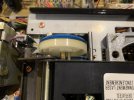
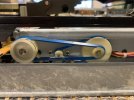
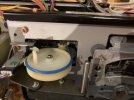
I have replaced the 4 belts with a kit of which two originals had perished and lubed the sliding tray mechanism and oiled the motor pulleys which seemed stiff initially. It feels like it doesn’t have any momentum to open the tray on its own and I can hear the motors trying to do their thing but nothing else happens.

The tray will close by it self if you hit close or play when it’s been manually opened and starts to spin the cd, but stops after a few seconds from here you have to manually open the tray again and there is a red error code on the display when trying to hit play or rewind or fast forward

This is a totally original example would be great to get up and running again any ideas what I can do next?
 

Attachments
  • IMG_3026.jpeg
    IMG_3026.jpeg
    88.6 KB · Views: 23
  • IMG_3024.jpeg
    IMG_3024.jpeg
    88.5 KB · Views: 22
  • IMG_3021.jpeg
    IMG_3021.jpeg
    98.8 KB · Views: 23
  • IMG_3022.jpeg
    IMG_3022.jpeg
    102.7 KB · Views: 22
Last edited:
Register to hide this ad
Quick update i managed to get it to play discs now however i get an error when trying to eject the drawer it has to be manually opened, once its opened it closes fine when you press the close button i noticed the two belts on the left hand side where the wire is doesn’t even attempt to move when hitting the open drawer button - any ideas what i can look for?
 
It looks like you are starting to get very familiar with the mechanical workings of the transport. Don't give up! The more you learn about it, the more you keep plugging away, the better your chances are at finding the problem. Transports can be a hassle to deal with to say the least. I've had to spend hours and hours sometimes trying to get some to start working properly. They're like a puzzle to be solved; the mechanical wizardry behind them is kinda fun to figure out.
 
Last edited:
You can test all of the various motors using a 9 volt battery. Test all of the switches too. Make sure all of the switches are where they are supposed to be - not loose or have moved from their original locations. New belts can make all the difference. Lubrication too.

You can use WD-40 to lubricate a stuck motor. If all you have is WD-40, then use it. Use 3-1 oil later on.
 
Last edited:
Hi all, I recently got a Philips CD960 CD player in very good condition unfortunately it’s not playing discs or the tray won’t eject when pressing the eject button. Fast forward and rewind not working either.

Reading online, it appears it’s the same as a Marantz cd94 internally

I have replaced the 4 belts with a kit of which two originals had perished and lubed the sliding tray mechanism and oiled the motor pulleys which seemed stiff initially. It feels like it doesn’t have any momentum to open the tray on its own and I can hear the motors trying to do their thing but nothing else happens.

The tray will close by it self if you hit close or play when it’s been manually opened and starts to spin the cd, but stops after a few seconds from here you have to manually open the tray again and there is a red error code on the display when trying to hit play or rewind or fast forward

This is a totally original example would be great to get up and running again any ideas what I can do next?
Does the motor driven pulley spin when the open/close button is pressed?
 
You can test all of the various motors using a 9 volt battery. Test all of the switches too. Make sure all of the switches are where they are supposed to be - not loose or have moved from their original locations. New belts can make all the difference. Lubrication too.

You can use WD-40 to lubricate a stuck motor. If all you have is WD-40, then use it. Use 3-1 oil later on.
Thanks! I’ll try wd40 see if it makes any difference
 
Does the motor driven pulley spin when the open/close button is pressed?
It does when it close when the drawer was manually opened to close but doesn’t spin when you hit the open when the drawer is in it’s closed position
 
Any ideas what I should check next?
Have you taken the belt off the motor pulley and pressed the O/C button to confirm that it indeed does spin in both directions? Also if it does, finger test the torque. It should have some oomph (technical term). Gotta try all possibilities. These motors do occasionally croak. One did in my buddies Sony x77es. I replaced it and all good.
 
Have you taken the belt off the motor pulley and pressed the O/C button to confirm that it indeed does spin in both directions? Also if it does, finger test the torque. It should have some oomph (technical term). Gotta try all possibilities. These motors do occasionally croak. One did in my buddies Sony x77es. I replaced it and all good.
I tried it and none of the wheels on the left hand side move even with the belts removed.

The motor works with the belts or removed when you manually open the tray door and then hit close, the tray closes fine so the motor appears to work counterclock wise to close the tray but does not operate in the clockwise position to open the tray.
 
Last edited:
You can test all of the various motors using a 9 volt battery. Test all of the switches too. Make sure all of the switches are where they are supposed to be - not loose or have moved from their original locations. New belts can make all the difference. Lubrication too.

You can use WD-40 to lubricate a stuck motor. If all you have is WD-40, then use it. Use 3-1 oil later on.
What is the best way to test the switches ? Mechanically they seem fine and I put some contact cleaner on them already
 
What is the best way to test the switches ? Mechanically they seem fine and I put some contact cleaner on them already
I was thinking along the lines of just making that sure those exposed copper flaps were not bent or broken and making contact correctly; checking to see if they were making contact when the sled moves in and out. Sometime they can get moved out of place or bent. You can use a multimeter to check them for continuity if you really want to make sure that they are working properly.
 
I was thinking along the lines of just making that sure those exposed copper flaps were not bent or broken and making contact correctly; checking to see if they were making contact when the sled moves in and out. Sometime they can get moved out of place or bent. You can use a multimeter to check them for continuity if you really want to make sure that they are working properly.
Do you have a photo of these I’m not sure what I’m looking for here I see the plastic micro switches that’s what I thought to check initially?
 
I tried with a 9v battery and can get it to open and close this way so it sounds like power is not getting to the motor for the open procedure but ok for the close procedure?
 
Do you have a PDF download of the CD960? If not get one. Google Philips CD-960 Service Manual and you should be able to get it downloaded.

Pages 23/24 show the exploded view of the CDM-1 transport. On it are 6 microswitches: S001 thru S006. It looks like there are no switches of the type that I was describing in my earlier posts. Or at least not what I was thinking. It's been a while since I've seen one of these transports. LOL

That's good. Check to see if all of these switches are where they are supposed to be. If they get moved just a little bit or come loose, then they might not be getting activated correctly. You can test them for continuity using a multimeter just to make sure that they are all electronically working as well.

It looks like there are three motors: M001, M002, M003. I cannot see M001 (the CD spindle motor?) anywhere on the exploded view. It looks like M002 is the motor that opens and closes the sled. Check that motor using a 9V battery; it should spin clockwise and counterclockwise by reversing the polarity of the 9V battery.

I cannot tell by looking at the exploded view which switches go with the open/close of the sled.
 
Last edited:

Here is a video of the 2 switches that go with the sled of the CDM-1 transport. The dude talks about how easy it is to break the plastic parts of the switches.
 
Do you have a PDF download of the CD960? If not get one. Google Philips CD-960 Service Manual and you should be able to get it downloaded.

Pages 23/24 show the exploded view of the CDM-1 transport. On it are 6 microswitches: S001 thru S006. It looks like there are no switches of the type that I was describing in my earlier posts. Or at least not what I was thinking. It's been a while since I've seen one of these transports. LOL

That's good. Check to see if all of these switches are where they are supposed to be. If they get moved just a little bit or come loose, then they might not be getting activated correctly. You can test them for continuity using a multimeter just to make sure that they are all electronically working as well.

It looks like there are three motors: M001, M002, M003. I cannot see M001 (the CD spindle motor?) anywhere on the exploded view. It looks like M002 is the motor that opens and closes the sled. Check that motor using a 9V battery; it should spin clockwise and counterclockwise by reversing the polarity of the 9V battery.

I cannot tell by looking at the exploded view which switches go with the open/close of the sled.
Thankyou very much for this! I tried the 9v battery trick and confirmed the motor was good turning in both directions

I also posted for help on diyaudio and a member there also reminded me check the switch next which I had done and had initially found no issues

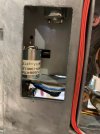
However checking again today I realised s02 was showing OL in the open and closed position, I gave it a good clean with contact cleaner and all the other switches and bingo the tray opens and closes now perfectly! Can these switches be changed in case if fails in future?

One cd in its working great so far

Thankyou for your help and the resources shared, i appreciate it! I’ll watch and read these over, quick scan looks like maybe a recap will be in order eventually but for now I’m going to enjoy it as is! There isn’t much posted on these cd players so hopefully this thread helps someone in the future
 
Ok so a quick update the cd player is now in my study set up and sounds good however it does occasionally not play discs it won’t read it and shows a disc or error message - the issue is intermittent

Any advice on what I can look at to try rectify this?
 
Back
Top Bottom