
• The move to the new server is done. There are some software and database maintenance updates in process. This has us passing the hat around to help out. We appreciate any donations. Seriously, even a dollar helps. The payment page may be found here - https://www.audiokarma.org/support.html

Pioneer QX-949 4-Channel Level Indicator Question

foo.kamikaze

Active Member
IMG_0589.jpg

Hi.

HISTORY:
I sold my Pioneer SX-1010, and was looking for a less expensive, but comparable sounding vintage stereo receiver with real wood veneer. I believe I found that in the Pioneer QX-949. In fact, surprisingly, the QX-949 sounds more like my Pioneer SX-1250. I purchased the quadraphonic stereo locally in the Twin Cities off of Craigslist a couple days ago. I paid $125, and is a better deal than I expected. The 949-stereo is very clean inside and out, and all the lights worked including the 4-channel indicators.

SERVICING/CLEANING:
I broke down the stereo so I could get to all the pots, and dusted. I used Deoxit on all the pots, especially the 4
balance controls and surrounding the 4-channel level indicator, and two CD-4 separation controls below.

RESULTS:
The QX-949 is looking like a pair of squared-away navy boondockers, and sounds laidback and clear as a bell. I'm very happy!

PROBLEM:
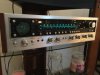
The lights in the 4-channel indicator are bright and working, but they no longer bounce (see attached pic)! I really would like to see the green glowing lights spring from the center of the "radar-like" screen. I'm using two channel stereo only, so I expect to see the front lights bouncing and nothing for the rear lights. Currently, the lights are frozen at unequal lengths striking out from the center.

WHERE DID I GO WRONG?
So you know I dusted the interior and ran Deoxit through all the pots, especially those associated with the 4-channel level indicator. Here's how I currently have the stereo set up: I have the 2CH power boosting switch set to 2CH mode on the stereo's backside. I'm using either the AUX or FM AUTO, 2CH mode and Speakers A-Front (Channel 1 and Channel 3). I have the top L/R front balance controls set to the max and the bottom L/R rear balance controls set to lowest. The two CD-4 separation controls are set to the middle.

Answers? Solutions? All responses are appreciated in advance. Thank you.
 
Last edited:
Register to hide this ad
I used to have one of those but it was stolen. Very high quality unit with lots of bells and whistles. I may even have the original owners manual if you’re interested. Just guessing here but I’m thinking the front channels balance knob should be centered and the rear position doesn’t matter since you are in two channel mode. Try this for a few days and see what happens. It may take several days for the deoxit used on the four display pots to dry out and not affect their performance. I used my 949 for many years in stereo mode after the quad phase was over.
 
Allow me to clarify now that my coffee has kicked in. I forgot that the display buttons also act as balance controls. I believe yours are set correctly. Just try running the unit for a couple of days to see if things improve. Also exercise the display knobs back and forth several times every few hours.
 
i have one of those too.do you have both indicator buttons pushed in? if so i still wouldnt rule out another go with d100 delivered with a syringe and leave it sit a few days.other than that if you disconnect the speakers and crank it up does do anything? its not really a scope its all done with electric shutters inside. the lights are on all the time with the set on and no signal no opening of shutters.looks like the left rear bulb is burned out.
 
Thanks for the answers.

The majority here suggested Deoxit, and let it sit. I Deoxit'd it and let it sit, then Deoxit'd it and let it sit some more.

Last try I got nothing, so I took my headphones off, and decided to let it rip. I turned the volume up slowly beyond what I normally listen to music. Usually no higher than 9 o'clock. At 10 o'clock, I got a jitter from the left front. At 11 o'clock, the right channel jumped in the mix. At noon, both channels were pumping out glow-stick green nearly to the outer "radar" circle. They work but not very sensitive. I will never, in my town home, or will my wife allow, the volume I need to keep these green jitterbugs dancing.

Now the question is: Can the sensitivity be adjusted?
 
http://audiokarma.org/forums/index.php?threads/qx-747-a-speaker-in-every-corner.662759/page-4
post #73 here shows the scope disassembly and the sutters used in front the of the lamps. FYI
Maybe check that the audio signal is getting through the two front panel switches to the shutters.

Looks like this is where I need to go if adjustment of sensitivity is needed. Anyone have experience with this issue?

Do these normally work as I described earlier. I mean does it take quite a bit of coaxing to get them moving?
 
On the QX-747 i needed to set the front panel push button to the most sensitive position and place the volume at a reasonably loud listening level to get the shutters to dance. I didn't look into cleaning or adjusting sensitivity, but it would have been a good idea.
 
Last edited:
have you looked at the schematic? it would appear that it drives the shutters directly off each channels output voltage going to the speaker's through aws-048, there area lot of diodes that rectify the voltage it would appear and then out through a resistor on each channel 1-4 it would be nice if some kind soul could tell you what the voltage at full deflection (not exactly the right word) for each shutter.the sensitivity switches when pressed in look like they shunt resistors on the -20db circuit and by doing so raise the output voltage to the shutters. could be a lot things that are causing your trouble and that aws 048 isnt much fun to get at. as a concept though there's nothing difficult going on.if it were i i think i'd go there first.but knowing the max voltage to open the shutters fully would tell you whether the problem is the meter or its drive.the only way to alter its sensitivity would be to install lower value resistors.i dont think i'd go there.
 
There are 2 Indicator Level sensitivity buttons next to the power button. 1 is for 10dB attentuation; the other is 20dB. However, if you press them both you get 30dB according to the manual. Try pressing both and see if your 'scope' doesn't start jumping alot further without having to crank the volume....
 
There are 2 Indicator Level sensitivity buttons next to the power button. 1 is for 10dB attentuation; the other is 20dB. However, if you press them both you get 30dB according to the manual. Try pressing both and see if your 'scope' doesn't start jumping alot further without having to crank the volume....
Worked for me thanks. I have one bulb not lighting up. Now I need to check the bulb.
 
Back
Top Bottom