• The move to the new server is done. There are some software and database maintenance updates in process. This has us passing the hat around to help out. We appreciate any donations. Seriously, even a dollar helps. The payment page may be found here - https://www.audiokarma.org/support.html

Pioneer SX-1250 Pre-amp Jumper Problem

Airjmax

Active Member
I have a very nice SX-1250 that was restored by @mattsd, however of late the unit drops the left channel, and can only be remedied by touching both pre-amp jumpers, which generates a loud hum. I have appealed to @mattsd for help or suggestions, but he has chosen to ignore me.
Any help or suggestions are welcome.
 
Register to hide this ad
Well, a loose connection would be my first guess - obviously there could be other issues. Generally if you touch something and the sound changes it could be a poor connection. Have not been inside my 1250 in a while so don't remember how hard it is to get to the jumpers. Could just be a cold solder joint.
 
I know Matt and he may well be busy with life right now.
Be patient.

Agree that from what you describe it is a problem associated with the RCA connections on the back panel.
A loose/bad connection issue.

Open the hood and bottom to gain access to the area. With just headphones and radio on placed so you can touch the area with a chop stick or non conductive implement. Should then become apparent if it is a wire jack solder joint causing the problem. Something short of shipping back will need to be handled by you in your local.
 
I have a very nice SX-1250 that was restored by @mattsd, however of late the unit drops the left channel, and can only be remedied by touching both pre-amp jumpers, which generates a loud hum. I have appealed to @mattsd for help or suggestions, but he has chosen to ignore me.
Any help or suggestions are welcome.

Okay, so first off, I had trouble finding where you had contacted me again about this issue. I remember that you had that issue with the jumpers back in May of last year but you had reported back that it was fixed after you did the fix I suggested. I finally found the message, you contacted me once in December and then nothing else. I must have missed that message and I apologize for that, I get a lot of messages and some do slip through the cracks. That being said, if you can get the channel to come back by touching the jumpers, then it's likely a oxidized connection. Does a quick volume bump also bring the audio back? Does engaging any of the push or toggle switches bring it back? If you're in the area I will fix it if you don't feel comfortable troubleshooting it yourself.
 
Okay, so first off, I had trouble finding where you had contacted me again about this issue. I remember that you had that issue with the jumpers back in May of last year but you had reported back that it was fixed after you did the fix I suggested. I finally found the message, you contacted me once in December and then nothing else. I must have missed that message and I apologize for that, I get a lot of messages and some do slip through the cracks. That being said, if you can get the channel to come back by touching the jumpers, then it's likely a oxidized connection. Does a quick volume bump also bring the audio back? Does engaging any of the push or toggle switches bring it back? If you're in the area I will fix it if you don't feel comfortable troubleshooting it yourself.
Matt, thanks for the reply. I tried both things you sent me, but the problem persists. In no way am I implying that you had anything to do with this particular issue. I’m very satisfied with the work you performed, it’s just unfortunate that an unrelated problem popped up.
Let me give you a little more detail about the jumper problem:
A typical scenario is: turn on unit, playback through phono, aux, etc. and all is well for around 30 minutes, then the left channel drops. No pop, just goes away.
The only way I discovered that the jumpers were involved was by accidentally touching them while reaching behind the unit.
I don’t live nearby, so I’ll try to troubleshoot here.
Hoping to get this ironed out so I can get back to the beast. What a great piece of equipment!
 
Try re-flowing the solder on those RCA jacks, or better is remove as much of the old solder and resolder.
Bob
 
To me it seems possible that the misbehavior is just the common case of degraded contacts in the speaker protection relay. If that was so, then simply cranking up the volume (with some source playing) would also restore sound.
 
My SX-950 had about the same problem, the jumpers were corroded ( they were nickel plated and were flaking with obvious rust ) and the jacks were oxidized. I bought new stainless jumpers from E-PAY (19.00 including shipping) and I used de-oxit on the jacks and problem solved. I just sprayed a LITTLE in the jack ( with the unit unplugged ) and worked each jumper back and forth a bit. easy :banana: Of course there may be something more ominous at work but try the easy stuff first.
 
Last edited:
To me it seems possible that the misbehavior is just the common case of degraded contacts in the speaker protection relay. If that was so, then simply cranking up the volume (with some source playing) would also restore sound.

Worth checking it out / ruling it out, just involves cranking up the volume a bit.
 
Hello all. I am reaching out to check what the finall solution of this problem is. I have the same issue - when I tap the jumpers I get the sound back and it goes away. Sometimes when I turn the volume up and down it crackles and the channel comes back. I was told I should do a crossover with an RCA cable but I could not identify any pattern. Sometimes the left one goes off and sometimes the right goes off. Sometimes both go off. Is the issue with replacing the speaker relay or resoldering the jacks, both, or ... something else?

Thanks!
 
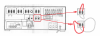
deoxiting - it's more than cleaning. cleaning leaves behind clean corroded contact material. deoxit softens those bonds so that the corrosion can be scrubbed off by contact friction and movement.
There are many switches and controls that carry the signal and the flow can be cut off anywhere by corrosion. move something a tiny bit and you are now on good enough contact material. The jack receptacles in the back, and anything that goes in and out, up and down or roundy round carries signal and is a candidate for deoxiting.

basically anything circled in red:
upload_2022-8-13_6-19-57.png

I was told I should do a crossover with an RCA cable but I could not identify any pattern.

upload_2022-8-13_6-25-34.png
 
Back
Top Bottom