Hello, I have just pick up a sony str d615 receiver and I would to pipe the Audio from my computer to the receiver, what I'm thinking is run a audio cable from the head phone jack on the PC to the RCA inputs on the receiver, is this the correct way of doing this or is there a better way?


You are using an out of date browser. It may not display this or other websites correctly.
You should upgrade or use an alternative browser.
You should upgrade or use an alternative browser.
Pipe audio in to receiver from computer
- Thread starter yanceycat
- Start date
-
- Tags
- computer audio
Register to hide this ad


I had great appreciation for a Dragonfly DAC. It plugs into a USB port on your computer, has a mini-plug for headphones on the outside, and is about the size of an older flash drive. Plug a mini-jack to double male RCA cable adapter into it, and you’re there - just plug the jacks into a tape or aux input. The older black Dragonfly can be had for $120 at multiple sources.


Thorsten R.
Super Member
Motu M2 USB Audio Interface. Has symmetrical and asymmetrical outputs. The latter are not so often to be found.

cpt_paranoia
Addicted Member
what I'm thinking is run a audio cable from the head phone jack on the PC to the RCA inputs on the receiver
That will work perfectly well, yes.
Then you need to decide if it sounds good enough for you. If not, look to USB DACs or other options.
The Digital Sources subforum is a good place to start for this topic.


RobRoy
It's just stuff - but fun
That works fine for me. Heck, I did that back in 1996, feeding directly to my Hitachi HCA/HMA separates system.Hello, I have just pick up a sony str d615 receiver and I would to pipe the Audio from my computer to the receiver, what I'm thinking is run a audio cable from the head phone jack on the PC to the RCA inputs on the receiver, is this the correct way of doing this or is there a better way?
I since got a USB to RCA adapter, but I only use it for using Sonar on my laptop to record live music.

imral3
Enjoy the musics!!
If you think your current connection sounds good for the music sources you're using then don't worry, just relax and enjoy the musics!!OK, Thanks
cpt_paranoia
Addicted Member
is the USB to RCA a better way to go?
PCs and laptops are built to cost and space constraints. So their audio circuitry may not be 'audiophile quality'. An external USB DAC allows for more space, and lots of money to be spent, sometimes questionably, to improve the sound.
As with all things 'audiophile', it's really up to you to decide if you're happy with how your system sounds, or if you want to go down the road of searching for 'perfection', with diminishing returns on what you spend.
If you're only planning on listening to lossy compression sources (MP3s & YouTube), then those sources may be the limiting factor in audio quality.

I agree. No sense in making it more complicated than it needs to be. I used this approach in my office for a long time and it was find. I then replaced a DAC on my home system because the output of the old system was on the low side, so I plugged the ond DAC into my office equipment for the fun of it. If there is a difference, it is subtle.
Depending on the sound card in the computer, try it direct from the headphone jack to the stereo. It will probably sound okay without DAC's and other external equipment.[/QUOT

also depends on the quality of the source. If its not that great to begin with, the onboard is probably adequate. My computers get used as a source but for dumb things like youtube and whatnot where it just doesn't matter.
the shop computer has a really crappy DAC but only because I did something dumb and managed to smoke the onboard sound card. Its a StarTech that I got for 10 bucks. Its noisier than the headphone jack was.
the shop computer has a really crappy DAC but only because I did something dumb and managed to smoke the onboard sound card. Its a StarTech that I got for 10 bucks. Its noisier than the headphone jack was.

Audioraven
Well-Known Member
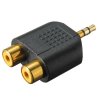
I use one of these little gems in the headphone jack of my laptop. Let's me use any RCA interconnect of my choosing.