• The move to the new server is done. There are some software and database maintenance updates in process. This has us passing the hat around to help out. We appreciate any donations. Seriously, even a dollar helps. The payment page may be found here - https://www.audiokarma.org/support.html

Problem getting output from DAC

abpeep

OU Sucks!!
Subscriber
I am having problems getting my Grant Fidelity TubeDAC 11 set up. It has worked in the past and I ran into this same problem a while back and just disconnected it while health and lifestyle issues took command of my life.

Running Windows 8.1 on a HP 8300 desktop. This is where I get confused:
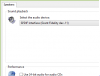
upload_2017-3-6_20-20-57.png

It looks like it should be getting sound with the green lines dancing but I get nothing through the DAC (headphone out - not set up right now to listen through speakers).

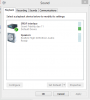
Also, these tests are disabled which does not seem right.
upload_2017-3-6_20-29-15.png

After lots of research on the multitude of audio problems with Windows over the past week, I've not found any corrective actions. It just seems like a system issue to me. I've tried many of the suggestions to be found on the web.

Any ideas on a resolution would be appreciate.

Thanks,
Alan
 
Register to hide this ad
What music playing software are you using? Perhaps this needs to be setup.

I use Windows Media Player and in the options tab select the properties
of speaker. Then select correct driver. If driver does not appear, then hasn't been properly installed.


upload_2017-3-7_7-2-32.png
 
Thanks

I had been using it with JRiver for months but it's not loaded right now on this newly purchased PC - using Windows Media Player now. This was part of the problem but it's been changed now with the same results.
upload_2017-3-7_10-36-17.png

I probably need to see if it works on my wife's laptop next.
 
OK, thanks for the suggestion but I thought a little while ago about checking the DAC using another input. No output using the digital coax, either.

Guess I need to find someone who can check this thing out.

Again - Thanks.
 
I would try the USB input and the RCA(analog) input. Try both SS and tube output.
I would also eliminate the DAC and go directly to amp. Try to narrow down where the issue is.
 
What I find interesting is that the PC somehow knows which device is connected over SPDIF (says Grand Fidelity under SPDIF interface), I thought SPDIF was unidirectional and there was no way the DAC could send its name back over it to PC. Or was it renamed by hand in device properties? As for the "Test" buttons being disabled, you actually need to highlight the entry in the list, e.g. 44.1 Khz, for the button to be enabled. The PC will play a test sound of with sample rate or format if you click on Test. Also look on the "Advanced" tab of "SPDIF INterface properties" window, it could be that the default format is set to something the DAC doesn't support like DTS.
 
So it's been a little while and I have tried all these suggestions. I determined that I get no output using any digital inputs - USB, coax, optical. Works fine using the analog inputs.

I've called around town but so far have not had anyone really interested in taking this thing on.
 
They don't do any in-house repair since the founder died a few years ago. They did provide me the schematics to share with a tech of my choosing.
 
Yeah, whatever, there is nothing "special" in there, just I didn't know exactly what switch you have on "input select". From th eposte dpictures it seems that it uses three relays, you could probably open it and try to hear the clicking when switching inputs.
The TE7022 USB interface is execrable for the 44.1kHz content, and the DAC (CS4398) is so and so. I know because I have a DAC with exactly those two chips (plus same SPDIF receiver) somewhere in my pile of useless electronics in the garage.

DAC-11%20function%20chart(1).jpg

DAC09-7inside.jpg
 
I think where the driver is nominated in speakers properties, that the driver had to be copied/installed to the computer.
I don't think it would get there automatically. Not that it matters.

When you tried USB did you change the speaker driver? It should use the Windows USB driver. Try to eliminate the GF driver by doing so.
 
Whenever I see a tube aligned horizontally on a PCB next to caps and semiconductors inside a tight enclosure the words "premature failure" fly through my brain.
 
I think where the driver is nominated in speakers properties, that the driver had to be copied/installed to the computer.
I don't think it would get there automatically. Not that it matters.

When you tried USB did you change the speaker driver? It should use the Windows USB driver. Try to eliminate the GF driver by doing so.
The DAC had been installed and was working fine - then one day it wasn't. It's plug-n-play so it doesn't need to load its own drivers but I've reloaded the drivers on the PC and reloaded the USB controllers. Even reloaded Windows. Spent hours online trying to find a solution.

After spening a bunch of time on this, I've come to the conclusion that if it was drivers, I'm not sure that I would get the dancing green lines in the Sound dialog - the PC thinks it's working fine.
 
i would try foobar200
its free
then go to preferences\audio\device
anything that can output sound will be there
it doesnt care about windows defaults
 
Back
Top Bottom