• The move to the new server is done. There are some software and database maintenance updates in process. This has us passing the hat around to help out. We appreciate any donations. Seriously, even a dollar helps. The payment page may be found here - https://www.audiokarma.org/support.html

Question for any computer geeks out there (windows 10 update)

the skipper

Professional Curmudgeon
Prior to this update, when in my "pictures" directory, all pictures displayed as a thumbnail. Now, aside from three or four pictures, all I get is a generic icon and when I click on it, they don't display.

They are all JPEG.

Funny thing is that when I upload a file on this site, they all display in thumbnail format,

Any idea as to what's up and how to correct it?

TIA, guys.
 
Register to hide this ad
The ones that display what is the file extension for these? If you do not see the file extension check the file name extension check box in the show/hide section.
It sounds as if you lost an association to the jpeg file extension
 
You should be able to go up to "View" in the finder tabs across the top and change it back.

Also, you can hold control and spin the mouse wheel to cycle through the view settings.
 
They are all JPG files. The "view" option really doesn't offer any help. How do I establish/check associations and what do I associate it with?
 
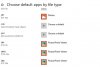
Control Panel --> Programs-->Default Programs-->Associate a file type or protocol with a program -->Choose default apps by file type This will list file extensions and the program associated with it

file_assc.JPG
 
W10 here, latest update.

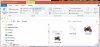
Open file explorer, click on pictures directory (folder). Click on View, then click on Preview Pane.

Or, click on Medium Icons.

DQHWOzL.jpg
 
OK, control panel shows the default program is "Photos recommended for Windows 10".

If I right click and choose "open", it does show but what kills me is tha tit used to show the picture when the folder was listed.

Effen' Microsoft. It wasn't broke before but now it is.
 
Still nothing. What's really odd is that when I hover over the icons, they say JPG file. When I hover over one of the handful of pictures, they say JPG too.

This is startin' to piss me off. :rant:
 
Back
Top Bottom