• The move to the new server is done. There are some software and database maintenance updates in process. This has us passing the hat around to help out. We appreciate any donations. Seriously, even a dollar helps. The payment page may be found here - https://www.audiokarma.org/support.html

Realistic 2100d problem!

Larryhere40

Active Member
Recently got my old receiver out of protection after doing a recap and all the transistors in the amps! I tried to do a video of the sound problem, but doesn’t get in the video, the sound issues are the same on left and right! Tried multiple inputs and all the settings! At lower volume I don’t notice it, if it is there! When you turn up the volume it gets very pitchie! I realize it is very hard to find, and even harder not being here! Wondering if one of the technicians on here would give me a few possibilities! Thinking more like a bad cap or tranny? Any suggestions would be greatly appreciated! Thanks in advance!!!
 
Register to hide this ad
Is this a noise when there’s no input source? No music playing? Or does the music sound pitchy?

Could be oscillation, maybe. Is it running hot? I feel like I had that issue on one of those and had to change out the driver transistors to something different.

Recheck all your work make sure all your transistors are installed incorrectly, as well as the caps.

Rob
 
Is this a noise when there’s no input source? No music playing? Or does the music sound pitchy?

Could be oscillation, maybe. Is it running hot? I feel like I had that issue on one of those and had to change out the driver transistors to something different.

Recheck all your work make sure all your transistors are installed incorrectly, as well as the caps.

Rob
No noise with no input Rob! Everything is fine until you turn the volume up, then the sound gets worse and the sound gets very pitchy! It’s like the Bass gets removed! I’m thinking maybe there is a problem in the tone board or the tone controls. I’m will do a deox and recheck. Since my previous post I noticed the bass control and over turn control a bit touchie! I will let you know! Be patient as I’m 70, and takes me a bit! Thanks so much!
 
Do you have another amplifier you could use? If so take the pre-amp outputs of the 2000D and plug them into the aux or tuner input of the other amp.

That way the 2000D will act as a pre-amp and the other unit will be the amplifier. If the audio is still "pitchy" then the problem is in the pre-amp/tone section of the 2000D.

If it is good then the problem is in the 2000D amplifier section.
 
Do you have another amplifier you could use? If so take the pre-amp outputs of the 2000D and plug them into the aux or tuner input of the other amp.

That way the 2000D will act as a pre-amp and the other unit will be the amplifier. If the audio is still "pitchy" then the problem is in the pre-amp/tone section of the 2000D.

If it is good then the problem is in the 2000D amplifier section.
Great idea, didn’t think of that! Thanks!
 
Do you have another amplifier you could use? If so take the pre-amp outputs of the 2000D and plug them into the aux or tuner input of the other amp.

That way the 2000D will act as a pre-amp and the other unit will be the amplifier. If the audio is still "pitchy" then the problem is in the pre-amp/tone section of the 2000D.

If it is good then the problem is in the 2000D amplifier section.
 
Thanks for all your support!!! After listening very closely, with the right and left channels I found that the left channel was a lot worse. I swapped in another amp that I had from some other 2100d’s, and it seems to sound pretty good! I am going to do the detox, think it would benefit from one! I know it’s pretty straightforward, but they are difficult to get at other than spraying in after pulling the knobs. Wish there was a video showing a how to for the 2100d! I would appreciate a lead on where I could send just the extra extra extra amps to be reconditioned reasonably! I have 4 extra ones, which I recapped and replaced bad resistors and all transistors in the amps! Needless to say they didn’t work work that great! Also don’t know to check bias or dc output! I guess you check the dc output at the speaker at idle? Thanks Larry
 
Thanks for all your support!!! After listening very closely, with the right and left channels I found that the left channel was a lot worse. I swapped in another amp that I had from some other 2100d’s, and it seems to sound pretty good! I am going to do the detox, think it would benefit from one! I know it’s pretty straightforward, but they are difficult to get at other than spraying in after pulling the knobs. Wish there was a video showing a how to for the 2100d! I would appreciate a lead on where I could send just the extra extra extra amps to be reconditioned reasonably! I have 4 extra ones, which I recapped and replaced bad resistors and all transistors in the amps! Needless to say they didn’t work work that great! Also don’t know to check bias or dc output! I guess you check the dc output at the speaker at idle? Thanks Larry
Larry,

By changing all of the caps and transistors there is no doubt in my mind the bias and offset will need adjusted.

Do you have a multimeter? Checking the offset is quite easy, bias is a little harder.

Be very careful if you attempt this. Depending upon what type of meter leads you have it may be easy to slip and short something. Mini grabbers are best for this.

Offset can be measured on the protection/meter board. at pin three (red wire) for the right channel and pin four (white wire) for the left channel.

2000doffset.jpg
Attach the plus lead of your meter to either pin 3 or 4. Attach the black lead to the chassis. Set the meter to read DC millavolts, or DC volts if millavolts in not an option on your meter.

You know where the amp modules are the trim pot at the middle top is the offset adjustment. The module that has the pot labeled as VR501 is the left and VR502 is the right.

Turn the unit on with the volume all the way down. Adjust the trim pot to get as near 0 mVDC as possible. The manual calls for + or - 20mV (millavolts).
The trimpots are usually pretty sensitive so adjust very slowly and let it settle. It is normal for the voltage to wobble around a little bit.
 
Larry,

By changing all of the caps and transistors there is no doubt in my mind the bias and offset will need adjusted.

Do you have a multimeter? Checking the offset is quite easy, bias is a little harder.

Be very careful if you attempt this. Depending upon what type of meter leads you have it may be easy to slip and short something. Mini grabbers are best for this.

Offset can be measured on the protection/meter board. at pin three (red wire) for the right channel and pin four (white wire) for the left channel.

View attachment 3627031
Attach the plus lead of your meter to either pin 3 or 4. Attach the black lead to the chassis. Set the meter to read DC millavolts, or DC volts if millavolts in not an option on your meter.

You know where the amp modules are the trim pot at the middle top is the offset adjustment. The module that has the pot labeled as VR501 is the left and VR502 is the right.

Turn the unit on with the volume all the way down. Adjust the trim pot to get as near 0 mVDC as possible. The manual calls for + or - 20mV (millavolts).
The trimpots are usually pretty sensitive so adjust very slowly and let it settle. It is normal for the voltage to wobble around a little bit.
That’s super for me!! I have fluke meters. Just never taught by a tech or pro! Thanks so much for the help!
 
That’s super for me!! I have fluke meters. Just never taught by a tech or pro! Thanks so much for the help!
You are welcome, if you successfully tackle the offset I can help you with the bias setting as well.

To be safe setting bias I would recommend you use a Dim Bulb Tester, do you have one?

It's a bit more involved but not too bad.
 
You are welcome, if you successfully tackle the offset I can help you with the bias setting as well.

To be safe setting bias I would recommend you use a Dim Bulb Tester, do you have one?

It's a bit more involved but not too bad.
Yes I have a dim bulb tester. Thanks again! I will do the off-set tomorrow if all goes well.
 
You are welcome, if you successfully tackle the offset I can help you with the bias setting as well.

To be safe setting bias I would recommend you use a Dim Bulb Tester, do you have one?

It's a bit more involved but not too bad.
You are welcome, if you successfully tackle the offset I can help you with the bias setting as well.

To be safe setting bias I would recommend you use a Dim Bulb Tester, do you have one?

It's a bit more involved but not too bad.
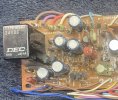
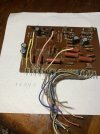
My pc board is 200554, a little different! Still has the 1 thru 21 wires off! Colors differ too! I assume it’s ok!image.jpgmy board is 200554! Wire color is different! Probably doesn’t matter, I know what to do! Ps, pulled this from a parts unit! Thanks again!
 
My pc board is 200554, a little different! Still has the 1 thru 21 wires off! Colors differ too! I assume it’s ok!View attachment 3627285my board is 200554! Wire color is different! Probably doesn’t matter, I know what to do! Ps, pulled this from a parts unit! Thanks again!
Interesting. That is the same part number as the one I posted the picture of, yet a totally different physical design. It appears that it may be mounted vertically with the wires under the chassis?

I picked that original spot because it was easily accessible from the top. No need to remove the bottom.
I can neither confirm or deny that pins three and four are the same on your board. I would guess based on what I see they are not.
My service manual does not have that version of the board in it.

If you have to remove to the bottom to access the connections we can go right to the amp modules for the test points.
 
Interesting. That is the same part number as the one I posted the picture of, yet a totally different physical design. It appears that it may be mounted vertically with the wires under the chassis?

I picked that original spot because it was easily accessible from the top. No need to remove the bottom.
I can neither confirm or deny that pins three and four are the same on your board. I would guess based on what I see they are not.
My service manual does not have that version of the board in it.

If you have to remove to the bottom to access the connections we can go right to the amp modules for the test points.
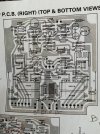
Your post is 200544 and mine is 200554! Very similar. My board is labeled and R and L outputs are pin 6 for R brown, and pin 4 for L pink! IMG_3969.jpeg
 
Are the left and right outputs from the protection board used. Thanks, please excuse my ignorance, at 70 I get confused easily, lol
 
Your post is 200544 and mine is 200554! Very similar. My board is labeled and R and L outputs are pin 6 for R brown, and pin 4 for L pink! View attachment 3627433
Damn that's what I get for looking at it so early in the morning. I went back and forth a few times to makes sure. :whip:

I believe that the pins you want are the R and L common. Can you take a picture of the bottom of the board.

The output pins will work as long as the relay is closed. If it opens you will get no reading.
 
Damn that's what I get for looking at it so early in the morning. I went back and forth a few times to makes sure. :whip:

I believe that the pins you want are the R and L common. Can you take a picture of the bottom of the board.

The output pins will work as long as the relay is closed. If it opens you will get no reading.
They all labeled and the com L and R are pins 2 and 7. Yellow and gray which I believe go to the L and R amp! Also each amp has 2 trimmers. One is the 501 and 502 which is used or both seems a little hard to do.IMG_3971.jpegIMG_3972.jpeg
 

Attachments

  • IMG_3970.jpeg
    IMG_3970.jpeg
    152.8 KB · Views: 1
Back
Top Bottom