• The move to the new server is done. There are some software and database maintenance updates in process. This has us passing the hat around to help out. We appreciate any donations. Seriously, even a dollar helps. The payment page may be found here - https://www.audiokarma.org/support.html

Realistic STA-84 Muddy Sound (Newbie)

Bentrong

New Member
Hello fellow esteemed members.

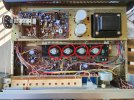
I just picked up a Realistic STA-84. When I hooked it up, I get this muddy distorted sound. I tried fiddling with the bass and treble and nothing helps. I opened it up and used some compress air to blow away the dust and the distortion is still present.
I know the speakers (Polk Audio R150) and turntable (AT-LP60X) work fine because I hooked them up to my previous amplifier (cheap lepy) to test and they function well.

Here is a video of the distorted muddy sound:

And here is a picture of the back:
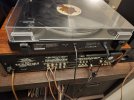

20230923_205033.jpg

Open to any ideas on what is causing this and how to fix it.
 

Attachments
  • 20230923_205033.jpg
    20230923_205033.jpg
    120 KB · Views: 8
Last edited:
Register to hide this ad
how does it sound with headphones?

i've had quasi-complimentary amps that sounded like that with speakers but sounded almost perfect with headphones and it was a failed output transistor.
 
Just a side note. I am really uncomfortable with your speaker wire connections; you should neaten those up, a stray wire strand or two can short your receiver's output and maybe cause damage.

I know you are a "newbie," but these connections must be very neat and tidy. Just a little solder on the tip of the bare wire may keep loose strands in check, but a crimped on solderless connector (in proper size for the screw terminal) may work easier for you.
 
Just a side note. I am really uncomfortable with your speaker wire connections; you should neaten those up, a stray wire strand or two can short your receiver's output and maybe cause damage.

I know you are a "newbie," but these connections must be very neat and tidy. Just a little solder on the tip of the bare wire may keep loose strands in check, but a crimped on solderless connector (in proper size for the screw terminal) may work easier for you.
whoa! speaking of that rear panel....

he has the phono switchable preamp set to line and plugged into the phono input.

could be the problem right there unless it happens with the radio as well.
 
I saw that, and thinking backwards, thought it OK...you are right. Possibly trying to amplify (receiver preamp) an amplified signal (with tt preamp)...self-administered dope slap! :confused:
 
If flipping the switch doesn't solve the problem, it sure sounds like the output and possibly the driver transistors need looking at. Not just looked at, but tested.

Any shorts here can cook transistors in a heartbeat.
Speaker Wires.JPG
 
Last edited:
Thank you everyone for the constructive feedback!! Lots of new things to learn for me so I super duper appreciate everyone's patience!

So I tried flipping the switch from phono to line and the distortion is still present, but the music is now much quieter. Same thing occurs when I am using the headphone jack as well.

I have tried hooking the TT to the aux input but the same distortion is present on speakers or the headphones.

Just a side note. I am really uncomfortable with your speaker wire connections; you should neaten those up, a stray wire strand or two can short your receiver's output and maybe cause damage.

I know you are a "newbie," but these connections must be very neat and tidy. Just a little solder on the tip of the bare wire may keep loose strands in check, but a crimped on solderless connector (in proper size for the screw terminal) may work easier for you.

Thank you @Bill Ashton for pointing out my wiring issue. I will get that fixed ASAP. Would you recommend something like this:?

1695581292236.png
 
Those could work OK, but you should get the proper connectors for the gauge wire you are using and the proper "fork" or hole for the diameter of the screw you are fastening it to...these are available at your local Home Depot, Lowe's or good hardware store. You will need a crimping tool as well, may be able to get it all as a set.

I am sorry if my answer is complicated, but no way to tell if those connectors are correct for your wire or your terminal screws...if you are lucky, a terminal screw may back right out of the panel, and you can take it and a small bit of your wire to the store.

Edit: Just tried to back out a similar screw from my Realistic STA-46, but its swedged so it will not come out; try yours, but when it stops, stop! Do not force it. Yours may not come out either.

Wild guess looking at your pictures, unless you know, I will suppose that your speaker wire is #18, get connectors that fit #16 (larger) to #20 (smaller). Try to get a crimping tool that does not have a tooth in the middle of the crimping die; when closed, the proper die hole for your connector should look like a small oval.
 
Last edited:
Those could work OK, but you should get the proper connectors for the gauge wire you are using and the proper "fork" or hole for the diameter of the screw you are fastening it to...these are available at your local Home Depot, Lowe's or good hardware store. You will need a crimping tool as well, may be able to get it all as a set.

I am sorry if my answer is complicated, but no way to tell if those connectors are correct for your wire or your terminal screws...if you are lucky, a terminal screw may back right out of the panel, and you can take it and a small bit of your wire to the store.

Gotcha, I'll take some measurements and hit up my lowes
 

power off. i generally test in circuit and if i get any shady readings, i pull the transistor to check it with a peak atlas dc55 tester

for your 4 outputs, you only need to be concerned with npn tests.
 

power off. i generally test in circuit and if i get any shady readings, i pull the transistor to check it with a peak atlas dc55 tester

for your 4 outputs, you only need to be concerned with npn tests.

I am sorry, I am going to sound like an absolute idiot but... how do I know where to find those NPN transistors. Is it the thing under those 4 metal caps?

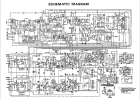
I have the schematics but I cannot make heads or tails of it, and i believe the scan is too low resolution for me to make out any numbers.

1695591238971.png
 
I am sorry, I am going to sound like an absolute idiot but... how do I know where to find those NPN transistors. Is it the thing under those 4 metal caps?

I have the schematics but I cannot make heads or tails of it, and i believe the scan is too low resolution for me to make out any numbers.
InkedNGIiqLE_LI.jpg

i think you might want to consider having a tech do this for you.
 
Look on the internet for how to test transistors. Unfortunately you have no electronic theory knowledge or how to read a schematic so it is going to be difficult for you. If you are really interested in learning, get the book, "The Art Of Electronics" by Horowitz, available for free download at The Internet Archive. What you are going to have to do is start testing transistors, starting with the outputs and working your way back toward the input (by following the schematic) until you stop finding bad transistors.
Otherwise, take it to a reliable tech for repair.
 
Thank you for sharing your knowledge! I am definitely learning more about testing transistors and will definitely check out that book @dr*audio!

@painttoad looks like you were correct, the right 2 transistors are not giving me any readings so they will have to be replaced. Hopefully that will fix all my issues!
 
If its playing at anything approaching normal volume, the chances of the output transistors being smoked is pretty small.

"sounds muddy" could be a whole lot of things, honestly at this point the most sensible thing to do is actually take some measurements for frequency response and power output to see what its doing and evaluate whats wrong based on that. Throwing parts in here at random is very unlikely to fix it, and very likely to cause new problems.
 
If its playing at anything approaching normal volume, the chances of the output transistors being smoked is pretty small.

"sounds muddy" could be a whole lot of things, honestly at this point the most sensible thing to do is actually take some measurements for frequency response and power output to see what its doing and evaluate whats wrong based on that. Throwing parts in here at random is very unlikely to fix it, and very likely to cause new problems.
He had a video showing the sound it makes. It has to be blown outputs or a power supply issue.
If one half of the push pull outputs is blown, it can and will make pretty loud distorted sound.
 
If its playing at anything approaching normal volume, the chances of the output transistors being smoked is pretty small.

"sounds muddy" could be a whole lot of things, honestly at this point the most sensible thing to do is actually take some measurements for frequency response and power output to see what its doing and evaluate whats wrong based on that. Throwing parts in here at random is very unlikely to fix it, and very likely to cause new problems.

Yikes that sounds like too much for me, maybe I will take it to a tech for repair then
 
Back
Top Bottom