• The move to the new server is done. There are some software and database maintenance updates in process. This has us passing the hat around to help out. We appreciate any donations. Seriously, even a dollar helps. The payment page may be found here - https://www.audiokarma.org/support.html

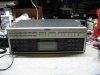
Revox B285 "The button monster"

Tinman

Super Member
First I'd like to give a heartfelt THANK YOU to forum member ke4mcl for selling this big beast to me. :tresbon:

The price was truly very fair, and I'm sure good Karma will reward him for his generosity many times over.

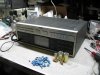
So here it is, COMPLETELY re-capped with the exception of the 2 giant amplifier caps which had been done at some point and were perfectly good.

In total I replaced over 60 capacitors and fixed the LCD display. The old B285 sounds AWESOME! :banana: The tuner is back to it's full performance and pulls in stations clean without hiss with a cliplead. I have said it before, I LOVE REVOX. It's some of the most service friendly gear I have ever owned. It sounds pretty darn good, too. :thmbsp:

A few pics for your amusement..... My life is complete. :D
 

Attachments

  • IMG_0332.jpg
    IMG_0332.jpg
    83 KB · Views: 360
  • IMG_0331.jpg
    IMG_0331.jpg
    84.1 KB · Views: 244
  • IMG_0329.jpg
    IMG_0329.jpg
    76.8 KB · Views: 358
Register to hide this ad
i always wanted one of those revox receivers. after i got my hands on it i was like...ok.. now what?!?!? good to see it went to somebody that will enjoy it!
 
i always wanted one of those revox receivers. after i got my hands on it i was like...ok.. now what?!?!? good to see it went to somebody that will enjoy it!

Well, it only makes sense if you want the whole set. I now have a full "B" series system. Works well together.

Now for some Revox speakers..... :scratch2:
 
Bah! the pile of caps from my su-8080 makes your pile look weak!
Very nice receiver btw~ I always admired Revox gear.
 
@ Tinman:

In total I replaced over 60 capacitors and fixed the LCD display.

Please elaborate on what you fixed in the display?
Mine has dead segments in the 'Station Number' section and the 'Speakers' selector arrows.
I had guessed it might be flakey silicone 'zebra' contact strips, but I'm not sure without opening it, that this display is built like that. (Those zebras were the cause of trouble on my B260, and quite easy to fix.)

Thanks.
 
The display is worse than that....

Remove the front panel and pop out the display. It's held in with clips.

Then you'll see the LCD sitting in 2 black connectors. Usually it is enough to gently wiggle it in the connectors to re-establish the electrical connection. No zebra strips on these. Just metal contacts.

If that does not work, (you can do it with the display plugged in and turned on to check the digits) then you'll need to unsolder at least one strip so you can remove the display, clean the contacts inside the strips and re-assemble.

It's in fact easier than it sounds.... for a tech. :D

Marc
 
If that does not work, (you can do it with the display plugged in and turned on to check the digits) then you'll need to unsolder at least one strip so you can remove the display, clean the contacts inside the strips and re-assemble.

In the time since I asked you this, I have opened the B285 and got the display PCB out (that was actually quite easy, once I had got over my fear that something would crack as I spread the plastic clips).

I see the connector strips you mean! Doesn't look difficult at all... just lots of careful de-soldering. And knowing you've done it without it all breaking is very helpful & reassuring! Thank you!

(A little of topic - I'm dreading the day I have to replace the vacuum fluorescent panel in my B250! I have a spare VFL tube which I bought years ago, knowing VFLs have limited life, but THAT PCB is a monster to desolder!)
 
It's in fact easier than it sounds.... for a tech. :D

The PCB holes are through-plated, which makes unsoldering that much harder.
But I have got one of the contact strips out, and with it the LCD glass.

What is a safe solvent to use to clean the edge of the LCD glass, where the transparent conductors emerge? The worst thing in the world now would be to remove any of those almost invisible traces!
 
The PCB holes are through-plated, which makes unsoldering that much harder.
But I have got one of the contact strips out, and with it the LCD glass.

What is a safe solvent to use to clean the edge of the LCD glass, where the transparent conductors emerge? The worst thing in the world now would be to remove any of those almost invisible traces!

Yeah... well.... I make real short work of that with the Metcal desoldering gun.

I have a B250. I can de-solder the display in about a minute. :D

It's ALL in the tools. Look up a complete Metcal MX-500 system. Cost a small fortune, but pays for itself every single day.

Use a q-tip with 99% alcohol on the glass.

Marc
 
If that does not work, (you can do it with the display plugged in and turned on to check the digits) then you'll need to unsolder at least one strip so you can remove the display, clean the contacts inside the strips and re-assemble.

I've had the LCD sandwhich out and cleaned the glass edges and solder clip strips - a 'high stress' activity, since I kept fearing I might crack the glass when pushing it all back together! I was hoping I could test it before resoldering all those pins - since if it isn't right, unsoldering it all again is more than I have the nerves for! Sometime today will be the acid test.

I was rather vexed to discover that the amplfier as a whole will NOT start if the display is unplugged. I was guessing that if you were familiar with its modes of operation you could operate it 'blind', but with the display unplugged, it just acts like it's retarded . Weird.

EDIT/UPDATE: The cleaning of the LCD sandwhich pins didn't work. When the glass was back in the two rows of clips, I managed to slide it horizontally about 0.5mm, which brought back some segments, but lost some others. I've got it now with only one intermittently flakey segment.
I think I might try to get a tiny dab of silver conductive paint onto the suspect pin.
 
Last edited:
rebuild?

Hi i just found one of these - it seems to sound fine for a few minutes and then i get distortion in both channels after it heats up - also if its off it ranadomly turns on and sometimes switches to another input or settings button- i suspect the distortion may be bad caps - what should i replace with? also one spot near the transformer transitors gets hot ( behind the the transformer where the three heat sink fins are .) is this normal?
 
Back
Top Bottom