• The move to the new server is done. There are some software and database maintenance updates in process. This has us passing the hat around to help out. We appreciate any donations. Seriously, even a dollar helps. The payment page may be found here - https://www.audiokarma.org/support.html

REW drop out Bizarre, any advice?

Mearle

Active Member
I finally got everything set up running 2 pairs of 15" subs located centrally along running at approx 3000W per pair and the R and L, 2 pair of Polk RTiA9 speakers being powered at with approx 1000 W/side.

I have Done a basic EQ to my basic liking (mostly took OUT 1000hz) nothing too fancy on the Equalization, sounds pretty good to my ears. I wanted to see what the ROOM itself was doing....

So I fired up the REW software, which I am not very familiar with and got this repeated response curve, I am using a flat/calibrated mic with an EQ text file. I "think" I am doing everything right when I run the sweep.

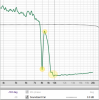
I Dont understand how or why I should be getting these huge drop outs (bottom pic) at 8K, a peak at 8.3K, then another huge drop after the 8.3 peak for the remainder of the spectrum.

Can someone explain where the logic is in this based on the fact that I dont have 8K filtered out at all? Is it possible that there is an opposite effect of resonance and that the 8 K is actually being absorbed somewhere. I suppose the tail end from 10K-20 K could be that the speakers are just not putting out the high frequency..... I am not sure where to start. I am running Audio Architect, so I have the possibility to boost the I/P & O/P EQ, but I would like to get a grounded opinion before I start messing with everything.

As mentioned, I am not very familiar with REW, so it might be operator error. this is 1/48 smoothed.
Overall Is this a TERRIBLE graph in your opinions or does it just need some work?

Advice appreciated, Mearle

upload_2022-10-31_7-23-54.png
upload_2022-10-31_7-33-19.png
 
Register to hide this ad
This is a pure operator error, I dont think I have the REW set up correctly, I get confused with all the I/P, O/P blah blah techno IT interfacing stuff.
I have some homework to do, I dont even know what I am measuring at this point.

I will come back to this once I can figure it out. If I cant figure it out perhaps I could say what my setup is and someone might be able to help me ???? I am using a phantom power Dayton mic and an ART Pro series USB Mic-Computer interface box. Thanks sorry for the prior request.
 
This is a pure operator error, I dont think I have the REW set up correctly, I get confused with all the I/P, O/P blah blah techno IT interfacing stuff.
I have some homework to do, I dont even know what I am measuring at this point.

I will come back to this once I can figure it out. If I cant figure it out perhaps I could say what my setup is and someone might be able to help me ???? I am using a phantom power Dayton mic and an ART Pro series USB Mic-Computer interface box. Thanks sorry for the prior request.

I'm going to have to start down the road you're on sometime soon & I'm not looking forward to it. I am looking forward to the results tho.
For me, I expect the process will take some time & the learning curve w be steep.
Good luck - you'll get it figured out.
 
OK, I got it.... finally, ughhhh, once lined up and all channels handshaking its a piece of cake, I say that now but there is very "spotty" info out there, most of the help on Youtube etc, doesn't resemble the exact application. The simple part of getting the visual graph on the screen is all I wanted to achieve, in the end I will go with my ears and what I like the sound of.

Below is what I got with some minor tweaks, mostly around 1K pulled out. This will be a good start, worth noting is being able to see the infrasonic's that are below 20hz. (I want that part as well "the chest thump").

I have no idea how to address the confusion part about the phase, AND dont know how much it matters OR what can be done about it.

upload_2022-10-31_15-33-45.png
 
I'm going to have to start down the road you're on sometime soon & I'm not looking forward to it. I am looking forward to the results tho.
For me, I expect the process will take some time & the learning curve w be steep.
Good luck - you'll get it figured out.
Bob, I can help you as much as I can, you NEED to get a mic with a calibration data file, I got one inexpensively, unless you have one already, you can not use any old Mic, it needs to be flat compensated. Then a simple USB interface to feed the MIC back to the computer.... where I got totally hung up was trying to feed the output "sweep" signal to the amps from the USB interface box, all I got was silence, and extraneous error notices about no volume. In the end I saw a guy take the sweep out of his computer via HDMI to the receiver, I didnt want to do that so I thot of trying the headphone O/P, presto got volume on the Level test and the Sweep, then the Microphone feeds it back via USB to the REW, and the results are presented as above.
 
Bob, I can help you as much as I can, you NEED to get a mic with a calibration data file, I got one inexpensively, unless you have one already, you can not use any old Mic, it needs to be flat compensated. Then a simple USB interface to feed the MIC back to the computer.... where I got totally hung up was trying to feed the output "sweep" signal to the amps from the USB interface box, all I got was silence, and extraneous error notices about no volume. In the end I saw a guy take the sweep out of his computer via HDMI to the receiver, I didnt want to do that so I thot of trying the headphone O/P, presto got volume on the Level test and the Sweep, then the Microphone feeds it back via USB to the REW, and the results are presented as above.

Appreciate the offer but I need to complete my listening room first.
Have to complete the project list I've been putting off before I can even get started tho.
But, it will be done by the end of this winter - oh, yes it will.
 
For questions about using REW I strongly recommend creating an account at Home Theater Shack. It's where I take my REW questions.

Home Theater Forum and Systems (hometheatershack.com)

They have a section of the forum dedicated to REW. The writer of REW is frequently logged in.
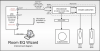
Joe, That Home Theater link helped, after a couple of clicks, I found the below USB interface hookup, after clawing my eyes out trying to find it else where..., for others, this may be helpful....
Secondarily, I mentioned earlier, initially I had to resort to the Mic output of the computer to feed the REW to the receiver, BUT I saw a guy taking it out of the HDMI port, BUT I think the below is the way it is "meant to be" when using an outboard USB mic interface (they refer to it as a soundcard), I had previously tried everything to make it work, but wound up with the laptop Mic O/P, I haven't tested this below hook up yet but I will and validate it, I will also try the HDMI laptop O/P and validate it.

Note: I found that the REW doesn't recognize the various drop down I/O selections for a short while before adding them to the pull down selection list and only initially gives the default selections, but after 15-30 seconds from plugging something in, the software adds the particular I/O to the dropdown list. It doesn't "exactly" match the device in the description, but a pre/post view combined with the description helps to identify it for selection. (This is in reference to the "Preferences" screen I/O.

To me the REW "general" reference to Input(s) and output(s), I found to be very confusing and caused a long term state of failure for me. Obviously hind-sight is 20/20 and its now easy, so was looking to help others through the maze.

upload_2022-11-1_7-21-40.png
 
I would pull down the region centered on 100 HZ for a flatter curve. What you have now is similar to what you would find from a juke box system or a poorly voiced disco system.
 
Joe, That Home Theater link helped, after a couple of clicks, I found the below USB interface hookup, after clawing my eyes out trying to find it else where..., for others, this may be helpful....
Secondarily, I mentioned earlier, initially I had to resort to the Mic output of the computer to feed the REW to the receiver, BUT I saw a guy taking it out of the HDMI port, BUT I think the below is the way it is "meant to be" when using an outboard USB mic interface (they refer to it as a soundcard), I had previously tried everything to make it work, but wound up with the laptop Mic O/P, I haven't tested this below hook up yet but I will and validate it, I will also try the HDMI laptop O/P and validate it.

Note: I found that the REW doesn't recognize the various drop down I/O selections for a short while before adding them to the pull down selection list and only initially gives the default selections, but after 15-30 seconds from plugging something in, the software adds the particular I/O to the dropdown list. It doesn't "exactly" match the device in the description, but a pre/post view combined with the description helps to identify it for selection. (This is in reference to the "Preferences" screen I/O.

To me the REW "general" reference to Input(s) and output(s), I found to be very confusing and caused a long term state of failure for me. Obviously hind-sight is 20/20 and its now easy, so was looking to help others through the maze.

View attachment 2703147

That's pretty much how I use it. My differences are, I have an electronic crossover and use a DSP in the feed to my subwoofers only. The front channel outputs from my processor are via an HT bypass through my two-channel preamp.
 
I would pull down the region centered on 100 HZ for a flatter curve. What you have now is similar to what you would find from a juke box system or a poorly voiced disco system.
Thanks but this is a raw first cut with near zero adjustments, it is just the first cut at it. But since you are commenting on curves, what do you say that a nice curve might look like???
 
That's pretty much how I use it. My differences are, I have an electronic crossover and use a DSP in the feed to my subwoofers only. The front channel outputs from my processor are via an HT bypass through my two-channel preamp.
Hey Joe, well , like I said, this is just the first cut, I have variable separate XOvers and Paragraphic EQ for mains, + subs and a blended (summed) center channel, I do have the DSP as well but I dont use it since I control the DSP through the computer to the Crown amp array (via audio architect software)
 
Back
Top Bottom