• The move to the new server is done. There are some software and database maintenance updates in process. This has us passing the hat around to help out. We appreciate any donations. Seriously, even a dollar helps. The payment page may be found here - https://www.audiokarma.org/support.html

Right Speaker Issue

Seabody

New Member
Hey folks,

I've recently set up a Pioneer SX-1080, however I'm having a slight issue. The right speaker channel sounds muffled. I've tried both A and B speaker ports with the same result. Switching the speaker cables causes my left speaker to exhibit the same problem so that rules out a speaker or wiring issue.

I've cleaned things out using deoxit. Should I have it another blast you think, or is this another issue?

There is definitely sound coming from the speaker, however it's very low. Sometimes it kicks in for a moment but then drops out again. Left speaker port on both A & B works flawlessly.

Any advice would be greatly appreciated!

Cheers,

Seabody
 
Register to hide this ad
Is problem independent of Input Selection (Phono/Tuner/Aux/Tape)? Any buttons or switch manipulation cause the Right channel to correct itself? That could indicate a dirty control pot/switch contact issue.

Try crossing your Pre-Out and Amp-In connectors with a patch cord. Right Pre-Out to Left Amp-In same for Left Pre-Out to Right Amp-In. If problem remains in Right side it should point to something in the Amp or Speaker Protection (Relay?) sections. If problem moves to Left side than issue is before the Pre-Out stage (Tone/EQ sections). Or feed another signal direct into Amp-In to test that section.
 
The problem persists across inputs, tested with both phono and tuner.

Switching the Pre-Out/Amp-In cables to cross over has no effect - still an issue on the right side.
 
So sounds like in Amp or Protection area. If you had a scope you could input a 1kHz Sine wave into Aux In and then check signal before and after the Speaker Protection Relay to see if the relay contacts are bad on the Right side. Or pull the relay cover and inspect the contacts. Others with more experience on the SX-1080 will probably jump in with additional suggestions.
 
Try cycling the switches and pots many, like 50, times with the power off and see if that made any changes. If it does affect it, then you know it is not an amp issue, but rather a switch/pot issue.
 
Try cycling the switches and pots many, like 50, times with the power off and see if that made any changes. If it does affect it, then you know it is not an amp issue, but rather a switch/pot issue.

Wow, that made a HUGE difference. Right speaker is still coming in a little lower, but it's probably 60/40 now. Also, previously the right would kind of cut in and out between clean and choppy sound - it sounds completely clear now.

So best bet is to go back to the deoxit cleaning thread and give the pots all another go over? I cycled literally everything so I'm not 100% certain which one(s) were the problem.

Also, thank you all for the help - I'm a complete newb with vintage gear/electronics in general.
 
"Switching the speaker cables causes my left speaker to exhibit the same problem so that rules out a speaker or wiring issue" .Simply try different Cables by chance:)
 
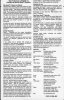
Seabody, just using Deoxit alone is not always the answer. I place isopropyl alcohol in a needle or squirt bottle and use it to flush out crap inside the switches and pots. I leave it dry overnight. The next day I use application of Deoxit 100% in a needle bottle. I follow this, after drying, with an application of Caig Fader 100%. This is followed, after drying, with an application of Caig Shield. Shield is designed to seal off the sealed contacts so they stay clean, otherwise you will be doing a Deoxit application very soon after. Here is the instructions from Caig:

Deoxit Instructions.jpg
 
Thanks all. I'll start with another solid cleaning and also replace the relay. Hopefully that will get things good as new. Very happy to have found these forums - very helpful folks here!

Cheers,

Seabody
 
Back
Top Bottom