• The move to the new server is done. There are some software and database maintenance updates in process. This has us passing the hat around to help out. We appreciate any donations. Seriously, even a dollar helps. The payment page may be found here - https://www.audiokarma.org/support.html

Ripping vinyl to Mac computer without analog audio input jack

monkboughtlunch

Super Member
Apple phased out the useful analog audio input jack on iMac and Mac Mini and Mac Book etc.

I assume the only way to rip vinyl on newer Apple computers is to use one of the Mac's USB inputs. Is this correct? Anyone successfully done this with high quality results?

  1. Is there a high quality (audiophile) way to do this (since the analog input jack has been deleted by Apple)?
  2. If so, what is the work flow from the turntable into the computer?
  3. What gear is recommended if you already have an outboard phono preamp you want to use?
 
Register to hide this ad
FYI, you don't "rip" vinyl. Ripping refers to making a perfect digital copy of a CD or DVD. When the source is an analog record or tape, the term is "dubbing" or "transferring".

And as for those old Macs with the line-level audio input jack -- they're cheap enough now that it might be worth getting one just for the purpose of transferring audio. Even the long-obsolete PowerPC models are perfectly fine for this task.
 
+1 on the UCA202 ... that's what I used to rip all my vinyls. Easy to use, cheap, and redbook quality rips. Plug your table into your external stage, output that to the behringer's inputs, hook the USB up to the computer, and yer good. No extra drivers required.

UCA202-large.jpg


Only problem I've heard folk have is no output when they first hook it up. If that's a problem, just flip the monitor switch to the other position.
 
I am using my Universal Audio Apollo Twin Duo interface at the moment to capture vinyl to my 2018 MacBook Pro using the Thunderbolt 3/USB 3 ports (there are four of these plus an 1/8" analog audio output --that's it for I/O on the new MacBook Pros).

Workflow--
Turntable-->Project Tube Box DS-->Integrated Amp Input--> Integrated Amp Recording Output-->Audio Interface Analog (1/4") Input-->Audio Interface Thunderbolt Output-->MacBook Pro-->Universal Audio Console (I/O software controller for hardware)-->Pro Tools

Alternatively, I could skip the integrated amp and go directly from the phono preamp to the audio interface.

I usually capture everything in wav format at 24 bit 96kHz.

Once in Pro Tools, I will split the album into songs and bounce each separately to its own wav or aiff file at 24bit 96kHZ. Those are then appropriately named and put into a folder with the name of the album. The album then gets copied under the appropriate artist on my music library external SSD (Samsung T5 1TB). I can plug the Samsung SSD T5 directly into my OPPO UDP 203 or, of course, into my computer for playback. I use Audirvana for playback on my Mac. Its cataloging is wonky, but the sound quality is superb and it recognizes everything, including 5.1 surround files. It also switches between DSD and other file types without popping and has no problems with high or low bitrates or sampling rates. Great player; crappy cataloger.


If you want to capture audio at 24 bit 96kHz or higher, a little Focusrite Scarlett 2i2 would be perfect. $159. Workflow would be the same as above except you would use a USB to Thunderbolt adapter between the Scarlett and the Mac. Also you could use Garage Band or the Ableton Live Lite DAW that comes bundled with the Scarlett to capture the music. Familiarize yourself with the Audio MIDI Setup utility on your Mac if you haven't already.

If you are going to be doing a lot of this, don't buy some cheapo solution from the accessories aisle at Best Buy. Get a real audio interface with decent Neutrik connectors and a stable analog to digital converter. The inputs on this Scarlett are dual purpose mic (balanced XLR) and line inputs. Very solid unit. I have one that I use for recording demos when I am not in my studio.
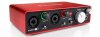

scarlett.jpg
 
Last edited:
I think those new Macs don't have any audio jacks of any sorts...

The new MacBook Pro has an analog audio output for headphones or powered monitors. I'm using the 15" fully spec'd version in my studio (and right now!). The big news on these machines is Thunderbolt 3, and Universal Audio just released its TB3 Apollo interfaces a few days ago. I ordered the x8. I'm pretty excited--it will be here on Saturday.

Apple Propaganda--
"Transferring data at speeds of up to 40Gb/s, which is two times faster than Thunderbolt 2 and eight times faster than USB 3, Thunderbolt 3 delivers the fastest connection to any dock, display, or device."
 
I think those new Macs don't have any audio jacks of any sorts...
I'm looking at pics of the new Mini due out next week, and it still has the hybrid headphone jack. Also two USB ports, HDMI, four Thunderbolt ports, and Ethernet.
The Mini will be my next computer when (not if) my iMac dies. The iMac is now "legacy" which means Apple no longer supports or services it.
 
Last Mac computers with an analog line-input jack:

iMac: Mid 2011 (iMac12,2)
Mac Mini: Late 2014 (Macmini7,1)​
Mac Pro: Mid 2012 (MacPro5,1)
MacBook: Mid 2010 (MacBook7,1)
MacBook Pro: non-Retina Mid 2012 (MacBookPro9,1 or MacBookPro9,2)
 
I use an AT DD TT made for this which has a BK AD converter and USB output. That's about as good as it gets these days. Audio inputs on a PC are not always noted for quality unless you are using an after market adapter.
 
FYI, you don't "rip" vinyl. Ripping refers to making a perfect digital copy of a CD or DVD. When the source is an analog record or tape, the term is "dubbing" or "transferring".

Speak for yourself, guy. :rolleyes: I "rip" vinyl when I make digital copies of it. I don't want people think I'm making a analog copies.
 
Anything with the "Behringer" name should be suspect. Some of their products are OK, but you need to read the reviews and make informed choices with this brand.
Even the entry-level Behringer interfaces are fine for home use. They just don't go above 16/48 in recording or playback.
 
Speak for yourself, guy. :rolleyes: I "rip" vinyl when I make digital copies of it. I don't want people think I'm making a analog copies.
Ditto. I even called my purpose built PCs "Rippers."
Speaking of which, I dismantled the last Ripper several months ago to make room for more LPs (what else?) but I have other LPs that I'd like to load into iTunes on my phone. Will Audacity rip mp3? This is just for the phone, no need for hi-rez.
 
Speak for yourself, guy. :rolleyes: I "rip" vinyl when I make digital copies of it. I don't want people think I'm making a analog copies.
The term "rip" comes from "ripping off" -- as in ripping off the record companies by copying a friend's CD instead of purchasing one for yourself.

These days, the record companies are the ones ripping us off, by charging $30+ for vinyl records that are often warped or scratched, have high surface noise, and don't sound any better than CDs...
 
Some hobby options above will work just fine... especially for mp3

But for discussion sake keep in mind the sky is the limit price-wise when transferring LPs to digital (Flac). The methods and equipment are so good today a 'ripped' Flac file can sound indistinguishable (critical eared panel) from the LP when both are played back on top dollar equipment
 
I have a UCA-222. As far as I can tell it's a UCA-202 with a red case instead of silver. It and the 202 go to 16/48 for a sampling rate.
 
Back
Top Bottom