

You are using an out of date browser. It may not display this or other websites correctly.
You should upgrade or use an alternative browser.
You should upgrade or use an alternative browser.
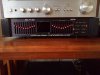
SAE E102 Equalizer - Display Problem
Register to hide this ad


century tek
Addicted Member
Make sure all 3 push buttons are pushed in under the display. My Fisher EQ also has these and needs to be pushed in in order for my spectrum display will show. And turn off your tape monitor. Don't need it if your EQ is connected to your stereo properly.
If that doesn't help, then it has bigger problems that need to be addressed.
If that doesn't help, then it has bigger problems that need to be addressed.
Last edited:

DoctorJon
Member
It has L, L+R, R underneath the display can press them all at once but they don't have an effect on the display.Make sure all 3 push buttons are pushed in under the display. My Fisher EQ also has these and needs to be pushed in in order for my spectrum display will show. And turn off your tape monitor. Don't need it if your EQ is connected to your stereo properly.
If that doesn't help, then it has bigger problems that need to be addressed.
Tape Mon off you got it.
DoctorJon
Member
I was...Were you feeding it a signal when you took the picture? Do you need to push the top right "Display Peak" button?
I have tried Displaying Peak but it has no effect on the visual of the display in center.
DoctorJon
Member
Make sure all 3 push buttons are pushed in under the display. My Fisher EQ also has these and needs to be pushed in in order for my spectrum display will show. And turn off your tape monitor. Don't need it if your EQ is connected to your stereo properly.
If that doesn't help, then it has bigger problems that need to be addressed.
Any suggestions?
How?I got it to work this evening. Thank you for all the suggestions. Solved!
Rick “don’t keep us in suspense” Denney

goodolpg
Just an old fart trying to help.
I got it to work this evening. Thank you for all the suggestions. Solved!
That's great.
Don't post the solution so others can ask the same question in the future. Make them work for the solution just like you did.
Especially if it was operator error and/or failure to find and read the manual.
You don't want to embarrass yourself just to help someone in the future.
Last edited: