• The move to the new server is done. There are some software and database maintenance updates in process. This has us passing the hat around to help out. We appreciate any donations. Seriously, even a dollar helps. The payment page may be found here - https://www.audiokarma.org/support.html

Safely Using Pre Gain without Clipping

EddNog

Active Member
I have a WiiM Ultra streamer as my main source. If I’m using ReplayGain for my Qobuz and personal library listening, but not the WiiM's room correction or PEQ, is it safe to apply some positive adjustment in the WiiM's Pre Gain control under Inputs without causing distortion or clipping? I use an external room correction/bass management/tone control DSP (DSPeaker’s Anti-Mode X2D), and due to the use of the tone control feature to sumulate a Harman curve, I lose a substantial amount of gain, and with the VibeLink connecting digitally to the Anti-Mode’s output, I can’t just jam a preamp with active gain in there to get more gain. I am hoping that (at least theoretically) I can apply (maybe no more than +5dB) a positive gain in the WiiM Ultra's Pre Gain panel to get some gain back, especially since I use ReplayGain to help reduce big up or down volume changes between songs on my mixed playlists.

Anyone got advice and/or experience in general with positive settings in software preamp/DSP, especially used in conjunction with ReplayGain? In reality there are only a handful of tracks in my library where I currently peg volume at 100 and it’s still a smidge not loud enough (such as Karajan conducting Beethoven or Carmen performed by All-Star Percussion Ensemble…highly dynamic orchestral pieces that ought to be very loud when hitting peak passages), and they’re still just slightly less loud than I want to go.

-Ed
 
Register to hide this ad
Does your playback software not allow you to set your target replaygain volume level or LUFS?

I use Roon and it allows me to specify LUFS for volume levelling.

If it is a local track, manually edit the replaygain tags is the other option.
 
Last edited:
Does your playback software not allow you to set your target replaygain volume level or LUFS?

I use Roon and it allows me to specify LUFS for volume levelling.

If it is a local track, manually edit the replaygain tags is the other option.
I have never seen this option in Qobuz.

-Ed
 
Adding 5db pre-gain might get you digitally clipping on some stuff in your room correction processing.

Having to dime your volume might not be that healthy for your system, sounds like you just need more power.
 
Adding 5db pre-gain might get you digitally clipping on some stuff in your room correction processing.

Having to dime your volume might not be that healthy for your system, sounds like you just need more power.
My room correction (DSPeaker Anti-Mode X2D) does not add gain anywhere, unlike the WiiM room correction—this is part of the reason I use that instead of WiiM’s.

-Ed
 
My room correction (DSPeaker Anti-Mode X2D) does not add gain anywhere, unlike the WiiM room correction—this is part of the reason I use that instead of WiiM’s.

-Ed

Is the DSPPeaker Anti-Mode X2D after the WIIM? My point is if you are feeding it more gain, it probably will have to lower that gain to prevent digital overs or it may clip.

Or is it after your preamp?
 
Is the DSPPeaker Anti-Mode X2D after the WIIM? My point is if you are feeding it more gain, it probably will have to lower that gain to prevent digital overs or it may clip.
Ah, so you’re saying if I raise the gain in the WiiM, since the Anti-Mode comes after the WiiM, the Anti-Mode will lower gain back down? Interesting…

-Ed
 
Ah, so you’re saying if I raise the gain in the WiiM, since the Anti-Mode comes after the WiiM, the Anti-Mode will lower gain back down? Interesting…

-Ed

It may, it needs headroom to do what it does without introducing digital clipping.

The Anti-Mode input volume trim would be where you want to play and see what happens, does it have any indicator if it's clipping?
 
If there is a headroom setting in the Anti-Mode you could also try lowering it if you know replaygain is guaranteed to introduce some digital head room.

Just be aware if you turn off replaygain, it could then cause clipping in the Anti-Mode.
 
If there is a headroom setting in the Anti-Mode you could also try lowering it if you know replaygain is guaranteed to introduce some digital head room.

Just be aware if you turn off replaygain, it could then cause clipping in the Anti-Mode.
I'll look into this. I don't think there is a control for this, but thanks for the advice.

-Ed
 
I'll look into this. I don't think there is a control for this, but thanks for the advice.

-Ed

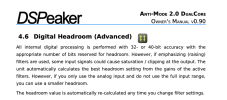
I bit of googling indicates that there should be and I think it might be doing a 6db reduction by default.

I know with volume levelling in Roon I can get away with a less digital headroom when EQing after. -1.5db seems to be enough.

Screenshot 2025-04-03 at 9.39.16 AM.png
 
I bit of googling indicates that there should be and I think it might be doing a 6db reduction by default.

I know with volume levelling in Roon I can get away with a less digital headroom when EQing after. -1.5db seems to be enough.

View attachment 3471844
I just checked, and that section does not exist in the manual for the X2D model.

The 2.0 DualCore uses the older Anti-Mode 2.0 correction model.

The X2 and X2D models use the newer Anti-Mode 3.0 correction model. There may be many differing points of functionality between the models. Given this section is completely missing in the manual for the X2/X2D models, it might not apply.

But again I do appreciate your efforts!

-Ed
 
Well that sucks as volume levelling is reducing the digital volume and the Ant-Mode 3.0 will be doing the same to perform room correction as it has no way of knowing that it was already done prior via volume levelling.
 
Well that sucks as volume levelling is reducing the digital volume and the Ant-Mode 3.0 will be doing the same to perform room correction as it has no way of knowing that it was already done prior via volume levelling.
I am digging into the DSPeaker Console which is a web-based tool for X2 and X2D models.

It has an Input Volume Trim adjustment, which allows adjusting relative gain for each input separately. This looks like the function I can try to play with. I wouldn't have dug deep enough to find this without your input, so thanks again!

-Ed
 
I am digging into the DSPeaker Console which is a web-based tool for X2 and X2D models.

It has an Input Volume Trim adjustment, which allows adjusting relative gain for each input separately. This looks like the function I can try to play with. I wouldn't have dug deep enough to find this without your input, so thanks again!

-Ed

Maybe there is an advanced section still that allows you to manually set the headroom which is the best place to adjust it instead of increasing input gain.
 
Back
Top Bottom