• The move to the new server is done. There are some software and database maintenance updates in process. This has us passing the hat around to help out. We appreciate any donations. Seriously, even a dollar helps. The payment page may be found here - https://www.audiokarma.org/support.html

Sansui 4000 Clean Up and Issues

SupATro0pA

New Member
I acquired a Sansui 4000 (along with Sp-2000 speakers) recently. It wasn’t working at first, but I cleaned the pots and it started working.

The tape monitor button was not holding, but this was not a big deal, I was mostly using the aux and occasionally the phono. However, I just acquired a working, matching, Sansui Reverb Amp, and thought I’d take a crack at fixing the button.

The pin and then the interior springs of the button left the chat pretty quickly, so I reassembled the switch without the interior pieces, knowing that it would no longer work, and with intention of getting a replacement button off the internet. I have reassembled the receiver, which I have done three or four times, but I am now not getting sound. I get soft music out of the speakers when I turn the volume up with audio running into the tape out, but that’s it.

Would a completely disassembled tape monitor switch cause this, or should I be starting somewhere else?
 
Register to hide this ad
The audio goes through the tape monitor switch when it is in the off position. When the switch is in the on position the signal also goes through the switch, but it goes out the tape record jack and back in the tape play jack. If the switch has no contacts in it, the receiver will have no audio. You could bridge the connections of the switch in the on position (wires between solder connections), and then put a pair of patch cords between the record out and play in jacks, or connect your reverb amp in the tape loop. The only way to repair it properly would be to replace the switch.
 
Or search for all of the missing pieces in the room. Have had to do that a number of times for things that exploded apart including similar switches.
 
Or search for all of the missing pieces in the room. Have had to do that a number of times for things that exploded apart including similar switches.
Do you happen to know what pieces make up this particular switch?

I know of the pin (still missing) and have the little v shape (which I’m assuming is either the spring or the contact piece). I think I’m missing at least one more piece, either a spring a ball or both.
 
The audio goes through the tape monitor switch when it is in the off position. When the switch is in the on position the signal also goes through the switch, but it goes out the tape record jack and back in the tape play jack. If the switch has no contacts in it, the receiver will have no audio. You could bridge the connections of the switch in the on position (wires between solder connections), and then put a pair of patch cords between the record out and play in jacks, or connect your reverb amp in the tape loop. The only way to repair it properly would be to replace the switch.
Thank you so much. This clears up my path to resolution.

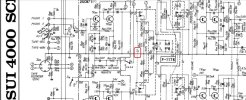
I spent way too much time staring at the old paper schematic trying to find the little S3 that designates the Tape Monitor switch. Still haven’t found it.
 
I have a 2000A for repair on the shelf tonight I can probably open the tape monitor switch on it and take pictures of the pieces and post them. Looks like it should be the same switch.
 
Thank you so much. This clears up my path to resolution.

I spent way too much time staring at the old paper schematic trying to find the little S3 that designates the Tape Monitor switch. Still haven’t found it.

There's a guy selling that switch bank on ebay. (F-1178)

Screenshot (22).jpg
 
Since I’ve got a good bank on the way, I might try hot wiring this one just to keep the unit working.

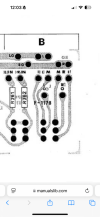
Based on the schematic + this picture of the board from the service manual, the switch moves from L + LI to L+LM and likewise for the R side? So I could do two wires, L-LI and R-RI to return normal sound and forget the Monitor for the time being?IMG_1072.png
 
I’ll post more about what my solution is for the button when the parts get here. I still would like to be able to run the matching Reverb amplifier off of it.
 
Back
Top Bottom