• The move to the new server is done. There are some software and database maintenance updates in process. This has us passing the hat around to help out. We appreciate any donations. Seriously, even a dollar helps. The payment page may be found here - https://www.audiokarma.org/support.html

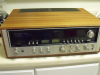
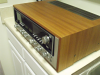
sansui 8080db

Agust ivan

New Member
Hello friends, someone who can help me in my sansui 8080db, I have the problem that Resistors R42, R44 of PCB F-2624 are damaged, this happens as soon as I turn on my 8080db and in exchange all fuse-type resistors and also a transistor that was shortened to be precise, the Transistor TR16, but as soon as I change the resistances for new ones, I turn on my 8080db and in a moment the resistors R42, R44, are damaged again (burn) in the same way when this happens of damage 2sc1116 2s audio outputs, I hope you can help me with my problem. greetings thank you very much
 
Register to hide this ad
So it appears that you developed issues after replacing the fusable resistors, Is that correct?
If so you should do the following"
1) check all the connections of these resistors and make sure you didn't bridge solder across other connections causing a short
2) check the transistor you replaced and make sure that you installed it correctly as far as B C E. Some replacements have different pin outs
3) check the driver transistors TR702 and TR704 to make sure they are not now shorted or open, as they may result in R42 and R44 burning
4) check the driver transistors TR12 and TR14 for shorts E to C or to B as these can cause those resistors to burn
5) Check transistor TR10 and make sure it isn't open B to E or shorted
6) if you found shorted output transistors (TR702 and TR704) you need to check the 2 resistors on the main power board (r20 and R24) to make sure they didn't open

Lastly, make sure to use a dim bulb tester when bring up the 8080. A dim bulb tester is no more than an incandescent bulb connected in series with the hot leg of the power input. This will prevent overcurrent and prevent further burning and damage. Using a 65W to 100W incandescent bulb in series on powerup you should get initial full brightness, but the lamp should dim considerably after a few seconds. If it stays bright you still have shorted components.
More details on putting the dim bulb tester together is available by searching this site for "Dim Bulb Tester"

Good luck
 
Hello Tom


All this is what has happened in the analysis I have done in 8080db


The 8080db came with audio outputs (TR704, TR702) in short circuit, I put the audio outputs (TR704, TR702) for some new ones turned on and it was heard but with an audio distortion in the right side channels, after damaged the audio outputs (TR704, TR702) again all this happened at a very fast time.

1-I noticed that the resistors R42, R44 of the PCB (F-2624) had been damaged, also check transistors and TR16 was in circuit.

2-Replace the resistors with new ones, replace the TR16 transistor with one of the same part number 2SC945

3-Replace audio outputs (TR704, TR702)

4-I turned on the 8080db and the resistors (R42-R44) and the audio outputs were damaged once more


I appreciate your help


Best regards
 
It is very important to NOT connect this receiver to direct power when you are testing it. Use the dim bulb tester or you will keep on shorting outputs and burning resistors.
 
Hello Tom

Thank you I will apply the procedure that tells me for to avoid that again components damaged

Thanks for your great help

Best regards
 
Hello Tom


All this is what has happened in the analysis I have done in 8080db


The 8080db came with audio outputs (TR704, TR702) in short circuit, I put the audio outputs (TR704, TR702) for some new ones turned on and it was heard but with an audio distortion in the right side channels, after damaged the audio outputs (TR704, TR702) again all this happened at a very fast time.

1-I noticed that the resistors R42, R44 of the PCB (F-2624) had been damaged, also check transistors and TR16 was in circuit.

2-Replace the resistors with new ones, replace the TR16 transistor with one of the same part number 2SC945

3-Replace audio outputs (TR704, TR702)

4-I turned on the 8080db and the resistors (R42-R44) and the audio outputs were damaged once more


I appreciate your help


Best regards

1. Build a DBT (dim bulb tester) as was already mentioned. Use a 150 watt *incandescent* bulb. Or if not available, use a 100 watt incandescent bulb as a minimum. Do NOT use an LED light bulb.
1a. Get the service manual! It is the same as the 9090db manual. But look for the 8080db specific sections, and part numbers. Beware there are some "mistakes" in the manual. And some mistakes on the silkscreen on the boards.
1b. Take LOTS of pictures before you begin any work for a reference to component orientation. Note the silkscreen mistakes mentioned.
2 Make sure you are using *genuine* transistors, especially the output transistors. A FAKE transistor will short out in a heartbeat, then cause more damage to your driver board F-2624
3. Change each and every fusible resistor, even if it "looks" good. They all go bad by drifting up high in resistance.
4. Pull a transistor to check it. That is a must. Same goes for diodes.
5. Pull and check all 4 driver transistors. The ones on the heatsinks. At least one is more than likely shorted which happens when output transistors short.
5. Pull and throw away the two VD1212 diodes (the little red "ball" looking things) that are on little ceramic standoffs. Replace them with 2 1N4148 small signal diodes in series for *each* one. One VD1212 = 2 1N4148 in series.
6. Show us *clear* pictures and don't be afraid to ask questions.
7. Use the DBT you built in #1 *every* time you power it up until all work is done, and it shows it is safe to operate on line voltage. If the bulb stays bright for more than 3 seconds, shut it off to prevent any more damage.

 
For unknown equipment, use a 60w bulb. The smaller the wattage bulb, the higher the resistance in the power circuit. 150w bulb won't provide much current limiting.

- Pete

I'll buy that. :biggrin: The 8080db draws some current and might show a "false positive" with the 60w. But it is a bit safer. Hopefully, it will be diagnosed enough to not be an "unknown" by then. Also, if the BIAS is a little high at 40ma or so (but does no immediate harm), the 60w will seemingly glow a bit too bright to think "something's wrong". But at least nuttin's burnin'! :p
We don't know the history of the unit either. Whether he has owned it for a while and this happened, or he bought it in it's present condition. If he recently purchased it, it may need the voltage set. I get the feeling he is somewhere in "220v country". Either way, proceed with caution and one step at a time. Fully diagnose first (after the DBT is built), and find all the faulty components. Then replace as needed with known *quality* components of the proper type.
 
I've had a lot of these on my bench and 60w works fine, no false positive. The line current doesn't mater as long as the bulb matches the line current.

- Pete

If anybody knows how the 8080db behaves, it would be you. :thumbsup: I only mentioned 220v to be sure the 8080db was set for whatever voltage it needs. I've had things come to me that had "smoked", or wasn't "sounding right" only to find out they got it off FleaBay or CL, or "somewhere" and the voltage was set for 220v instead of 120v. The same could happen in reverse.
 
Hello friends

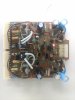
where me locations is 110v, still I am waiting to arrive the new components in order to replace those who damaged the last time before not using the meter bulb, as new components arrive I will proceed with the repair of the 8080db,Some images of the PCB (F-2624 for 8080db).

Of beforehand thank you very much for your great help best regards
 

Attachments

  • IMG_20190427_070704001.jpg
    IMG_20190427_070704001.jpg
    41.3 KB · Views: 35
Back
Top Bottom