• The move to the new server is done. There are some software and database maintenance updates in process. This has us passing the hat around to help out. We appreciate any donations. Seriously, even a dollar helps. The payment page may be found here - https://www.audiokarma.org/support.html

Sansui AU-101 where to obtain replacement Selector Switch ?

marbles1

New Member
Hi,

I need some help in obtaiing a new switch for an old 70's Sansui AU-101 integrated amp.
it's the input selector switch for Mic, Phono & Aux that sits far right on the front panel.
the sevice manual parts list calls it a S1 (a~d) Selector Switch 1-4-3 1101240
does anyone know where i can buy a replacement part?
 
Register to hide this ad
Why do you want a replacement? Is it physically damaged or just 'not working' ? Usually if you have the switch it can be restored to working condition with a good clean.
If you don't have the switch (missing?), or it is physically damaged - then watch for it on ebay, but don't hold your breath. :)

Just remember this is the World of Vintage Audio where you are lucky, or very lucky to find replacement spare parts. 40 years ago Sansui probably had those switches made to order, they had just enough made to satisfy production requirements, plus a few for warranty repairs. After a few years there were none to be had anywhere. Now 35+ years later, you are asking where you can buy a new one. :angel:

Edit - update
I've just been looking around and this might work

It is a 3 way 4 pole switch, which is what I judge that you need to replace the original. It depends if you have the smarts to wire up this replacement, and whether the switch shaft (which is 'flatted' or 'D' shaped), is compatible with the switch knob.
 
Last edited:
the switch is there but only works in one position.. it has been cleaned a few times but has not improved..
I can get a second opinion on the cleaning but it looks like it's too far gone.
the Mouser website is down atm but i'll look into your recommendation later..
thanks very much for your help John.
 
I can get a second opinion on the cleaning but it looks like it's too far gone.
I give switches like that a de-grease first - then paint the contacts using a soft brush with liquid jewellery cleaner - works like a charm. (Sometimes I fully immerse the switch in the jewellery cleaner). Then rinse with plain water and leave to dry.

But if someone has been there before and roughed up the switch contacts they are probably not gripping the contacts anymore. You can sometimes gently ease them together so they pinch the contacts properly again.
 
Last edited:
“Too far gone”…? Photos (macro) would help. Afre with Hyperion…If it’s in original condition and nobody messed with it mechanically (like poked around and possibly bent contacts or something), it’s likely repairable.
 
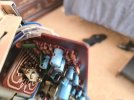
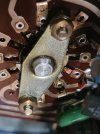
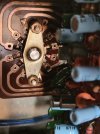
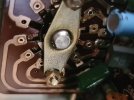
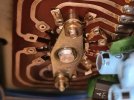
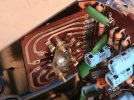
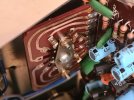
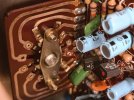
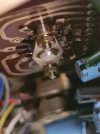
This is the best i could do with just the cover off and my phone.. they look better if you zoom out a bit.
Nobody has done anything to it other than spray cleaner on it..
The shaft is round and not D shaped like the potential replacement part Hyperion found on Mouser.
What do you think?
 

Attachments

  • 1.jpg
    1.jpg
    77.5 KB · Views: 22
  • 9.jpg
    9.jpg
    101.3 KB · Views: 22
  • 8.jpg
    8.jpg
    109.1 KB · Views: 21
  • 7.jpg
    7.jpg
    85.9 KB · Views: 21
  • 6.jpg
    6.jpg
    102.5 KB · Views: 23
  • 5.jpg
    5.jpg
    106.8 KB · Views: 24
  • 4.jpg
    4.jpg
    103.9 KB · Views: 24
  • 3.jpg
    3.jpg
    112.4 KB · Views: 22
  • 2.jpg
    2.jpg
    76.9 KB · Views: 23
Welcome.

How about you tell us a little about the unit? Do you know any history? Have you serviced it all, or know if it was serviced.
Tell us about your skill level and the tools you have available to you. That will help us provide good advice.

That switch looks really nice and clean, and I don't think it is too far gone unless somebody has been poking and bending contacts.

How sure are you it is the problem? It is somewhat unusual for two inputs to be completely gone. Does it crackle or give any indication of audio passing through it when you wiggle it around or switch back and forth? Which two inputs don't work?

I have some ideas about testing and repair but want to hear about history (if you know) and your skill set.

How comfortable are you with completely removing (unsoldering) the switch from the pc board? It would be the best way to work on it.

BTW thanks for the pictures, we love pictures here!
 
I give switches like that a de-grease first - then paint the contacts using a soft brush with liquid jewellery cleaner - works like a charm. (Sometimes I fully immerse the switch in the jewellery cleaner). Then rinse with plain water and leave to dry.

But if someone has been there before and roughed up the switch contacts they are probably not gripping the contacts anymore. You can sometimes gently ease them together so they pinch the contacts properly again.
Off topic a bit but what type (brand) of jewelry cleaner do you use?
 
Off topic a bit but what type (brand) of jewelry cleaner do you use?
It's called 'Silver Dip' - there must be many copies of this around the World. ;)

I agree that switch looks fine, further investigation required I think. ;)
 
Welcome.

How about you tell us a little about the unit? Do you know any history? Have you serviced it all, or know if it was serviced.
Tell us about your skill level and the tools you have available to you. That will help us provide good advice.

That switch looks really nice and clean, and I don't think it is too far gone unless somebody has been poking and bending contacts.

How sure are you it is the problem? It is somewhat unusual for two inputs to be completely gone. Does it crackle or give any indication of audio passing through it when you wiggle it around or switch back and forth? Which two inputs don't work?

I have some ideas about testing and repair but want to hear about history (if you know) and your skill set.

How comfortable are you with completely removing (unsoldering) the switch from the pc board? It would be the best way to work on it.

BTW thanks for the pictures, we love pictures here!
Hi,

History:
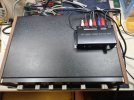
The unit belongs to my 86 yr old uncle. He bought it new in the 70's. It was repaired once about 10 yrs ago but he can't remember what was wrong with it at the time. Last week i took it to a local retired electronics tech who specialises in vintage hi-fi. He said the switch was the issue and sprayed contact cleaner into it multiple times over a few days but it didn't improve.. he also serviced the other levers & pots that were a bit scratchy and they responded well. He suggested getting a small 3rd party preamp unit that takes phono/CD inputs and feeding that into the Aux input and not bothering to try and fix the switch anymore. That option will be my last resort (See photo).

Fault Condition:
When the rotary selector switch is set to AUX it works fine. (no hum, noise, volume inconsistency between channels or overall weakness evident)
When the rotary selector switch is set to either Phono or Mic it has the fault. Phono is very dirty/noisy on the right channel and passes audio on the left but it has a hum.
The Mic setting has the dirty/noisy sound on both channels & not just one.. but it's mono so maybe that is why it's on both.
When the tape monitor switch (different lever switch) is set to Playback, that input works fine as well (in this state the rotary selector switch seems to be bypassed as turning it has no effect on what you hear)
Wiggling the selector switch doesn't affect the behaviour.

Logical Assumption:
With the tape input working fine it seems to prove everything downstream is ok.. The rotary selector switch seems to be the common point of failure with just the Aux setting working while the other 2 (Phono & Mic) exhibit the symptoms i mentioned above.

Skill Set:
I am not an electronics tech but i have done a number of basic repairs over the years like switch/pot replacements, recapping old electrolytics, biasing, circuit mods based on other peoples instructions/designs.. these often involve soldering which i can handle ok. I haven't reconditioned a switch before so would need some guidance on what's critical there. I could desolder the switch if necessary but would rather not if possible.


Below is a Drop Box link for audio recordings of each speaker (couldn't upload them here as .wav file type is not supported)
the right chanel has all the hiss/noise and the left chanel has a hum after audio finishes.
Maybe from the sound you can tell it's something else?

Audio Files

many thanks for your help :)
 

Attachments

  • preamp.jpg
    preamp.jpg
    145 KB · Views: 7
Hi,

History:
The unit belongs to my 86 yr old uncle. He bought it new in the 70's. It was repaired once about 10 yrs ago but he can't remember what was wrong with it at the time. Last week i took it to a local retired electronics tech who specialises in vintage hi-fi. He said the switch was the issue and sprayed contact cleaner into it multiple times over a few days but it didn't improve.. he also serviced the other levers & pots that were a bit scratchy and they responded well. He suggested getting a small 3rd party preamp unit that takes phono/CD inputs and feeding that into the Aux input and not bothering to try and fix the switch anymore. That option will be my last resort (See photo).

Fault Condition:
When the rotary selector switch is set to AUX it works fine. (no hum, noise, volume inconsistency between channels or overall weakness evident)
When the rotary selector switch is set to either Phono or Mic it has the fault. Phono is very dirty/noisy on the right channel and passes audio on the left but it has a hum.
The Mic setting has the dirty/noisy sound on both channels & not just one.. but it's mono so maybe that is why it's on both.
When the tape monitor switch (different lever switch) is set to Playback, that input works fine as well (in this state the rotary selector switch seems to be bypassed as turning it has no effect on what you hear)
Wiggling the selector switch doesn't affect the behaviour.

Logical Assumption:
With the tape input working fine it seems to prove everything downstream is ok.. The rotary selector switch seems to be the common point of failure with just the Aux setting working while the other 2 (Phono & Mic) exhibit the symptoms i mentioned above.

Skill Set:
I am not an electronics tech but i have done a number of basic repairs over the years like switch/pot replacements, recapping old electrolytics, biasing, circuit mods based on other peoples instructions/designs.. these often involve soldering which i can handle ok. I haven't reconditioned a switch before so would need some guidance on what's critical there. I could desolder the switch if necessary but would rather not if possible.


Below is a Drop Box link for audio recordings of each speaker (couldn't upload them here as .wav file type is not supported)
the right chanel has all the hiss/noise and the left chanel has a hum after audio finishes.
Maybe from the sound you can tell it's something else?

Audio Files

many thanks for your help :)

Thank you for the excellent narrative, very helpful.

I agree with part of your logical assumption, everything downstream of the tape switch is OK. The aux input is also working fine and passing through the selector switch with no problems. I believe the common point of failure is the pre-amp, not the switch.

Both the mic and phono inputs share the pre-amp. All of the transistors in the pre-amp circuit are on the list of known trouble makers. causing noise & random static.
There are a couple of small value caps that could also contribute to the problems.

The AU-101 is very simple and has good access. I think I can talk you through putting in two temporary jumper wires at the selector switch which will tell us if the switch is the problem or not.

It seems like you easily have the skills to do this. I need to look over the schematic and the board layout to see where the jumpers would go. You will need a couple of short pieces of small wire, solid would be best if you have it. A scrap of CatX network cable has small solid wires in it.

I will get back with you later.
 
R002 (2.2KΩ) open perhaps?
Probably not. Some audio seems to be present. I am thinking transistors, maybe some of the caps?

OP said:
When the rotary selector switch is set to either Phono or Mic it has the fault. Phono is very dirty/noisy on the right channel and passes audio on the left but it has a hum.
The Mic setting has the dirty/noisy sound on both channels & not just one.. but it's mono so maybe that is why it's on both.
 
Sorry my world went to crap as far as spare time goes for a while. I have looked at where the jumpers need to go but still not done tracing out the circuit path.
 
Back
Top Bottom