• The move to the new server is done. There are some software and database maintenance updates in process. This has us passing the hat around to help out. We appreciate any donations. Seriously, even a dollar helps. The payment page may be found here - https://www.audiokarma.org/support.html

Sansui AU-20000 troubleshooting

BoBBa72

Member
Hi guys, i recently got this beautiful AU-20000 with some issues.
Previous owner said hi could use it 1-2 minutes and later the sound would get distorted and it would get really warm.
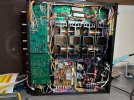
I found some obvious things like this on motherboard for the driver boards, the paths where almost off and i soldered wires to fix that.3.jpg
2.jpg
Another thing was that the voltage selector was connected not like the manual and set at 200V somehow and we got 230V here where i live so i changed it to 240V.
Since it had evidence that someone has been in it i decided to make a restore with caps, transistors, resistors similar to many of the threads here.

My main problem is that i can't set bias on pin 2 and 4 and reading zero but i can measure the pins under VR02 and set bias there.
DC offset is adjustable and ok.
I tried putting back the original transistors in F-2507 with the exception of TR-10 and TR-11 (MJE15032/33) with same result.
I'm all out of ideas and been struggling for days now so if someone could point me in the right direction in where to troubleshoot?
My knowledge in electronics is very basic but i love to learn stuff about it.
 
Register to hide this ad
Check the resistance from the pins on VR02 where you can measure bias to their corresponding pins on the bias test points. Is there continuity?
 
I know you're battling bias, but don't leave any original transistors on the amp boards, you'll just have more issues. Watch the new pinouts on TR04,5,8,9.
Check all power supply voltages going into the amp boards.
The bottom test points for bias are really hard to connect to, make sure your probes are really on there, I've had that happen before.

Can always do a DBT test too! The bulb should light up if you crank the bias on each channel one at a time. It won't hurt it.

These are a PIA. Good luck.
 
I know you're battling bias, but don't leave any original transistors on the amp boards, you'll just have more issues. Watch the new pinouts on TR04,5,8,9.
Check all power supply voltages going into the amp boards.
The bottom test points for bias are really hard to connect to, make sure your probes are really on there, I've had that happen before.

Can always do a DBT test too! The bulb should light up if you crank the bias on each channel one at a time. It won't hurt it.

These are a PIA. Good luck.
Thanks, i did measure it now and i could only get a few mV on each pin leading to F-2507 on both sides.
+68V on the motherboard (the ones fixed with wires) but only -0,6V on the other pin.
 
Last edited:
Yes there is continuity on pin 4 but nothing on pin 2.
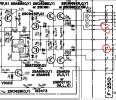
Have you had any luck getting good connections to measure the bias? I'm attaching a schematic, with the test points circled. Maybe you can attach your probes to the resistors on the board instead to get a better attachment point.

AU20000.png
 
Have you had any luck getting good connections to measure the bias? I'm attaching a schematic, with the test points circled. Maybe you can attach your probes to the resistors on the board instead to get a better attachment point.

View attachment 3048834
Yes i have Fluke SureGrip the ones that has hooks but i will see if i can remove the side panel when im home after work and try to measure where it stops :)
 
Have you had any luck getting good connections to measure the bias? I'm attaching a schematic, with the test points circled. Maybe you can attach your probes to the resistors on the board instead to get a better attachment point.

View attachment 3048834
Made another try with the side panel off and with the same result on both sides.
I must have done something very wrong since its on both boards.
Will give it some more time this weekend and find where i messed up.
 

Attachments

  • IMG_1164.jpg
    IMG_1164.jpg
    149.1 KB · Views: 29
Well i got +66V here on emitter TR04 and -66V on emitter TR05.
Should it be +6.3V on TR04 or is it just a error in the schematics?
I also checked the pins under F-2508 starting from left to right on the solder joints:
1. -78,4V
2. +85V
3. Ground or close to zero
4. Empty
5. +1,459V
6. Ground or close to zero
7. Ground or close to zero
8. +69,6V
9. Ground or close to zero
10. -69,5V
Shouldn't there be 35V somewhere?
 

Attachments

  • Screenshot 2023-12-01 at 21.11.21.png
    Screenshot 2023-12-01 at 21.11.21.png
    350.7 KB · Views: 8
Last edited:
Did measure the red and blue wires on the motherboard F-2512 the ones that where burned.
Red: +69V Blue: -0,6V, if i understand the schematics it should be -69V on the blue wire?
Have resodered all the connections on F-2512 and checked F2508 and cant anything wrong with it :dunno:
Any ideas where to check?
 
+68V on the motherboard (the ones fixed with wires) but only -0,6V on the other pin.

You're missing the negative voltage rail for the driver transistors which could explain why you're having trouble setting bias.

Trace the blue wire back to F-2511 and test there for the missing voltage. Disconnect the wire at terminal 30 and measure the voltage at that point. If you find -68Vdc at terminal 30 then there must be a fault in the wiring or connectors between F-2511 and F-2512. If not, then remove connectors 7 and 8 from F-2511 and measure the voltage at board terminal 7. If you measure the correct voltage at 7 but not at 30 then there must be a break on the underside of F-2511, but if you still have only 0.6V at this point then there must be a problem with the rectifier. You must operate the amp on DBT to avoid further damage.

Evidently, you also have problems with F-2508. I'm surprised you went to such lengths in replacing components without doing some basic trouble shooting first. It certainly complicates the task.
 
You're missing the negative voltage rail for the driver transistors which could explain why you're having trouble setting bias.

Trace the blue wire back to F-2511 and test there for the missing voltage. Disconnect the wire at terminal 30 and measure the voltage at that point. If you find -68Vdc at terminal 30 then there must be a fault in the wiring or connectors between F-2511 and F-2512. If not, then remove connectors 7 and 8 from F-2511 and measure the voltage at board terminal 7. If you measure the correct voltage at 7 but not at 30 then there must be a break on the underside of F-2511, but if you still have only 0.6V at this point then there must be a problem with the rectifier. You must operate the amp on DBT to avoid further damage.

Evidently, you also have problems with F-2508. I'm surprised you went to such lengths in replacing components without doing some basic trouble shooting first. It certainly complicates the task.
Wow thank you richardpp!
I will check that later today and get back.
Since it was broken when i got it i went all in and did not do the basic trouble shooting so you are right, im always saying "no one remembers a coward and everyone remembers the idiot" guess im the idiot now :biggrin:
 
You're missing the negative voltage rail for the driver transistors which could explain why you're having trouble setting bias.

Trace the blue wire back to F-2511 and test there for the missing voltage. Disconnect the wire at terminal 30 and measure the voltage at that point. If you find -68Vdc at terminal 30 then there must be a fault in the wiring or connectors between F-2511 and F-2512. If not, then remove connectors 7 and 8 from F-2511 and measure the voltage at board terminal 7. If you measure the correct voltage at 7 but not at 30 then there must be a break on the underside of F-2511, but if you still have only 0.6V at this point then there must be a problem with the rectifier. You must operate the amp on DBT to avoid further damage.

Evidently, you also have problems with F-2508. I'm surprised you went to such lengths in replacing components without doing some basic trouble shooting first. It certainly complicates the task.
Thank you richardpp, there was a small damage under the F-2511 and now i have +-68V on both sides on F-2512 :bowdown:
Still have the bias issue and no 35V from F-2508 so im guessing the issue is within F-2508.
Again thank you so much for pointing me in the right direction Richard <3
 
No worries, I'm glad it helped ...

I also checked the pins under F-2508 starting from left to right on the solder joints:
1. -78,4V
2. +85V
3. Ground or close to zero
4. Empty
5. +1,459V
6. Ground or close to zero
7. Ground or close to zero
8. +69,6V
9. Ground or close to zero
10. -69,5V

Pin 1 should be -85V. From F-2508, trace the blue wire back to F-2511, remove the connector at TM01 on F-2511 and measure the voltage there.

If you read -85V then the problem must be on F-2508 but if -78.4V check the solder joints around the rectifier diodes D03 , D04. Check the fuse holders F01, F02 for good contact. The film capacitor at C01 doesn't look right to me, I would have stuck with the ceramic disc type.

Pins 5 and 7 should be +35V and -35V respectively. Could you post a better photo of F-2508 ? It looks to me like TR12 is installed backwards.
 
Ok so i removed 2511 and put in the original ceramic capacitor in C01, checked all solder joints and resoldered D03, D04 and fuse holders.
TR12 is KSC2383 so pinout is ECB.
F-2508 Pin 1: -78,4V
F-2511 TM01 -68,4V
 

Attachments

  • 2508.jpg
    2508.jpg
    170.9 KB · Views: 10
Back
Top Bottom