• The move to the new server is done. There are some software and database maintenance updates in process. This has us passing the hat around to help out. We appreciate any donations. Seriously, even a dollar helps. The payment page may be found here - https://www.audiokarma.org/support.html

Sansui AU-999 unstable & bias issues

Assil

Member
Hi everyone,

I would to share with you my rather strange experience with a 1971 AU-999 recovered from scrap.

I renewed all transistors and Elec caps on all boards and some resistors. The PS reservoir Caps but I’ll replace them eventually. The Pots and switches were cleaned and as far as the F1159 boards are concerned, I replaced them with new spare boards.

I tested the preamp section successfully and the phono stage work perfectly. However I am facing the following issue with the power stage:

1. The amplifier sounds perfectly but I am unable to set the bias correctly due to the fact that whenever I put the speaker selector to OFF ( See Video) the series Safety bulb lights up. My understanding in such situation is that one of the channels of the amplifier is in saturation.

2. I checked the dc voltage of the main capacitors, and it drops from +\-41volts to around +/- 18 volts. I have checked the voltage across the resistors R854 and R856 on F1277 as well as resistors R853 and R855 on F1231. Following is my observation:

F1277-measurements
A- when speakers are connected (volume down to zero)
R854: 6.6 mV
R856: 0 mV
B- when speakers are disconnected (speaker selector switch to OFF)
R854: 281.9 mV
R856: 286.4 mV

F1231-measurements
A- when speakers are connected (volume down to zero)
R853: 1.2 mV
R855: 11.5 mV
B- when speakers are disconnected (speaker selector switch to OFF)
R853: 0.4 mV
R855: 0.3 mV

3. While playing, in case I switch the balance check S17 down, the safety bulb will start flashing on and off as you can see in the video.

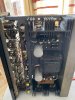
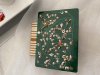
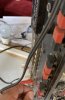
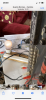
Please see the video link and photos attached. The video is on an iCloud link provided hereunder: https://share.icloud.com/photos/0F7MrrzujEK-rLVFAc8ynVGZA#Quatre_Bornes

In case you are unable to watch it let me know

Thanks for advising

Regards

Assil
 

Attachments

  • 4D40F70C-5BB2-4A23-9024-B5107D8F2288.jpeg
    4D40F70C-5BB2-4A23-9024-B5107D8F2288.jpeg
    138.5 KB · Views: 30
  • F04925DF-64CC-4464-B795-7642461CBF2F.jpeg
    F04925DF-64CC-4464-B795-7642461CBF2F.jpeg
    142.7 KB · Views: 30
  • 57688C44-13F5-47A8-A8C3-00872E02BCB5.jpeg
    57688C44-13F5-47A8-A8C3-00872E02BCB5.jpeg
    128.6 KB · Views: 31
  • 2C98C611-82D5-4E3B-9BE5-6EDD450659B7.jpeg
    2C98C611-82D5-4E3B-9BE5-6EDD450659B7.jpeg
    185.2 KB · Views: 32
Register to hide this ad
Do not expect normal performance from your amplifier with the 'safety bulb' (DBT) in circuit, strictly speaking it should only ever be used for fault finding hard to find overcurrent situations, and should never be used when playing music. Simply because, music peaks will light the 'safety bulb' - this is expected and normal - but also because of this rail voltages (as you have observed) will be pulled down by this extra current demand.

So unless there is another fault caused when you operate some switches, you can remove the 'safety bulb' as it has served its purpose and is no longer required now.
 
H
Do not expect normal performance from your amplifier with the 'safety bulb' (DBT) in circuit, strictly speaking it should only ever be used for fault finding hard to find overcurrent situations, and should never be used when playing music. Simply because, music peaks will light the 'safety bulb' - this is expected and normal - but also because of this rail voltages (as you have observed) will be pulled down by this extra current demand.

So unless there is another fault caused when you operate some switches, you can remove the 'safety bulb' as it has served its purpose and is no longer required now.


Hi Hyperion
Thank you very much for your prompt reply.
But I would like to clarify that the problem happens without music as well.
The bulb will light on , without music, whenever the speaker selector is switched to off. Also the voltage drops accordingly as described above
Regards,
Assil
 
According the instruction manual switching speaker selection to off engages your headphone jack. Maybe you have a short there
 
Don't run the amplifier on the DBT!!

Hi everyone
Thank you
I have checked the speaker switch & headphone connections.
As clarified above, the fault is present even when I do not connect any music input.
Now I would avoid disconnect the DBT because as mentioned above, when i put the speaker selector to Off, I also measure a high mV reading across R854 and R856.
 
Hi everyone
Thank you
I have checked the speaker switch & headphone connections.
As clarified above, the fault is present even when I do not connect any music input.
Now I would avoid disconnect the DBT because as mentioned above, when i put the speaker selector to Off, I also measure a high mV reading across R854 and R856.
Check again, if you are switching the speakers off, how does it cause the amplifier to suddenly draw a lot of current?
Its impossible if the switch is wired correctly.
There is something wrong there.
Check again.
Have you checked that the headphone jack is not shorting out?

What do you mean "High mV" reading? What is the reading? Is this when the amplifier is idling or when its playing music with a load on it?

Running the amplifier playing music with a load connected will cause the DBT to pulse as the amplifier draws current to drive the speakers.
 
Check again, if you are switching the speakers off, how does it cause the amplifier to suddenly draw a lot of current?
Its impossible if the switch is wired correctly.
There is something wrong there.
Check again.
Have you checked that the headphone jack is not shorting out?

What do you mean "High mV" reading? What is the reading? Is this when the amplifier is idling or when its playing music with a load on it?

Running the amplifier playing music with a load connected will cause the DBT to pulse as the amplifier draws current to drive the speakers.

Hi Kevzep,

The switch and headphone connections have been cross verified are are ok. No short circuits

I did another test today. I kept the speaker switch on A. I disconnected the left speaker and nothing abnormal happened. I then disconnected the right speaker and then the DBT lit up.

So my conclusion is that there may be a problem on the right channel , probably oscillation, leading to the saturation of the output transistors. This is correlated with what I described earlier as the rather high voltage across R854 and R856 (>280mV). Strangely I checked the zobel network for this channel on F1277 and found the connections and Components ok.

Photos are attached.
 

Attachments

  • 929C4770-B419-456F-9258-69AE30486F20.jpeg
    929C4770-B419-456F-9258-69AE30486F20.jpeg
    72.4 KB · Views: 27
  • 65F3F4B6-2BEF-4BED-A5A7-B3C9E973756B.png
    65F3F4B6-2BEF-4BED-A5A7-B3C9E973756B.png
    460.4 KB · Views: 27
Last edited:
Hi Kevzep,

The switch and headphone connections have been cross verified are are ok. No short circuits

I did another test today. I kept the speaker switch on A. I disconnected the left speaker and nothing abnormal happened. I then disconnected the right speaker and then the DBT lit up.

So my conclusion is that there may be a problem on the right channel , probably oscillation, leading to the saturation of the output transistors. This is correlated with what I described earlier as the rather high voltage across R854 and R856 (>280mV). Strangely I checked the zobel network for this channel on F1277 and found the connections and Components ok.

Photos are attached.

Hi, just wondering if you ever figured this out?

I am troubleshooting some bias issues with an AU-999 as well

Thx!
 
Hi Bolero,
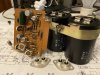
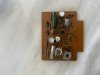
Sorry for the late reply. I was fed up with this resolved the problem by replacing the repaired F-1159 with new old stock F-1159 boards I had in my possession and the matter got resolved . See attached photo showing the new F-1159 boards. Now am getting the same issue with an AU-555A.

Is your problem resolved ?
 

Attachments

  • 4BBD42E3-0C5D-46F3-89C1-1EE70CFE970A.jpeg
    4BBD42E3-0C5D-46F3-89C1-1EE70CFE970A.jpeg
    125.6 KB · Views: 17
Thanks!

My 999 bias issue was: I didn't realize my new filter caps had two dummy terminals, by the negative leg. So one filter cap wasn't hooked up right.

All good now
 
Hello @Assil
I found this thread yesterday and it's a similar problem to the one I'm having with my AU999.

I made changes to the F-1159 board, I changed the electrolytic capacitors, the C801 for a WIMA and the TR809 for an original but revised one.
That caused the team to put up a lot of heat in the power transistors and transformer.
I turned off the equipment and checked it many times for short moments while taking measurements but so far I haven't found the cause.
I could never adjust the value of VR803, turning the pot doesn't cause any effect.
End up changing the VR803 for new ones and the rest of the transistors for equivalents.

I left the equipment stopped for several months until now that I found your thread.
My next step is to check all the resistor values (although I've done it before).

In other Sansui equipment I found schematic diagrams that show the voltage in various places, however for this AU999 I did not find that. Can someone help me with this?

Any suggestions?
Thanks in advance.
 
Hmm, if it was working before, I would guess some of the new parts are not installed correctly? Have you double checked the polarity of caps, and leg pinouts of transistors?

You are correct, I don't see any voltages on the 999 schems either
 
Hmm, if it was working before, I would guess some of the new parts are not installed correctly? Have you double checked the polarity of caps, and leg pinouts of transistors?

You are correct, I don't see any voltages on the 999 schems either

Yes, I'm going to double check everything.
Maybe I'm missing something.
Any suggestion is welcome.
Thank you
 
AU999's are not prone to going unstable, you will need to check the replacement parts are correct, installed in the correct positions and with the correct pinout....
 
Back
Top Bottom