Dom123
Well-Known Member
I just recently bought a set of equipment comprising a non working AU-517, TU-717 & SC-1110.
Repaired & recapped the AU-517 as per the restoration thread on Audiokarma & got the TU-717 working. These two are working really well. The AU-517 is sounding great.
Turning my attention to the SC-1110. I know it's a bit BOTL, but it looks really smart. After some lubrication, a new drive belt & a good clean, it kind of works. Reverse wind is OK, play is OK, although there is a slight tendency to slowly speed up & slowly decrease in repeated cycles, but the main issue is with the fast forward.
Pressing fast forward, it only works for 2 seconds or so before the solenoid kicks in and stops it.
This corresponds to the function "Lead-in". I just can't get it to fast forward normally. The solenoid for stop, kicks in straight away.
However, if the "Lead in" button is pressed and held in, the fast forward works at at decent speed.
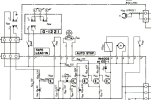
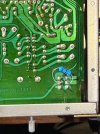
I am struggling to fix it. I have checked every single resistor, transistor & cap on the G-1230 board (Lead-in and Shut-off circuit Board) and can't find anything wrong. I changed the electrolytics just for good mesure but to no avail.
Has anyone ever come across this issue before on an SC-1110 ?
Repaired & recapped the AU-517 as per the restoration thread on Audiokarma & got the TU-717 working. These two are working really well. The AU-517 is sounding great.
Turning my attention to the SC-1110. I know it's a bit BOTL, but it looks really smart. After some lubrication, a new drive belt & a good clean, it kind of works. Reverse wind is OK, play is OK, although there is a slight tendency to slowly speed up & slowly decrease in repeated cycles, but the main issue is with the fast forward.
Pressing fast forward, it only works for 2 seconds or so before the solenoid kicks in and stops it.
This corresponds to the function "Lead-in". I just can't get it to fast forward normally. The solenoid for stop, kicks in straight away.
However, if the "Lead in" button is pressed and held in, the fast forward works at at decent speed.
I am struggling to fix it. I have checked every single resistor, transistor & cap on the G-1230 board (Lead-in and Shut-off circuit Board) and can't find anything wrong. I changed the electrolytics just for good mesure but to no avail.
Has anyone ever come across this issue before on an SC-1110 ?