• The move to the new server is done. There are some software and database maintenance updates in process. This has us passing the hat around to help out. We appreciate any donations. Seriously, even a dollar helps. The payment page may be found here - https://www.audiokarma.org/support.html

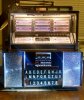
Seeburg Consolette mp3 conversion Rasperry Pi Zero /w

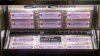
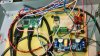
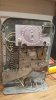
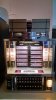
I was originally going to gut the consolette, and break down a laptop to convert this consolette, but I stumbled on a similar project someone else did, and it got me thinking that I would leave it original, and just use the Pi as a mp3 player, and pulse decoder for the consolette. I vas able to program the V8 combination to switch directories, so as to double the song capacity to 318 songs in the standard format.You can also add as many songs as you want to in each "slot" so as to have for instance Blue A1 can be a country mix of 100's of songs and Red A1 be the top 100 songs of a particular year if desired.It is programmed in Python.

Link to video switching directories, more pics coming...
https://www.dropbox.com/s/lindhtffd0cnhfb/VID_20191026_221211248.mp4?dl=0
 
Register to hide this ad
Very cool. Those things are neat looking, but fairly useless without the main box to drive it. Nice way to make it useful and modernized.
 
Great idea. Looks great!
Probably too advanced for my skills. But, I would love a look at the plans.
 
It wasn't all that hard, the only issues were that Python is a little picky on indents and punctuation.
I needed a project to learn to write Python programming on, so I spent about 3 weeks writing the 3 programs that run concurrently (the button decoder and queue file writer, Mp3 player and queue file reader, and a Mp3 player killer program to skip playing songs)
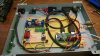
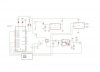
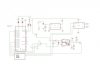
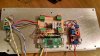
The bridge rectifier was left in from an earlier attempt, and is no longer necessary

wallpy schematic.jpg
 
Last edited:
The 3 programs are waiting in the background, the button program is waiting for pulses from the wallbox to decode into a letter-number combination, when it's finished decoding, it writes it to the Queue.csv file. The program also switches directories and the Red / Blue LED , and filters pulses that are less than 12ms to prevent voltage spikes from causing errors.The player file is always waiting for a combination(letter-number and red or blue for the file path)to appear. In the Queue.csv file, to play the file located (the name doesn't matter like a real jukebox)in a directory like /Blue/A1 for instance. The skipsong program is just watching for a gpio pin to change state from high to low, and just kills the mplayer program,which moves to the next song in the queue
 
Last edited:
Very nice.
I've been thinking of doing something along those lines with an old Buckley wall box I have kicking around.
 
I'm not quite sure on how it operated. I couldn't find alot of info on it either. I've never played around with a jukebox so I'm not that familiar with the operation.
My dad had it in his collection of trinkets since he was a kid.
I was thinking of using it as an enclousure for a Raspberrypi music streamer and put some sort of display in the front.
20191029_063305.jpg 20191029_063324.jpg
 
What a great project, how many coding changes would be needed to have it decode and use a Seeburg 3wa 200 selection?

Also when you say you no longer use the bridge is this how it should be connected?
gOjO6sq.jpg
 
Last edited:
The coding is pretty minor, only reversing the letters and numbers.and adding the extra selections, I believe, I could research the 3WA.
I believe I already have a version of that program in my desktop system, that I created my program from.
 
Last edited:
The coding is pretty minor, only reversing the letters and numbers.and adding the extra selections, I believe, I could research the 3WA.
If you have time, it would be greatly appreciated. I glanced at the code but it has been decades and it was "C" and quickbasic the last time I coded.
 
I am working tonight, I'll be able to post it tomorrow.
The nice thing about this, is the pi can be remotely mounted. With no modifications to the wallbox.
 
Last edited:
These are the lines and changes that I can think of that need to be changed for the 3WA box.
I would recommend using my system unmodified to start with an error free working system before editing.
it is running Raspian Stretch with Python 2.7
It is providing a hotspot called jukebox so you can log in remotely and play songs remotely.


SELECTION_LETTERS=("A","B","C","D","E","F","G","H","J","K","L","M","N","P","Q","R","S","T","U","V")


if first_train:
if length_of_last_gap > MINIMUM_PULSE_GAP_WIDTH: count_of_number_pulses -= 1
else:
count_of_letter_pulses +=1
if count_of_letter_pulses > 20: count_of_letter_pulses = 20
if count_of_number_pulses > 11: count_of_number_pulses = 11
else: #indicates we're in a new gap
time_of_last_gap = time.time()
else:
length_of_last_gap = time.time() - time_of_last_gap #update gap length and continue to poll
song = SELECTION_LETTERS[count_of_letter_pulses -1] + str((count_of_number_pulses))


if dirsong == "Blue" and song == "V10":
dirsong = "Red"

elif dirsong == "Red" and song == "V10":
dirsong = "Blue"


Add extra directories for added numbers (A9 A10 B9 B10 etc...)

This is all I can think of for now.
Python is very particular as to indenting, and punctuation, keep the formatting of the original program, this site has deleted the leading blank spaces in the lines above.


If you get the hardware, I will be happy to help with the project privately
wallpy jukeboxR1.jpg
 
Last edited:
[QUOTE="
Add extra directories for added numbers (A9 A10 B9 B10 etc...)

This is all I can think of for now.[/QUOTE]

Thank you, i'll hopefully get this up and running this weekend.
 
Back
Top Bottom