
• The move to the new server is done. There are some software and database maintenance updates in process. This has us passing the hat around to help out. We appreciate any donations. Seriously, even a dollar helps. The payment page may be found here - https://www.audiokarma.org/support.html

Sony DVP-CX995V CD Player REMOTE CONTROL question

stevex

Member
As I have many hundreds of CD's, I thought I'd try a big 400 CD carousel. It works great, except the remote control doesn't work. So I bought a generic remote from Amazon. It works ok except I can't find the disc change button. It looks different from my stock remote and it came with no directions. It's always possible this remote isn't fully compatible. Is there some sequence of buttons I need to push or some setup I need to do first to the remote to enable it to work with my CD player and change disks? It changes tracks, opens/closes the door, plays, stops, etc - everything but change disks until its finished playing the current disc. And the volume doesn't seem to work from the remote. I've tried all the buttons. Which one is supposed to change the disk? I apologize for this newbie questions.

Here's the one I bought from Amazon:
https://www.amazon.com/Universal-Replacement-DVP-NC85H-DVP-CX995V-DVP-NS5325/dp/B0CK9XQRZ5/
1760748296724.png
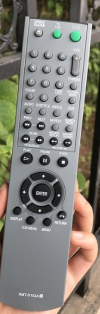
And here is a picture of my stock remote. The most noticeable difference is the stock remote has a 3-position switch at the very top middle position, rather than a push button. I've been unable to find any of this style on eBay. Here is a picture of my stock remote:
1760747558765.png
 
Register to hide this ad
Have you tried opening up the original remote's battery compartment to make sure there's no corrosion? How about the remote itself to clean the contact pads?

Did a search and found several remotes that might work, but it's always a gamble. Here's an OEM remote but pricey.


Have you tried opening up the original remote's battery compartment to make sure there's no corrosion? How about the remote itself to clean the contact pads?

Did a search and found several remotes that might work, but it's always a gamble. Here's an OEM remote but pricey.


Thank you Duane for the reply.
Yes, the battery contacts are very clean. But I've never tried opening it up - good suggestion.
I've done searches and all I came up with are similar remotes on eBay and Amazon - nothing exactly correct except for the one in your link. I've ordered a similar Sony brand remote on eBay, and if that doesn't work then it looks like I will have to go with the pricey one you suggested. Thank you for the help.
 
Your welcome.

Another thought. Have you viewed the front of the remote to see if there's an infrared glow that shows when any button is pushed on the original remote is pushed? If not, you might to look at doing a basic reset or even a factory reset on it. If you don't know how, do a google search on resetting a Sony DVD player remote. Can't hurt.
 
Your welcome.

Another thought. Have you viewed the front of the remote to see if there's an infrared glow that shows when any button is pushed on the original remote is pushed? If not, you might to look at doing a basic reset or even a factory reset on it. If you don't know how, do a google search on resetting a Sony DVD player remote. Can't hurt.
There is no glow visible when any of the buttons are pushed. However, there is a video on that awesome web site you put a link to above. It shows how to test every button on a remote using only the remote and a cell phone. It works better in real life than it does on his video. And I found every button on both remotes work good. Nowhere in the Sony CD players operating manual does it mention anything about doing a reset on the remote. So that is what I'm searching now - how to do a reset on the remote. In fact it says the opposite - remotes are pre-programmed and only just need batteries to work.
Thank you for the help.
 
Every button on the remote puts out a signal. And I've tried doing a reset on the remote with the top slide switch in each position and with the player turned off and on. The remote just will not communicate with the CD player. Perhaps there is some other way to do a reset that is more specific to this remote? Any suggestions, anyone?
I used this procedure but its for a Sony TV remote. It's the closest I could find for my remote.
 
Why not buy the correct remote on ebay? That's what I did when my CD player remote died. It was not expensive. I think I paid like $20.
 
Why not buy the correct remote on ebay? That's what I did when my CD player remote died. It was not expensive. I think I paid like $20.
The correct remote is not on eBay
Why not buy the correct remote on ebay? That's what I did when my CD player remote died. It was not expensive. I think I paid like $20.
There are over 100 remotes on eBay for a CX99V CD player. I looked at every one. Most range in price from about $8 to about $40. I bought one new generic remote that was supposed to be compatible with my CD player and some main functions don't work with my player.
There is only one remote on all of eBay that looks correct and exactly like my stock remote. And they want a little over $80 including shipping. But their description says "Photo is generic. . . . Compatibility based on unverified third party web information." So I don't really know what I would be getting with that remote.
I have just bought another remote from eBay - a Sony and its the closest I could find that looks like my remote, but it's not exactly the same. If all the main functions don't work on it with my player, then I think I will have no choice but to go with the one in the link above. At least I get a warranty and customer service with it.
 
Just to follow up and conclude, I tried 4 different remotes on this CD/DVD player. The stock one it came with did not work at all despite using the cell phone procedure above showing every button was putting out a signal.
Then I bought a generic remote from Amazon - some functions worked but many did not.
I then bought a Sony remote from eBay - one that looked as close as possible to my stock remote. Some functions work but many do not.
I then contacted Spencer from the above link. I asked him to actually test the remote I wanted to buy on the same CD player as mine. He called a few days later saying he had the same problem - no communication at all with the player despite the cell phone camera showing all buttons put out a signal. Then he discovered under the remote's batteries a 3-position micro-micro slide switch. The switch can't be seen unless one looks very closely after the batteries are removed. He changed the position of that switch then the remote worked perfectly. He told me about it but I had already disassembled my remote so I bought his remote. It worked perfectly.
Four things I learned -
1- things sold on Amazon and eBay don't always work as described
2- for some unknown reason there is a hidden slide switch under the battery compartment of this Sony remote and if not set properly the remote will not communicate with the player,
3- this model of remote cannot be disassembled without damage to the remote.
4- and Spencer is a really nice, and helpful guy. I would have been money ahead if I had started with him.
 
Back
Top Bottom