• The move to the new server is done. There are some software and database maintenance updates in process. This has us passing the hat around to help out. We appreciate any donations. Seriously, even a dollar helps. The payment page may be found here - https://www.audiokarma.org/support.html

Sony TA-AX22 repair

Felixpotato

New Member
Hi, I'm quite the beginner in DIY repairs, so I'd like some help troubleshooting.
I have an old Sony TA-AX22 amplifier. The speakers don't work (no voltage at all on the outlets, but the resistance of the speakers themselves seems fine). The STK 2129chip might be at fault from what my researches tell me.

This is where the lack of experience kicks in: what troubles me is that the headphone jack does work. Is it therefore still possible the STK chip is at fault? Checking the wiring, I'd guess the headphones wouldn't work if the STK chip really is at fault.

Thanks for the help!
 
Register to hide this ad
Hi, I'm quite the beginner in DIY repairs, so I'd like some help troubleshooting.
I have an old Sony TA-AX22 amplifier. The speakers don't work (no voltage at all on the outlets, but the resistance of the speakers themselves seems fine). The STK 2129chip might be at fault from what my researches tell me.

This is where the lack of experience kicks in: what troubles me is that the headphone jack does work. Is it therefore still possible the STK chip is at fault? Checking the wiring, I'd guess the headphones wouldn't work if the STK chip really is at fault.

Thanks for the help!
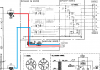
Well, the service manual I got off of ElectroTanya is a bad scan, but the headphones tap right off the outputs. So the STK chip is probably OK, although there's a chance it outputs enough current to drive headphones but doesn't output enough current to drive speakers. Check your speaker switches. In the pic below, the red and blue lines come off your outputs and go to both the speaker switches and the headphone jack:

upload_2022-2-6_15-39-43.png
 
Speaker B must be OFF or speaker A won't play. You are correct that if the headphone works the STK is probably ok.

Thanks! I thought i tried every single combination of every button but it seems I didn't try to put B speakers off, now I feel quite dumb hahaha.

I'm still glad to know my hindsight was good regarding the headphone jack, and that I can understand at least a bit from the diagram.

Thanks again for taking the time to help me out!
 
Well, the service manual I got off of ElectroTanya is a bad scan, but the headphones tap right off the outputs. So the STK chip is probably OK, although there's a chance it outputs enough current to drive headphones but doesn't output enough current to drive speakers. Check your speaker switches. In the pic below, the red and blue lines come off your outputs and go to both the speaker switches and the headphone jack:

View attachment 2476953

Indeed, the chip is okay, i was just too dumb to press the right buttons. (Had both A and B on i guess) I'm glad the amp is ok, still feel a little dumb though hahaha. Thanks for taking the time to help me out!
 
Don't feel dumb. I wouldn't have guessed that without looking at the wiring diagram. I didn't need to check the schematic because the wiring diagram clearly showed what I needed to know. You'd be surprised how many things can be repaired by pushing the right button. I can't count how many digital receivers that came in with no sound as a complaint and someone had pushed the tape monitor button and it isn't a mechanical switch that you could see was pushed in.
 
Yeah, I can imagine. I've seen all kinds of similar problems for industrial machines. Often, all it takes is a fresh pair of eyes to try something simple and the problem is solved. I'm glad I spent the time troubleshooting, i learned a lot from it!
 
Back
Top Bottom