• The move to the new server is done. There are some software and database maintenance updates in process. This has us passing the hat around to help out. We appreciate any donations. Seriously, even a dollar helps. The payment page may be found here - https://www.audiokarma.org/support.html

Soundcard for a Laptop using Audacity

Oerets

AK Subscriber
Subscriber
The Desktop with my iTunes will not accept W11 and the last update pretty much took it out. So until a decision is reached on getting another Desktop for my music or just using a external hard drive it is on now. Going to try my laptop to record records to put on my phone. Loaded up Audacity and want to go with a USB external sound card to feed the audio.

Looking at one of these...

StarTech.com 7.1 USB Sound Card​


616-h4ESzBL._AC_SX466_.jpg


Any other suggestions?

Wanting to use a line in over a microphone input.
Volume control not a deal breaker or headphone.
Just good reproduction.

Wishing to see how well the laptop does the job.
Using a separate computer doing only one thing worked out well.
The reason was using the desktop.
 
Register to hide this ad


I've had extremely good luck with everything from a 40$ DAC to the hundred dollar plus DACs from hifime. I carry one with my laptop, and have had no problems with them running without issue.

caveat; I use linux, but they should still be painless in windows

I know nothing about actually recording through a dac to a computer.


I've had extremely good luck with everything from a 40$ DAC to the hundred dollar plus DACs from hifime. I carry one with my laptop, and have had no problems with them running without issue.

caveat; I use linux, but they should still be painless in windows

I know nothing about actually recording through a dac to a computer.
I'll check out hifime thanks.

As to recording it is easy or was on old computer. Just get a good signal to the program using and put it down.

After checking them out seeing what they had. I need more of a sound card that my tape out analog signal can be fed into. Then from there is converted into a signal that will go the a USB slot on a Laptop. Choosing this over the microphone input.
 
Last edited:
The Desktop with my iTunes will not accept W11 and the last update pretty much took it out. So until a decision is reached on getting another Desktop for my music or just using a external hard drive it is on now. Going to try my laptop to record records to put on my phone. Loaded up Audacity and want to go with a USB external sound card to feed the audio.

Looking at one of these...

StarTech.com 7.1 USB Sound Card​


View attachment 3783384


Any other suggestions?

Wanting to use a line in over a microphone input.
Volume control not a deal breaker or headphone.
Just good reproduction.

Wishing to see how well the laptop does the job.
Using a separate computer doing only one thing worked out well.
The reason was using the desktop.
No, these are cheap garbage. I speak from experience sadly.

Look for a second hand Behringer UCA202 or UCA222 on eBay. It'll probably only cost you $10-15. The Hifime stuff posted above is excellent too.
 
(...) Any other suggestions? (...)

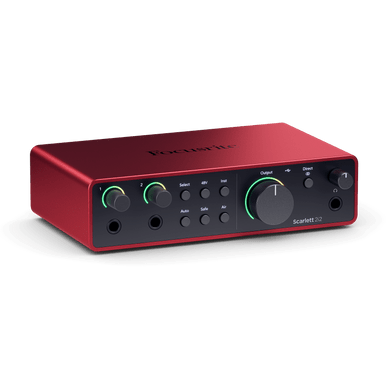
If really good recording quality is as important as really good playback quality to you, I'd suggest to consider one of the typical 2 x in / 2 x out prosumer USB audio interfaces from one of the reputable manufacturers (e.g. Focusrite Scarlett 2i2 (3rd or 4th gen.), Motu M2, Tasxam US-2x2HR, Unirversal Audio Volt 2, Yamaha UR22 MK3....).

Greetings from Munich!

Manfred / lini
 
If really good recording quality is as important as really good playback quality to you, I'd suggest to consider one of the typical 2 x in / 2 x out prosumer USB audio interfaces from one of the reputable manufacturers (e.g. Focusrite Scarlett 2i2 (3rd or 4th gen.), Motu M2, Tasxam US-2x2HR, Unirversal Audio Volt 2, Yamaha UR22 MK3....).

Greetings from Munich!

Manfred / lini


Thanks will check them out.

Really would prefer to not to make cables up like XLR's, the old K.I.S.S principle at work...

​

 
I just retired my trusty EMU 0202 for the same reason. Replaced it with a Scarlett 2i2 4th gen due to reviews, not any special knowledge. Too soon to tell how good it is, but it gets a 10 on appearance and build quality.
 
Have a 202 on the way to me. Will see how it does.
Had a pretty good setup before. A Dell desktop with a very good soundblaster sound card. The computer started out life as XP in 2014.

Last windows update froze it up good and so far looks likely a windows reinstall will be needed. So figure quit chasing this one this time. Have the music files (iTunes) saved already on a tb hard drive that will go into a case to use with the laptop.

Probably end up getting a new desktop and a good sound card after doing research . Just now will not be in a big hurry now. If this works out then maybe set anyway.


Thanks for the info guys!
 
The Desktop ... will not accept W11
Are you sure?

Despite not meeting all hardware specs, many will take it as long as they are not super ancient with very easy workaround using Rufus (free) to build the installer from official W11 ISO file you can download free from MS.

Running a few Dell OptiPlex i5 4th gen SFF desktops and an older HP Zbook i7 6th gen(?) laptop that do not meet the official hardware spec but none the less have installed W11 and they work fine. At least as good as before, maybe better. And, yes, they receive security updates from MS.
 
Last edited:
Are you sure?

Despite not meeting all hardware specs, many will take it with very easy workaround using Rufus (free) to build the installer from official W11 ISO file you can download free from MS.

Running a few Dell OptiPlex i5s and an older HP i7 laptop that do not meet the official hardware spec but none the less have installed W11 and they work fine. At least as good as before, maybe better. And, yes, they receive security updates from MS.
The computer is maxed out with 4G RAM and can't recall the processor in it right now. Was told the processor also is a poor match for W11 safety protocols.
Unable to boot even to safe mode at the moment. Last year it did the same thing and reinstalled windows then. Updating issues both times. Was thinking of putting in a SS drive just for windows operations last week. Then this happened. Bought it in 2012 not 14 found the receipt when looking for the paperwork. Time to move on and not have to chase the every few months issues probably the best thing to do. Choosing listen to music and working of audio gear over computers....
 
Wouldn't be any less secure than they were before/are now. But, yeah, sounds like you're not interested in going that way.
 
Wouldn't be any less secure than they were before/are now. But, yeah, sounds like you're not interested in going that way.
Also kinda remember finding and getting a BIOS driver or two update was also issues. To old ...

Already planned to have it offline just waited one day to long. Wanting to get all the updates before they went away. Tried once had it stable on Saturday to no joy. Froze the next boot anyway. That's when I quit.

Yeah put two new CD's into iTunes and shut down. Later woke it up and ooooh noooo!

Time to move on.
 
I just retired my trusty EMU 0202 for the same reason. Replaced it with a Scarlett 2i2 4th gen due to reviews, not any special knowledge. Too soon to tell how good it is, but it gets a 10 on appearance and build quality.
A good recommendation. I almost posted yesterday with the same, but didn't know if it would fit the budget. If it does, then go for it. As another poster said, stick with Focusrite, Tascam, MAudio, Universal Audio, Yamaha, etc. Any of their USB interfaces with two simultaneous 1/4" inputs will work great. Many will come with software much more flexible than Audacity, too, if that's of any interest.
 
Also kinda remember finding and getting a BIOS driver or two update was also issues. To old ...

Already planned to have it offline just waited one day to long. Wanting to get all the updates before they went away. Tried once had it stable on Saturday to no joy. Froze the next boot anyway. That's when I quit.

Yeah put two new CD's into iTunes and shut down. Later woke it up and ooooh noooo!

Time to move on.
Sounds like a lot of problems. Maybe there was some sort of hardware issues behind the scenes too, maybe a clean install. Hard to say.
 
I’ve been using this ADS RDX-150-EF Instant Music Box that I got 25 years ago to rip vinyls, currently with a mid 2014 MacBook Pro that I’ve set up exclusively for that task. I figured I’d need to get something newer and state of the art, but this will record at 24 bit, 192kBs and even higher, if I wanted, using audacity.
IMG_0366.jpeg

Had this not worked, I could have used my Zoom TAC-8, which is overkill for this application. I’d hoped to use a Tascam US-366, but it doesn’t have updated drivers to use with any of my laptops. Other options would have been more recent USB Audio interfaces; I would have likely used a FocusRite Scarlet or similar, 2-channel USB audio input, which are plentiful on Facebook marketplace and Craigslist.
 
Last edited:
The older Behringers with the chip from Burr Brown were not that bad. The present versions are definitely noisier. I have a bunch of both + the UFO 202 with phono preamp. They are dead cheap. Nevertheless I use Focusrite Scarlett 2i2 (third Generation) and Saffire 6 USB2. They work and sound well, perhaps I would use the Motu M2 today.
 
Back
Top Bottom