• The move to the new server is done. There are some software and database maintenance updates in process. This has us passing the hat around to help out. We appreciate any donations. Seriously, even a dollar helps. The payment page may be found here - https://www.audiokarma.org/support.html

Teac F200 Cassette Tape Deck help fixing record button

theobear

New Member
Hello I have a Teac F200 Cassette Tape Deck I got for free and would like to use it. The belt had turned to goo. This post helped start me on my way...
Teac F-200 Cassette Deck
after watching a few videos (unfortunately the one with the clearest info last after I messed up) I do have a the belt replaced but in the process I broke the record button mechanism. Also when I hit play the audio isn't registering on the gauges.

I've posted a little video outlining the problem.

Here is a link to a pdf with technical drawings of a very similar model

Thanks for any help anyone can provide!
 
Register to hide this ad
So the button I point out in the video when I push that I get output to the gauges. (obviously I totally don't know what I'm doing... )
 
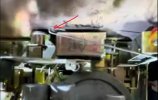
First, I don't know your specific deck. Generally, that "hook" that you show in you video usually is connected to a long switch that moves when you go between Play and Record. It will usually attach to the lever actuated by the REC button. Make sure that the tab on the REC key in on the correct side of the lever to move the spring. I can't tell from your video.
Screenshot 2025-07-08 084935.jpg

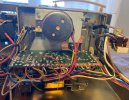
Here is a photo from the internet of that hook connected to the lever and spring. Maybe this will help?
https://audiokarma.org/forums/index.php?threads/teac-f-200-cassette-deck.1053807/

Screenshot 2025-07-08 090903.jpg

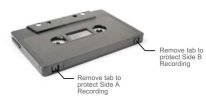
As for not being able to push the REC button down, I notice in the video that you have a pre-recorded cassette installed. Pre-recorded cassettes have the REC-protect tab knocked-out so you don't accidentally record over the tape. You can check this by looking at the back edge of the cassette on the left side. If there is a hole, the REC protect is on. Put in a recordable cassette and try to push the REC button down again... it should let you press it now.
Screenshot 2025-07-08 084600.jpg
 
Last edited:
First, I don't know your specific deck. Generally, that "hook" that you show in you video usually is connected to a long switch that moves when you go between Play and Record. It will usually attach to the lever actuated by the REC button. Make sure that the tab on the REC key in on the correct side of the lever to move the spring. I can't tell from your video.
View attachment 3546817

Here is a photo from the internet of that hook connected to the lever and spring. Maybe this will help?
https://audiokarma.org/forums/index.php?threads/teac-f-200-cassette-deck.1053807/

View attachment 3546830

As for not being able to push the REC button down, I notice in the video that you have a pre-recorded cassette installed. Pre-recorded cassettes have the REC-protect tab knocked-out so you don't accidentally record over the tape. You can check this by looking at the back edge of the cassette on the left side. If there is a hole, the REC protect is on. Put in a recordable cassette and try to push the REC button down again... it should let you press it now.
View attachment 3546816
Thanks so much for your response! I should have thought of that, but I haven't used cassettes since the 80s. ... but unfortunately it still doesn't work. I imagine I need to fix the whole linkage ... I see where the hook connects at the front but I'm not sure how the pieces behind the spring attach. I should have photographed everything extensively before starting.
 
Thanks to PioneerPro who sent me a video I was able to get the mechanism working. But I'm still not getting audio to output. I made a video outlining the problem:
 
In the comments on this video
I find:
I just put a new belt on mine and all worked good but had no sound, so I seen your video and sure enough when you pull that board the brass toggle falls down, so the mute button was out, so I took the board back out and raised that copper toggle back up.... it now works like a charm...thanks for your video
to which I asked
Can you tell me if the copper toggle goes into the black plastic "button" ... does it fit in the hole/slot of that button or does it just rest against it. Thanks!

Does anyone here have any ideas? You can see the brass toggle in video I posted yesterday. I'll just go ahead and take the pieces apart if I don't hear anything and experiment but it would be good to know if there is a right way before I take it apart and yet again put it back together (I'm close to stripping a number of the screws)
 
In the comments on this video
I find:

to which I asked


Does anyone here have any ideas? You can see the brass toggle in video I posted yesterday. I'll just go ahead and take the pieces apart if I don't hear anything and experiment but it would be good to know if there is a right way before I take it apart and yet again put it back together (I'm close to stripping a number of the screws)
Okay, one side of the brass toggle sits against the button the other side rests on a black projection on the case.
 
Back
Top Bottom