• The move to the new server is done. There are some software and database maintenance updates in process. This has us passing the hat around to help out. We appreciate any donations. Seriously, even a dollar helps. The payment page may be found here - https://www.audiokarma.org/support.html

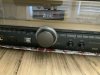
Technics SA-TX50 in Overload Protection....

red71rum

Active Member
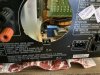
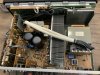
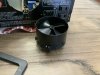
I got this unit last year, lights were out and I had a tech put in new lights. I got the unit home and it would go into overload protection. I took it back to the shop and found the tech put in the wrong amp bulbs, instead of replacing they took a bulb out on each side of the VU meters which I was not totally happy about...Anyway, fast forward to a couple of days ago, playing the unit on maybe volume level 3, I paused my music and went outside(I normally turn my stuff when not there). I come back in and it is in overload protection. The VU meters do not light up, could it be the bulbs are acting up and drawing too much power? I found that the fan could be the culprit, I took it out cleaned the connectors and reseated it. I also checked some other connections, the machine looks flawless to my untrained eye when looking inside it.
 

Attachments

  • image.jpg
    image.jpg
    81.8 KB · Views: 21
  • image.jpg
    image.jpg
    106.4 KB · Views: 20
  • image.jpg
    image.jpg
    117 KB · Views: 21
  • image.jpg
    image.jpg
    76.6 KB · Views: 21
Register to hide this ad
I would start with checking the main circuit board mine did this as well . Look for 2 3 pin pin packages on the right side close to the front and resolder them also fit heatsinks as they love to hear up and cause dry solder joints .
 
Unfortunately I am not adept at soldering, I would be afraid of ruing the trace, I think that is what is called. I wish there was someone closer to me instrpead of my having to take this to Nashville to get worked on.
 
Back
Top Bottom