• The move to the new server is done. There are some software and database maintenance updates in process. This has us passing the hat around to help out. We appreciate any donations. Seriously, even a dollar helps. The payment page may be found here - https://www.audiokarma.org/support.html

Technics SL-3 Record Size Switch Help

Kel_Varnsen

New Member
Anyone have a Technics SL-3 Linear Tracker? I found one in a thrift store for $10 a few weeks ago. It was in rough shape but I mostly got it working. I cleaned the whole thing, replaced both broken belts, straightened the wire that stops the tonearm when it moves back to the start, and used contact cleaner on all the controls that were super unresponsive.

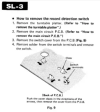
The only thing that is still causing issues is the switch that automatically detects a 7". If I put one on the player doesn't recognize and still starts at the 12" position.There is a little lever at the back that detects the record size and it moves fine so I suspect the switch contacts are dirty. The problem is I can't get the cover off to clean them.

I found this thread on Vinyl Engine which shows one removed but I can't figure out how to unlock the hidden locking tabs. The service manual doesn't even mention them.


Anyone have this table and have any luck getting that cover off? With all the other work I've done I would really like to get this last issue fixed.
 
Register to hide this ad
I never saw the TT, but it seems logical...

There are openings for the locking tabs which you can acces from underneath (bottom cover removed) and then press/unlock the tabs. If you didn't already, you might check it out.

1791471183453.png
 
I never saw the TT, but it seems logical...

There are openings for the locking tabs which you can acces from underneath (bottom cover removed) and then press/unlock the tabs. If you didn't already, you might check it out.

View attachment 3852483
I will check that out when I get home. I didn't really know there were tabs until I saw that picture today. The service manual doesn't even mention tabs. There must be some way to unlock them, although I am not sure if you can remove the bottom, the only screws in the bottom are the ones for the feet and two to take off the front top knob cover (the repair manual also doesn't mention those screws).
 
The manual says to just pull the cover off.
1791481520179.png

So it seems the locking tabs and hole/opening edges are not that sharp for the tabs to have to be pressed in/away to unlock...like:
1791481762161.png

Aaaah, I see now what you mean - I was watching a SL-5 video and asumed the SL-3 has a bottom cover as well.
 
So I got the cover off. It took a lot of wiggling and some light prying but it came off. Unfortunately the pieces of the detector switch were broken inside. I tried putting them back together but while I was trying I ended up breaking the solder connections where the wires connected to the switch. Since I still can't fix the switch and I don't know how to solder I am probably just going to give up and it won't have the auto size select.
 
Same happened to me when i owned a SL-3 one of the plastic tabs of the microswitch was broken. It was so thin that was impossible to glue. Had to live without that feature while I had the turntable. Not a real problem as I don't play singles.
 
Had an SL5 with the same problem. It got hard-wired to 12". I don't recall the SL5 having a manual size selection option.
 
Had an SL5 with the same problem. It got hard-wired to 12". I don't recall the SL5 having a manual size selection option.
For the SL3 it also defaults to 12" if you want to use it for full auto. If the size detector switch wasn't broken when you put something smaller than that on it would work at 7" full auto.

With mine because the detector is broken if I want to play a 7" I have to manually move the tonearm over.
 
Back
Top Bottom