• The move to the new server is done. There are some software and database maintenance updates in process. This has us passing the hat around to help out. We appreciate any donations. Seriously, even a dollar helps. The payment page may be found here - https://www.audiokarma.org/support.html

The Novice's Dilemma With Ripping Cds

Cohen'sGhost

New Member
I’m an older guy who’s downsizing. I have 400+ CDs to rip/dispose of: mostly 60-90s rock, with some classical, jazz and blues. A mix of MoFi, gold, remasters and lots of old AADs.

Years ago I ripped several dozen into WAV files with a CD/DVD drive in a Dell tower using Windows Media Player. There are no perceptible issues but I’m uncertain if that’s the right drive/software for my entire collection since I’ll be getting rid of the hard copies.

I’ve heard two things seemingly at odds with one another:
1) Win11 Media player is low-end AND unreliable. A higher-quality drive and better software is vital.
2) For ripping/burning, it’s binary. If it copies without issue, it’s copied. Playback is the thing.

I’m a novice (that’s one step above newb ;)) but know neither is 100% correct. I’m willing to invest a tad if need be but would prefer freeware (EAC, dbPoweramp, etc.).
I won’t even peek into the audiophile rabbit hole. My friend did several years ago and I haven't seen him since.

Asking for input and suggestions (for an upgraded optical drive and software if that’s your opinion) and equally important: your recommendation of the best free media player/library that has a user-friendly interface). Many thanks and my apologies for undershooting your experience level.
 
Register to hide this ad
I use music player called Music Bee. It can rip CDs too. I set the rip settings to FLAC lossless and store the music files on a NAS that way I can stream anywhere in the house. Music Bee uses something I think it's called "accurate-rip" or "accu-rip" to see if what you ripped matches some database's rip data. I don't go by it like it's the Holy Bible or anything, but it seems to help just to see if your rips are fairly accurate or if they are all off by a mile.

I have a cheap PC with an old CD ROM Drive. Seems to work fine for me.
 
Lots of threads here on this topic. There is a consensus around ripping CDs using EAC (Exact Audio Copy) to create FLAC files. It's freeware. Upon playback FLAC files recreate the original WAV file plus have better meta data capabilities. For players there are a multitude of options. I use WinAMP/WACUP. Endlessly customizable. Here is one of the many config options.

Enjoy the music.
WinAMP Quinto Black CT.jpg
 
if windows, I always used EAC, with the LAME encoder, and I ripped the original wav and encoded it to MP3 at the highest bitrate.


that way i'm future proofed.

in the linux world, it doesn't matter, as along as the software uses cdparanoia, AND that you have 'rip faster' unchecked. you want the error protection.
 
I use a script called abcde to rip to AIFF file format. I still keep the physical media. The encoding is done with the command line version of CD paranoia. It incorporates musicbrainz for the track list.

This is all on Linux. The AIFF files are then uploaded to a RPi based music server, that is Linux based. I don’t use Windows.
 
Eac is what you want to use because it can confirm it copied it without error. Then whatever player you choose to use is down to preference.
 
I think EAC is fine and it works great but I think it can be unnecessarily complicated. There are many, many options. For simplicity I like dBPoweramp. It's not free, but it's dead simple and easy to use. I suggest FLAC which has become the defacto standard for audio archiving. Don't use a compression factor above 5 as the gains are very minimal. Also, just my opinion, don't discard your CDs if you can store them. You never know when you may need to re-rip. Also copyright laws in the USA require you to own the physical copy. Not that the police are going to arrest you for not having that old Billy Joel CD.
 
I bought two Apple disc burners for my iMAc before they were phased out. They work perfectly. I also have a Pioneer burner that burns Blu rays discs as well as CD's and SACD's I use with my 2018 27 inch iMac with no problems and does a great job. iMovie is for making DVD's and Music is for burning CD's. Its real easy as Apple says. But you might want an external SS hard drive to back up whats on your computer. Though iCloud will cover everything for close to 90 days to half a year. I have 600 Albums, some streamed some copied, and 30,000 images on my fusion drive and i Cloud. Its costs me about $3.00 month at the moment. If I had waited for the 24 inch iMac or the Studio iMAc then the storage would be all SS drive. Mine is a combination of disc and SS .

I am waiting on a new one piece 27 inch iMac. The Studio with the monitor is just to pricey for what I do.
 
I got a used 27" monitor off Craigslist for $150 - no need to pay the crazy Apple Price for a Monitor, tho I did pay the retail price for the Apple M4 Max Studio.
48Gb of memory and a 1TB SS internal drive. (I bought it this year to avoid potential tarrifs on new Macs).
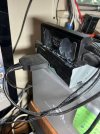
Emma got an external Mac Superdisc drive. I found that too slow, and I have an external LG M-Disc drive (CD, DVD, BluRay)
with a Serial ATA adapter to run it off my USB Hub. Rips CDs very quickly!

LG_MDisc-Fr_8474.jpeg
Got the 4 port USB hub silicon glued to the top back of the M-Disc drive so it stays handy for thumb drives, etc.
LG_MDisc-Bk_8473.jpeg

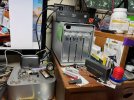
It sits on top of a USB/Thunderbolt external drive stack with 28TB of drives inside ...
All kinds of data contained, plus Audio & Video I can stream around the house via Wifi

MacStack-2025_8476.jpeg
I rip in Apple Lossless mode - to a 2TB drive just for iTunes & music files. Mac OS Sequoia - v15.5
Back-up your ripped music files regularly - you only want to do the mass ripping project ONCE!
 
^the nineties come to mind. We did a lot of ripping. Found out that CD quality is such a thing and when the metallic layer began to peel years later.
 
I only do Linux. Fedora. Asunder CD Ripper to rip. Brasero to burn. Works well. My DVD burner drive is a Plextor. Works fine. Haven't ripped anything in a while.
 
I miss the old Winamp!!!! Foobar is easy to use.
I have a 1T platter drive I store all my downoaded music on.
That drive is in the third desktop I've built since getting it.
I have a hot swap bay built into the top of my desktop computer I used to plug other drives into with even more music, etc. on them also.
I'm always looking for the easiest burner/player software.
I still prefer physical media, but do have a lot of music files I use to burn CD's, or transfer to a thumb drive to use in my truck and Jeep.
So having easy to use software is a big plus for me.
 
When I do "rip" CD's, I just plug a portable drive into my laptop, open the CD in WMP and copy it in .wav format. Pretty much lossless and everything I have plays wav.

Quick and simple.

Works for me. YMMV....
 
Back
Top Bottom