

You are using an out of date browser. It may not display this or other websites correctly.
You should upgrade or use an alternative browser.
You should upgrade or use an alternative browser.
Trying to get the most out of my digital audio, component suggestions please?
- Thread starter TallyTech
- Start date
I have a Mac mini also, and it does in fact output a digital signal through the headphone jack. A better option...and you won't find this on the Mac spec sheet...is to use the USB out and send it to a DAC. The Mac Mini TOSlink output is limited to 24/96 while the USB can do 24/192.
Thank you for the heads up, do you know if yours is newer than mine (2011)? If it isn't then I'm sure mine will have it.

Chris Brown
Super Member
Couldn't he use an RCA analog input on the AVR from an external DAC?
Yeah he could, but in most newer HT receivers all analog inputs are immediately converted back into digital. It's cheaper and easier for manufacturers to do signal processing when everything is digital.
So feeding a digital signal into the receiver would result in this:
MacMini -> Receiver (D/A conversion) -> Speakers
External DAC would result in this:
MacMini -> DAC (D/A conversion) -> Receiver (A/D conversion, D/A conversion) -> Speakers
In that case adding an external DAC resulted in an extra Analog to Digital, and Digital to analog conversion, and ultimately you still ended up using the DAC in the receiver. 3 conversions instead of 1, which is what you get if you just run digital into the receiver.

I bought mine about a year and a half ago, so I'd say it's identical. (I'm at work now)Thank you for the heads up, do you know if yours is newer than mine (2011)? If it isn't then I'm sure mine will have it.
1. Make sure that you only use lossless codecs. There are two most common: FLAC and ALAC. Last one is natively compatible with MacOS
2. Find how your Mac can send digital audio out. I am not an expect in Apple products but it likely has Toslink connector somewhere. If it isn't, get one of USB to SPDIF adapters, but make sure that they support MacOS (this is not always a case).
3. Connect Mac digitally to Yamaha. Use Yamaha to do D/A conversion. It should support up to 24/96 resolution.
4. Get proper music player software, like JRiver. Make sure that player supports output in NATIVE resolution (not all of them do).
5. Start downloading music in high-res format - 24/96. Besides better technically, it is usually mastered better too as target customer base are those who care about sound quality.
2. Find how your Mac can send digital audio out. I am not an expect in Apple products but it likely has Toslink connector somewhere. If it isn't, get one of USB to SPDIF adapters, but make sure that they support MacOS (this is not always a case).
3. Connect Mac digitally to Yamaha. Use Yamaha to do D/A conversion. It should support up to 24/96 resolution.
4. Get proper music player software, like JRiver. Make sure that player supports output in NATIVE resolution (not all of them do).
5. Start downloading music in high-res format - 24/96. Besides better technically, it is usually mastered better too as target customer base are those who care about sound quality.
I bought mine about a year and a half ago, so I'd say it's identical. (I'm at work now)
Cool, thanks
1. Make sure that you only use lossless codecs. There are two most common: FLAC and ALAC. Last one is natively compatible with MacOS
2. Find how your Mac can send digital audio out. I am not an expect in Apple products but it likely has Toslink connector somewhere. If it isn't, get one of USB to SPDIF adapters, but make sure that they support MacOS (this is not always a case).
3. Connect Mac digitally to Yamaha. Use Yamaha to do D/A conversion. It should support up to 24/96 resolution.
4. Get proper music player software, like JRiver. Make sure that player supports output in NATIVE resolution (not all of them do).
5. Start downloading music in high-res format - 24/96. Besides better technically, it is usually mastered better too as target customer base are those who care about sound quality.
1. Everything I have right now is in FLAC, but I'm planning on converting it to ALAC.
2. I'm not 100% sure yet, but I'm pretty sure the aux out can be used as a digital out (I know my MacBook pro pumps out a red light when a cable is plugged in). According to a couple contributors above this should be a feature on my Mac Mini, I'm just not sure what kind of cable to use since the typical Toslink cable will not fit into the 3.5mm jack. Suggestions?
3. Pending finding out that my Yamaha does not do conversions I plan on hooking up the Mac directly to the receiver.
4. Right now I've been using VLC to play my FLAC files since iTunes won't support it. I was planning on using iTunes to manage my content. Is iTunes a subpar product compared to software like JRiver/not support native resolution? Is there anything else I should consider in a media player? I'm trying to stick with iTunes so I can manage my iPod, iPhone, and other media devices in tandem with my lossless and other media.
5. Any suggestions on where to purchase quality high-res albums?
http://www.monoprice.com/Product?c_id=102&cp_id=10229&cs_id=1022902&p_id=1557&seq=1&format=2
This plugs into the Mac mini headphone jack, toslink on the other end.
This plugs into the Mac mini headphone jack, toslink on the other end.
Yeah he could, but in most newer HT receivers all analog inputs are immediately converted back into digital. It's cheaper and easier for manufacturers to do signal processing when everything is digital.
So feeding a digital signal into the receiver would result in this:
MacMini -> Receiver (D/A conversion) -> Speakers
External DAC would result in this:
MacMini -> DAC (D/A conversion) -> Receiver (A/D conversion, D/A conversion) -> Speakers
In that case adding an external DAC resulted in an extra Analog to Digital, and Digital to analog conversion, and ultimately you still ended up using the DAC in the receiver. 3 conversions instead of 1, which is what you get if you just run digital into the receiver.
Yeah that makes sense if his AVR works as you describe. No point in all that conversion.
Yeah that makes sense if his AVR works as you describe. No point in all that conversion.
Awesome, I've never heard of a cable like that before, it should get the job done nicely!
Awesome, I've never heard of a cable like that before, it should get the job done nicely!
Apple doesn't really emphasize that feature. Too bad because I think the mini is ideal for music storage and as a digital source.

Gang-Twanger
Resident Wharfedaliophool
IMO I would focus on the DAC first. That is the point at which the analog signal is created; everything is digital prior to that. It sounds like in your current config you are simply using the DAC inside your Mac Mini. I'm sure you can do much better.
If you have the option to run digital to your receiver, via a USB soundcard if your Mac lacks digital output, that would result in you using the DAC inside your receiver instead. Whether that is better than the DAC in your Mac, I can't say, but I'd guess that it probably is.
One thing to consider though is that many home theater receivers do all of their processing in the digital domain. They will take any signal on any analog input and reconvert it back into digital, and ultimately back into analog using the receiver's own DAC. In that situation there would be no benefit to using anything but a digital connection into the receiver, as you'd always be using the receiver's DAC no matter what, and feeding analog into the receiver would result in 3 conversions instead of 1 (D/A, A/D, D/A instead of just D/A). I'm not sure if your specific model handles analog inputs that way but many do and it's something to think about.
That's it right there... This is why I will never use any amp or receiver that converts the signal to digital. I'll handle my own conversion, thank you very-much, and with an external DAC at that. It's surprising how few people actually understand how those things work (the ones that DO convert the signal to digital when it gets to the receiver). I'm an analog guy. Always have been. CD's are one thing, but I'd prefer the digital-to-analog conversion for CD's be done by a decent, standalone unit (It's one of many good ways to better-tailor your system to suit YOUR tastes).
Anyway, my DAC isn't a high-end 800lb gorilla-killer, but it's a VERY-good one for the price, and it's smoothness and musicality suits my early to mid '60's, tube-powered system very-well (When I finally got into tubes, that's when I realized just how good the MSII really was... The richer and more-analog-sounding your hi-fi setup is, the more you'll get out of this DAC). I like having an asynchronous-USB DAC because it's designed to make the most of a USB connection, unlike some which are good with S/PDIF, HDMI, Toslink, etc., but regard the USB connection as an afterthought (Having a USB-friendly DAC means it will also work well with my laptop, which I use when I'm on vacation, house-sitting, etc.).
The model DAC I use is the HRT Music Streamer II (Was $149 when I bought it, but the price has since been raised a bit... $179, I think, but still an excellent, bang-for-buck asynchronous-USB converter... Great build-quality too... Nice high-quality RCA jacks that insure a firm connection).
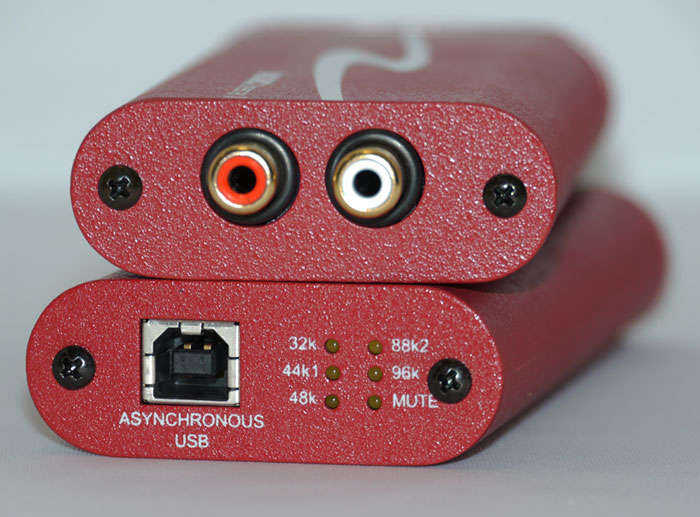
Last edited:
1. Everything I have right now is in FLAC, but I'm planning on converting it to ALAC.
2. I'm not 100% sure yet, but I'm pretty sure the aux out can be used as a digital out (I know my MacBook pro pumps out a red light when a cable is plugged in). According to a couple contributors above this should be a feature on my Mac Mini, I'm just not sure what kind of cable to use since the typical Toslink cable will not fit into the 3.5mm jack. Suggestions?
3. Pending finding out that my Yamaha does not do conversions I plan on hooking up the Mac directly to the receiver.
4. Right now I've been using VLC to play my FLAC files since iTunes won't support it. I was planning on using iTunes to manage my content. Is iTunes a subpar product compared to software like JRiver/not support native resolution? Is there anything else I should consider in a media player? I'm trying to stick with iTunes so I can manage my iPod, iPhone, and other media devices in tandem with my lossless and other media.
5. Any suggestions on where to purchase quality high-res albums?
Mac had much poorer DAC than Yamaha - it wat top of the line receiver 10 years ago. All receivers do A/D conversion of incoming analog signal unless they are in "direct" mode bypassing any audio processing. iTunes is only useful for syncing your music library to mobile player/phone and purchasing from iTunes. Third part players are better in their primary function - play music. Most players can use iTines managed library as a source.
Here is a list of download sites http://www.head-fi.org/a/high-res-music-download-sites
If you are not afraid to use torrents - you have much more options, including rips from rare vinyl.
**********************
I just checked and I could be wrong about support of 24/96 digital audio in Yamaha. You can check it, when you get optical cable.
Last edited:
That's it right there... This is why I will never use any amp or receiver that converts the signal to digital. I'll handle my own conversion, thank you very-much, and with an external DAC at that. It's surprising how few people actually understand how those things work (the ones that DO convert the signal to digital when it gets to the receiver). I'm an analog guy. Always have been. CD's are one thing, but I'd prefer the digital-to-analog conversion for CD's be done by a decent, standalone unit (It's one of many good ways to better-tailor your system to suit YOUR tastes).
Anyway, my DAC isn't a high-end 800lb gorilla-killer, but it's a VERY-good one for the price, and it's smoothness and musicality suits my early to mid '60's, tube-powered system very-well (When I finally got into tubes, that's when I realized just how good the MSII really was... The richer and more-analog-sounding your hi-fi setup is, the more you'll get out of this DAC). I like having an asynchronous-USB DAC because it's designed to make the most of a USB connection, unlike some which are good with S/PDIF, HDMI, Toslink, etc., but regard the USB connection as an afterthought (Having a USB-friendly DAC means it will also work well with my laptop, which I use when I'm on vacation, house-sitting, etc.).
The model DAC I use is the HRT Music Streamer II (Was $149 when I bought it, but the price has since been raised a bit... $179, I think, but still an excellent, bang-for-buck asynchronous-USB converter... Great build-quality too... Nice high-quality RCA jacks that insure a firm connection).
Sounds like something to consider if I ever want to play my 70s Pioneer system with something besides the radio or turntable. Maybe some day I'll have tube power to go with it, but those things are just so damned expensive.
With the DSP-A1 doing the conversion theres not much point in have a conversion before the receiver.
Mac had much poorer DAC than Yamaha - it wat top of the line receiver 10 years ago. All receivers do A/D conversion of incoming analog signal unless they are in "direct" mode bypassing any audio processing. iTunes is only useful for syncing your music library to mobile player/phone and purchasing from iTunes. Third part players are better in their primary function - play music. Most players can use iTines managed library as a source.
Here is a list of download sites http://www.head-fi.org/a/high-res-music-download-sites
If you are not afraid to use torrents - you have much more options, including rips from rare vinyl.
**********************
I just checked and I could be wrong about support of 24/96 digital audio in Yamaha. You can check it, when you get optical cable.
If a good program can reference the organized library I guess that will fit what I'm looking for.
I'll have to look through that link you sent me later, looks like some good stuff.
I have used torrents, but I feel purchasing is probably the better way to go at the end of the day if it is readily available.
Gang-Twanger
Resident Wharfedaliophool
Mac had much poorer DAC than Yamaha - it wat top of the line receiver 10 years ago. All receivers do A/D conversion of incoming analog signal unless they are in "direct" mode bypassing any audio processing. iTunes is only useful for syncing your music library to mobile player/phone and purchasing from iTunes. Third part players are better in their primary function - play music. Most players can use iTines managed library as a source.
Here is a list of download sites http://www.head-fi.org/a/high-res-music-download-sites
If you are not afraid to use torrents - you have much more options, including rips from rare vinyl.
**********************
I just checked and I could be wrong about support of 24/96 digital audio in Yamaha. You can check it, when you get optical cable.
Yeah, if you're gonna' be using a digital player (iTunes, Winamp, etc.), it's important to make sure you're getting the most out of it in terms of audio-quality. I prefer a simple, meat & potatoes kind of player that doesn't have any bells and whistles and commits it's power to the music/audio instead of performing a zillion CPU-sucking functions I don't need (Say THAT ten times fast). Foobar is a good program for "simple-minded" folks such as myself ( :scratch2: ).
Right now I'm bouncing back and forth between that and VLC (I bypass the Windows mixer, which requires a plug-in software, and while Foobar is an extremely-efficient and powerful program, much-more-efficient than VLC, I just can't get the WASAPI-For-Foobar plug-in to work as well as the Virtual Audio Cable plug-in... If I WASN'T bypassing the Windows mixer, then Foobar would be the clear winner, but I've been having some sort of buffering issue that I can't seem to sort out... Virtual Audio Cable seems to be a much-better plug-in, but it's not plug-and-play on Foobar the way it is on VLC...I get great audio-quality with that setup... It struggles on certain higher-quality video stuff, but I think that's related to my video card, which has been struggling since I got this computer... The audio-quality is first-rate).
Yeah, if you're gonna' be using a digital player (iTunes, Winamp, etc.), it's important to make sure you're getting the most out of it in terms of audio-quality. I prefer a simple, meat & potatoes kind of player that doesn't have any bells and whistles and commits it's power to the music/audio instead of performing a zillion CPU-sucking functions I don't need (Say THAT ten times fast). Foobar is a good program for "simple-minded" folks such as myself ( :scratch2: ).
Right now I'm bouncing back and forth between that and VLC (I bypass the Windows mixer, which requires a plug-in software, and while Foobar is an extremely-efficient and powerful program, much-more-efficient than VLC, I just can't get the WASAPI-For-Foobar plug-in to work as well as the Virtual Audio Cable plug-in... If I WASN'T bypassing the Windows mixer, then Foobar would be the clear winner, but I've been having some sort of buffering issue that I can't seem to sort out... Virtual Audio Cable seems to be a much-better plug-in, but it's not plug-and-play on Foobar the way it is on VLC...I get great audio-quality with that setup... It struggles on certain higher-quality video stuff, but I think that's related to my video card, which has been struggling since I got this computer... The audio-quality is first-rate).
Don't forget - he uses Mac, so no Winamp, foobar etc.
