• The move to the new server is done. There are some software and database maintenance updates in process. This has us passing the hat around to help out. We appreciate any donations. Seriously, even a dollar helps. The payment page may be found here - https://www.audiokarma.org/support.html

Tube amp PC schematic drawing progam

ab0ez

AB0EZ
Ok, drawing schematics when you're dog-tired isn't working so good. Even with a t-square nothing is coming out straight! I wish I could find a PC schematic drawing program that would work with vacuum tube hifi amps and wasn't a total migraine inducing pain to learn how to use!

Anybody have some recommendations?
 
Register to hide this ad
Eagle offers a free schematic and PCB version. You are limited to a 4" x 6" board, I think, and I don't think the schematic has any limits.
 
Microsoft Visio would work for drawing a tube amp schematic. Or Omnigraffle if you are a Mac user.
 
I'm a PC user, but my biggest headache is the part symbols. I don't want to create each and every symbol I might use, such as a power transformer with 5 secondaries!
 
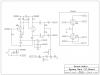
I've used ExpressPCB for several years now, I have always been impressed with the ease of use, and the quality of print out. I have posted an example of a schematic of the Mark III by Dynaco.
 

Attachments

  • Mark III.png
    Mark III.png
    29.5 KB · Views: 54
I've used ExpressPCB for several years now, I have always been impressed with the ease of use, and the quality of print out. I have posted an example of a schematic of the Mark III by Dynaco.

Very cool! I have that program, but the million dollar question is where did you get the parts symbols from, especially when building an amp from scratch? Especially the power supply?

And this coming from a guy who works on various multi-computer based simulators for the Army and Marines!
 
Back
Top Bottom