• The move to the new server is done. There are some software and database maintenance updates in process. This has us passing the hat around to help out. We appreciate any donations. Seriously, even a dollar helps. The payment page may be found here - https://www.audiokarma.org/support.html

TubeDAC-11 ASIO USB Driver

Well I think I need to give up on the asio as every time I have installed it, it comes back corrupt and I takes all the components with it. I have tried it 5 times now and no luck. I did however try the kernel streaming and that worked. Played around with it a bit, not long enough. Im enjoying Foobar and feel somewhat lost as Im not great with PCs. Its a definite upgrade from the streaming AE. I want to continue trying asio but also want to start learning more about Foobar and its components without the fear of losing it everytime.
 
Hi Gridslayer,

I only use Foobar, but pretty sure with WinAmp or almost any media player that has it you need to download and install an ASIO plugin for the player, then you would select the GF/Yulong ASIO driver from that interface.

Cheers,
Ian
 
No, it is a plugin that allows ASIO to run, the GF/Yulong is a driver that needs the plugin to run, I know it works just fine with Foobar with the ASIO Plugin, I don't use Winamp.

Cheers,
Ian
 
hmmm.... won't even play now. plus my computer crashed... I think I'll try foobar or media monkey...
 
Wow... after customizing Foobar I'm very pleased, in fact, ecstatic with the sound I'm getting! The Yulong is definitely better than the stock driver. :banana:
 
Last edited:
Experiences with various players: warning, long and lots of pics

Today I had a chunk of unexpected free time and decided to play around with various audio players to see which player/driver combo I liked best with the TubeDAC-11 and my newly acquired AH-D5000's. Running on a desktop computer with plenty of horsepower to handle the 24 bit 96khz flac files I was about to try out.

I'm also providing some screenshots to demonstrate how these changes can be performed easily.

Winamp
CTRL-P to bring up properties. Using the left hand menu select Plugins->Output. Click on the ASIO Output Plugin option, then click Configure.
winamp-driver-selection.jpg


There are two drivers I can use here, the ASIO4ALL driver I have installed for use with various pro audio applications, but also works well in media players, and the YULONG Audio DAC driver. I'm going to try the ASIO4ALL driver first.
winamp-asio-config.jpg


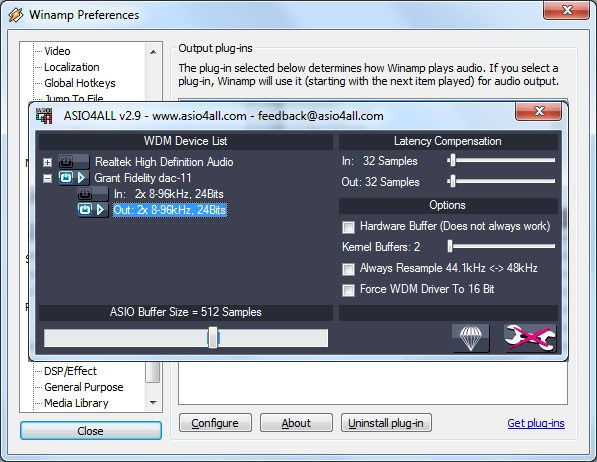
With that selected I click Control Panel and select disable all input and outputs except for the output on the TubeDAC.
winamp-asio-control-panel-small-buffer.jpg


I press play to try it out... it's full of clicks! It was just a buffer issue, I went back into the ASIO config and upped the buffer to 608.
winamp-asio-control-panel-large-buffer.jpg


Hit play again, smooth as silk. It sounds very, very nice like this, but lets see how it compares to the Yulong ASIO driver. Stop playback, open the ASIO config again and change the driver to YULONG Audio DAC.
winamp-asio-config-yulong-driver.jpg


Now when I click on the Control Panel button, I get the Yulong interface, which lets me know that it's using the correct driver. I leave the buffer set to auto adjust for now.
winamp-asio-control-panel-yulong.jpg


Go back to Winamp, restart play.... getting the same symptoms as the ASIO4ALL driver with the small buffer. Try some different source material, a FLAC instead of a V0 MP3. Hmm... same kind of sounds. Grit and lots of clicking. Went back into the Yulong config and changed the buffer size to a fixed 6000. It didn't help. Changed the driver back to ASIO4ALL, and the clicking continued! Gah! SO I restarted Winamp at this point. Once it came back up it was still using the ASIO4ALL driver, so I clicked play and behold, no clicking. Changed the driver back to Yulong, clicking returned. Restarted Winamp again, clicking continued. Switched back to ASIO4ALL, restarted Winamp again, clean playback. So I guess for Winamp I'll stick with the ASIO4ALL as the go-to driver. Onto the next media player...

Media Monkey
Click Tools->Options to open the options menu, and then use the left hand menu to select Player -> Output Plug-ins.
mediamonkey-options.jpg


I have several options here, the first one I'll try is the WASAPI option. I select the radio button next to the WASAPI option and click on the Configure button. After selecting SPDIF Interface (Grant Fidelity dac-11) at the top of the config page, I put a check in the Exclusive box and I uncheck all of the "smooth" options at the bottom (except for smooth seek because I kind of like that feature) and then I click OK and close the options screen.
mediamonkey-wasapi-config.jpg


At first I think it sounds just as good as Winamp with ASIO4ALL, but after a couple tracks I notice a little bit of grain. Time to switch it up. Tools->Options brings the Option menu back up and I select the ASIO output plugin, then click Configure.
mediamonkey-asio4all-config.jpg


I make sure that the ASIO4ALL option is selected under the device dropdown field. All other fields on this screen I leave alone. Next I open the ASIO Control Panel, which isn't accessed as easily as it is in Winamp. To open it, I need to look in my System Tray, that area at the bottom right of your computer screen with the clock and all the icons in it. The ASIO icon looks like a little green box with a white play button in the middle. Double clicking on this icon will load the ASIO Control Panel.
asio-system-tray.jpg


I make the same setting changes that I made for the Winamp ASIO4ALL driver.
mediamonkey-asio4all-control-panel.jpg


After closing all the config screens I start up a track. It sounds very clean and doesn't have the grain noted with the WASAPI driver. Sounds just like Winamp with ASIO4ALL, actually. I could live with the sound of both of these player/driver combos, it just comes down to interface preference. But there is still one more option to try, the Yulong driver. Going back into the ASIO config screen, I change the device to YULONG Audio DAC. I hit OK and close the options screen.
mediamonkey-yulong-config.jpg


The Yulong driver opened up the sound a bit more, the lows were slightly lower and more defined, and the upper end just sounds right. A bit less edge than the other drivers. I think this is my favourite combo yet. But in the interest of fairness I still have one more media player. (see next post)
 
Foobar2000
CTRL-P brings up the options menu in this app.
foobar-options.jpg


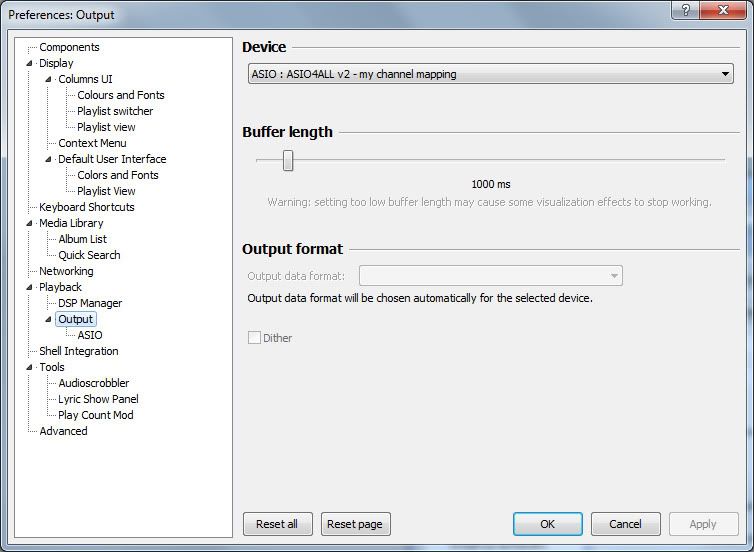
Go to Playback->Output. I have a different selection of drivers again! This time my viable options are ASIO4ALL, a custom ASIO4ALL mapping, and a Kernel Stream option. I select the plain ASIO4ALL option and hit OK to close the window.
foobar-options-driver-dropdown.jpg


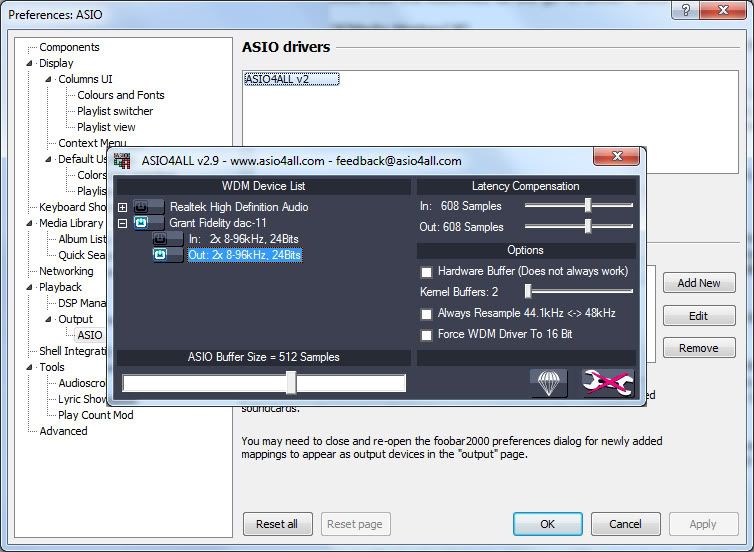
When I click play, it only gives an error message. Crap. Open the Options menu back up, and now go into the ASIO option on the left, under Playback->Output.
foobar-asio-config.jpg


Double click on the ASIO option in the top part, it gives me the usual ASIO control panel. All of the options look OK so I close it. Hit OK and close the options.
foobar-asio-config-control-panel.jpg


Try playback again, another error message. I open the config back up, it returns to the ASIO config page, and this time I double click on the custom mapping to open the mapping scren.
foobar-asio-config-mapping.jpg


This screen showed me that both channels were mapped the the TubeDAC, and when I right clicked on either channel and clicked Play Test Signal, the signals came through fine. So I hit OK, then returned to the Output page in the Fubar options. I selected the custom ASIO channel mapping and hit OK to close the screen.

I tried to play a song again. No dice!!! Frustrated, I decide that I am left with only one viable option in Fubar, the Kernel Stream option. I return to the options menu and select the KS option. OK to close the window.
foobar-config-ks.jpg


Hit play, and... music!! Lovely music! I listened to a couple of tracks and decided that this sound is on par with Media Monkey and the Yulong ASIO driver. I'll be listening more and more over the next few weeks to decide which one to use permanently, but it's really down to program asthetics and usability at this point as both options sound incredible to me. Totaly clean sound, incredible detail, great depth, it has everything I desire.
 
^ Nice recap!!.....I have not played that much with the Yulong ASIO driver.....My media player I have been using is the Zune program, so it is very basic, no plugins, just open the software and I hit play and I get superb music.
On WMP, pretty much the same thing......I did download Foobar but did not play with it much. Reason is the sound I got thru it did not rival WMP or the Zune software, bear in mind I only have a couple hi-res 24/96 files.....everything else is 16/48 WMA files.

All I have been using is the Zune software since that is what manages all my digital collection.

I don't plan on replacing my collection with enough 24/96 FLAC files to make it worth while for Foobar2000....I am very happy with my WMA 16/48 files, most of them lossless and some 356kbps.....They all sound pretty darn good thru the DAC11.
 
@Phil

For Foobar/Asio, turn on the Input button for GF DAC-11 under WDM device list in Asio4all control panel.
 
Why not just use the Yulong driver instead ASIO4all? the Yulong works great...

That's kind of what I was getting at with showing all the options available - there was no option for using the Yulong ASIO driver, only for using ASIO4ALL. I've tried reinstalling both Fubar and the Yulong driver.

@hebe, tried that too, still didn't make the Yulong driver an available option.


And I'll also add, I have no issues using the Yulong driver with Fubar on my other machine, but that's the one I've got hooked up to the stereo downstairs.
 
Weird, so it shows up as an option on one computer but not the other? Maybe foobar needs to be updated?
 
So now the Yulong driver "disappears" occasionally from the Foobar playback options and I have to reinstall it... anyone else have this problem?

Edit: Never mind, when the TubeDAC is turned off, the driver doesn't show up. Once turned on, it reappears...
 
Last edited:
Back
Top Bottom